
 WhatsApp: +86 16626708626
 Email:
  Phone: +86 16626708626
Description
Key Technical Specifications
| Parameter | Value |
|---|---|
| Model | DS-4008HCI |
| Manufacturer | Hikvision |
| Product Series | DS-4000HCI |
| Product Type | PCI video/audio compression board |
| Video Inputs | 8 channels |
| Video Interface | BNC, 1.0 Vp-p, 75 Ω |
| Audio Inputs | 8 channels |
| Audio Interface | BNC, 2.0 Vp-p, 1 kΩ |
| Video Compression | H.264 |
| Audio Compression | OggVorbis, 16 Kbps |
| Maximum Video Resolution | 4CIF |
| Real-Time Encoding | 8-channel CIF/2CIF or 4-channel 4CIF |
| Maximum Frame Rate | 25 fps PAL / 30 fps NTSC per channel |
| Bit Rate | 32 Kbps–2 Mbps per channel |
| Dual Stream | Yes |
| Bus Standard | PCI 2.2 |
| Power Consumption | <7 W |
| Operating Temperature | -10 to +50 °C |
| Operating Humidity | 10–90% RH |
| Dimensions | Approximately 201 × 109 mm |
| Supported OS | Windows 2000/XP/Server 2003/Vista; selected Linux distributions |
Hikvision documentation identifies the DS-4008HCI as an 8-channel H.264 compression card with eight video and eight audio inputs. The published specifications include PCI 2.2, 4CIF encoding capability, dual-stream operation, and less than 7 W power consumption.
Product Introduction
The Hikvision DS-4008HCI is an 8-channel PCI-based analog video and audio compression card designed for PC-based digital video surveillance systems. It accepts eight composite video channels and eight audio channels, performs hardware H.264 video compression and OggVorbis audio compression, and supports up to 4CIF encoding.
The card supports dual-stream encoding and SDK-based software integration, making it suitable for legacy DVR/NVR workstations, industrial PCs, and custom surveillance systems that still depend on analog CCTV infrastructure. Its PCI 2.2 interface and legacy operating-system requirements make host-PC compatibility a primary replacement consideration.
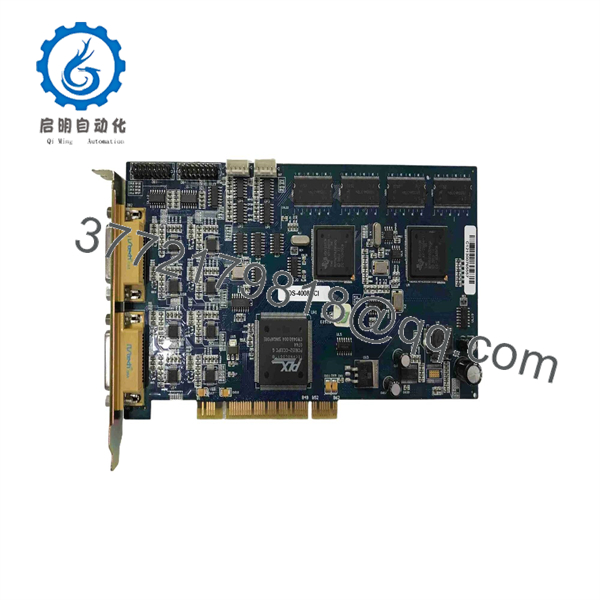
DS-4008HCI
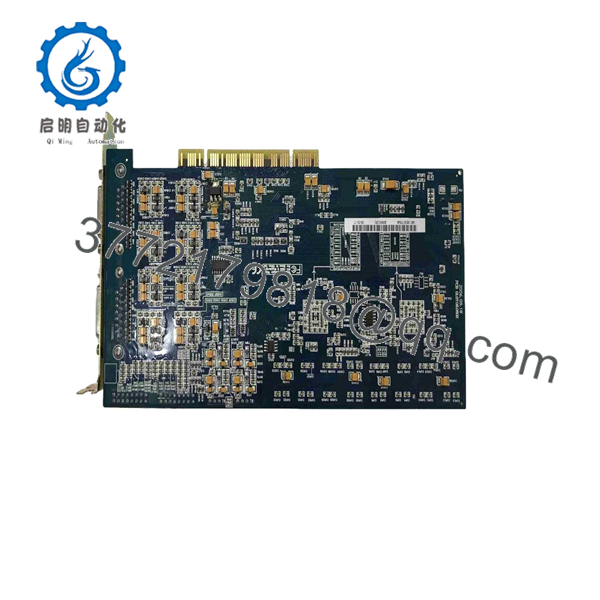
DS-4008HCI
Installation & Configuration Guide
Stage 1 — Pre-Installation Preparation
- Verify the complete board marking: DS-4008HCI.
- Confirm that the host computer provides a compatible PCI 2.2 slot; do not assume a modern PCIe slot is electrically interchangeable.
- Record the installed driver version, DVR software version, SDK version, video standard, channel configuration, and encoding parameters.
- Back up the surveillance application and configuration files.
- Shut down the PC completely and disconnect AC power.
- Use ESD protection when handling the PCI card.
- Prepare the required DB-15-to-BNC video/audio breakout cables before installation.
Stage 2 — Removing the Old Module
- Confirm that the PC is completely powered off and isolated from AC power.
- Remove the chassis cover according to the computer manufacturer’s procedure.
- Identify the installed DS-4008HCI and document its PCI slot position.
- Disconnect both external DB-15 breakout connectors.
- Remove the PCI retaining screw or bracket fastener.
- Pull the card vertically from the PCI connector without twisting the PCB.
- Inspect the PCI slot and connector for contamination, oxidation, or mechanical damage.
Stage 3 — Installing the New Module
- Confirm that the replacement card is DS-4008HCI, not DS-4008HSI, DS-4008HCI+, or another DS-4000 variant.
- Insert the card into the correct PCI 2.2 slot with even pressure.
- Secure the bracket to prevent connector movement during continuous operation.
- Reconnect the two DB-15 breakout cables.
- Reconnect the eight video and eight audio channels according to the original channel mapping.
- Install the driver appropriate to the actual card revision and host operating system.
- Restore the DVR application configuration and verify channel numbering, PAL/NTSC selection, resolution, frame rate, and bit rate.
- Do not assume a newer DS-4008HCI revision will work with an older application without checking the SDK requirement.
Stage 4 — Power-On & Testing
- Reinstall the PC chassis cover and reconnect power.
- Start the operating system and confirm that the card is detected.
- Verify that the correct driver loads without hardware-resource conflicts.
- Open the DVR application and test all eight video channels.
- Confirm audio acquisition on all eight channels where audio is installed.
- Check live preview, recording, playback, frame rate, and timestamp synchronization.
- Test video-loss detection and any configured alarms.
- Run the system continuously under normal recording load before returning it to service.
- If the card is a newer hardware revision, verify that the installed application uses the required SDK version before troubleshooting the hardware itself. Hikvision documented that later DS-4008HCI cards could require software based on SDK V4.2 or higher.
Frequently Asked Questions (FAQ)
Q1: What is the Hikvision DS-4008HCI?
It is an 8-channel PCI analog video/audio compression card for PC-based digital surveillance systems. It uses hardware H.264 video compression and supports eight video and eight audio input channels.
Q2: How many cameras can the DS-4008HCI support?
The card provides 8 analog video inputs, so it is designed for up to eight composite CCTV camera channels when the associated DVR software is configured accordingly.
Q3: Does the DS-4008HCI use PCI or PCI Express?
The original DS-4008HCI is specified with a PCI 2.2 interface. Hikvision also published an DS-4008HCI-E variant associated with PCI Express, so these should not be treated as the same physical interface.
Q4: What video compression standard does it use?
The DS-4008HCI uses H.264 hardware video compression. Audio compression is specified as OggVorbis at 16 Kbps.
Q5: What is the maximum video resolution?
The card supports up to 4CIF encoding. For real-time operation, Hikvision documents 8-channel CIF/2CIF or 4-channel 4CIF operation; the exact combination depends on the configured channels and encoding mode.
Q6: Can DS-4008HCI be used with modern Windows PCs?
Compatibility should not be assumed. The published documentation lists legacy operating systems such as Windows 2000, XP, Server 2003, and Vista, along with selected Linux distributions. The PCI interface and driver architecture also require a compatible legacy host platform.
Q7: What is the most important point when replacing an older DS-4008HCI?
Check the hardware revision and software/SDK compatibility, not only the model number. Hikvision issued a technical notice stating that later cards using a replacement chip could require software based on SDK V4.2 or higher; cards with serial numbers beginning from 0650000 in the last seven digits were specifically identified in that notice.



