
 WhatsApp: +86 16626708626
 Email:
  Phone: +86 16626708626
Description
Key Technical Specifications
| Parameter | Value |
|---|---|
| Model Number | F8627 |
| HIMA Part Number | 984862702 |
| Manufacturer | HIMA Paul Hildebrandt GmbH |
| Product Family | HIQuad H41q / H51q |
| Product Type | Ethernet communication module |
| Primary Function | Ethernet data exchange and safety-related controller communication |
| Compatible System | HIMA H41q/H51q programmable electronic safety systems |
| Ethernet Standard | IEEE 802.3 |
| Ethernet Interface | 10Base-T or 100Base-TX |
| Ethernet Connector | RJ-45 |
| Safety Communication Protocol | SafeEthernet |
| Standard Data Interface | OPC DA through HIMA OPC Server, system configuration dependent |
| Programming Connectivity | ELOP II Ethernet programming support, version dependent |
| Network Configuration | Mono or redundant SafeEthernet communication |
| Maximum Connected PES Systems | Up to 64 H51q PES systems on the Ethernet network |
| High-Speed Redundancy Interface | RJ-12 connection for HSR communication module |
| Serial Interface | FB serial interface, not used on standard application |
| Ethernet Node Addressing | IP address configured in ELOP II; default network range commonly 192.168.0.x |
| Module Address / Mode Setup | Front or board-level switch settings, configuration dependent |
| Rack Format | 3 HU high, 4 SU wide |
| Rack Compatibility | BS41q/51q Version 7.0-7 (9835) and later, verify exact base |
| Backplane Supply | 5 V DC |
| Maximum Current Consumption | Approximately 1 A |
| Operating Temperature | 0 to +60 °C |
| Storage Temperature | −25 to +70 °C |
| Relative Humidity | 10–95%, non-condensing |
| Cabinet Protection | IP20; install in a suitable enclosure |
| Lifecycle Status | Legacy HIQuad communication module; limited stock availability |
The F8627 is an Ethernet communication module, not a HIQuad CPU, I/O card, or rack power supply. It provides Ethernet connectivity for H41q/H51q safety systems and supports SafeEthernet communication in mono or redundant arrangements. The later F8627X is a distinct model with added capabilities, including Modbus TCP slave, OPC A&E, and Ethernet programming from ELOP II Version 4.1; do not treat F8627 and F8627X as identical parts.
Product Introduction
The HIMA F8627, part number 984862702, is an Ethernet communication module for legacy H41q and H51q HIQuad safety systems. It connects the safety controller to Ethernet networks for SafeEthernet controller-to-controller communication, engineering access, and data exchange through supported HIMA software interfaces.
The module is used where an installed HIQuad architecture requires a 10/100Base-T RJ-45 network link and approved HIMA communication configuration. It supports mono or redundant network arrangements, but it is not a general-purpose unmanaged switch or a direct replacement for an F8627X without a project and software compatibility review. Verify the exact CPU, rack version, ELOP II version, firmware, addressing, and redundancy hardware before ordering.
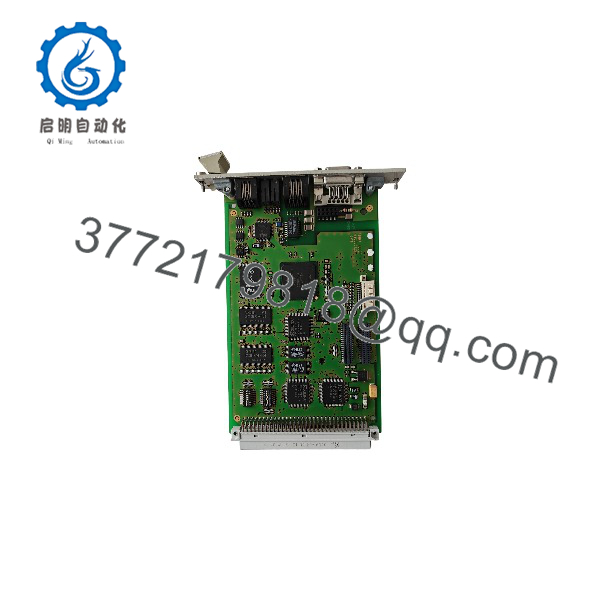
F8627
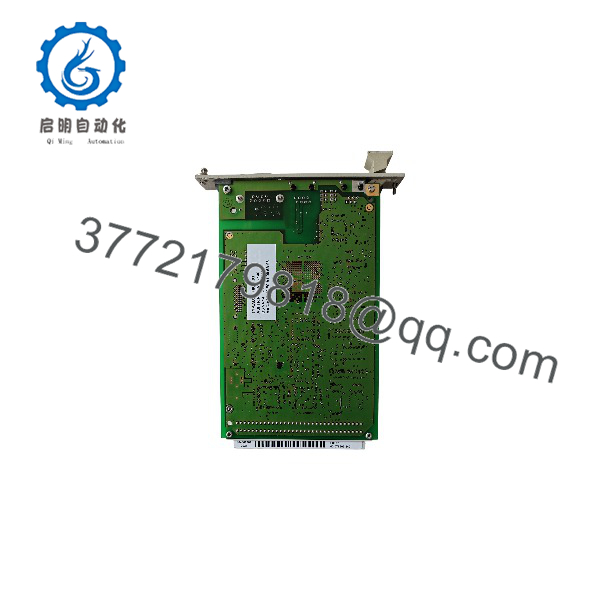
F8627
Troubleshooting Quick Reference
| Symptom | Possible Cause | Relevance to This Part | Quick Check Method | Recommendation |
|---|---|---|---|---|
| No Ethernet link indication | Damaged patch cable, remote switch port down, incorrect cable connection, failed F8627 port | ❌ Usually external | Replace the patch cable with a known-good Cat5e/6 cable; test the remote switch port with another device; inspect RJ-45 latch and connector pins | Replace the cable or correct the remote network first. Suspect the F8627 only if the fault remains on a known-good network |
| Controller cannot communicate over SafeEthernet | Incorrect IP address, incorrect SafeEthernet project configuration, duplicate address, topology error, safety network fault | ❌ Usually configuration related | Compare ELOP II project settings to the physical topology; verify every node IP address; read H51q/H41q diagnostic messages | Restore the validated project configuration. Never bypass SafeEthernet diagnostics to keep a process running |
| HMI or DCS cannot read data | OPC Server configuration fault, firewall rule, wrong IP subnet, incorrect tags, Ethernet link issue | ❌ Usually host-side configuration | Ping the module only if permitted by the network design; verify OPC server connection, network route, data-point mapping, and controller diagnostics | Correct workstation, OPC, or network settings before replacing the |
| ELOP II cannot connect for engineering | Wrong Ethernet interface selected, incorrect IP address, incompatible ELOP II version, cable fault, programming access not enabled | ❌ Usually software or configuration | Verify ELOP II version, PC IP settings, Ethernet connection, and approved programming configuration; compare with project documentation | Use the exact approved engineering workstation setup. Do not change live safety project settings without formal change control |
| Module has power but is not recognized | Incorrect rack position, poor backplane contact, incompatible base version, damaged module, wrong module model | ✅ Medium | Isolate power under approved procedures; reseat the module; inspect connectors; verify BS41q/51q base version and read system diagnostics | Confirm hardware compatibility before replacing the module |
| Intermittent communications during vibration or heat | Loose RJ-45, bent connector latch, cable strain, cabinet heat, failing port electronics, poor grounding | ✅ Medium | Inspect cable strain relief and connector retention; check cabinet temperature; test using a short known-good cable; review time-stamped diagnostics | Correct cable routing and cooling first. Replace the only if the fault follows the module in controlled testing |
| Communication loss after replacement | IP settings not restored, incorrect switch settings, F8627X substituted for , wrong project, missing redundancy cable | ✅ High | Photograph the old module settings and network wiring before removal; compare exact suffix, part number, DIP settings, IP address, and RJ-12 HSR connection | Install the exact and restore validated settings before commissioning |
| Redundant SafeEthernet path does not recover | Missing HSR connection, redundant peer not configured, unmatched IP settings, incorrect network wiring | ✅ High | Inspect the RJ-12 High Speed Redundancy connection and approved redundant topology; review both controller diagnostics | Restore the documented redundant arrangement. Test failover only under approved site procedure |
| Ethernet link works but data is stale | OPC scan-rate issue, DCS polling configuration, controller application update failure, network congestion, host software fault | ❌ Usually host or application layer | Compare live safety-controller values to OPC/DCS values; review scan rates and timestamps; check for communication alarms | Correct the supervisory interface. Do not replace the merely because a DCS display is stale |
| Two network nodes become unreachable after changes | Duplicate IP address, subnet-mask conflict, bad switch configuration, incorrect static route | ❌ Network configuration | Disconnect the new or changed device as approved, scan or document addresses, and compare to the IP plan | Resolve addressing conflicts before reintroducing the module |
| Communication fails only after power cycles | Project/configuration retention issue, startup sequence dependency, switch boot delay, aging module memory | ✅ Medium | Record startup diagnostics and timing; test with known-good network equipment and verified power supply | Correct sequence/configuration issues. Replace the module if controlled testing confirms repeatable boot failure |
| Module overheats or produces intermittent fault LEDs | High cabinet temperature, poor ventilation, bad 5 V backplane supply, internal component aging | ✅ Medium | Measure cabinet temperature and 5 V rack supply; inspect module ventilation and rack loading | Correct rack cooling and power problems. Replace the module only if fault remains under stable conditions |
❗ Model warning: Do not substitute an F8627X for an just because both are Ethernet communication modules. The F8627X added functions such as Modbus TCP slave, OPC A&E, and ELOP II programming through Ethernet, and it has a different part number. Confirm project, software, firmware, CPU, rack, and protocol compatibility before a substitution.
❗ Addressing warning: Before removing the old module, record its IP address, subnet mask, gateway if used, SafeEthernet configuration, module number, switch settings, rack slot, Ethernet cable labels, and RJ-12 redundancy connection. I have seen a technician install a healthy replacement, reuse an old IP address that was already active elsewhere, and bring down both engineering access and DCS data.
❗ Network safety warning: A valid Ethernet link LED does not prove valid SafeEthernet communication. Link only proves physical Ethernet connectivity. Use HIMA diagnostics and the validated ELOP II project to prove the safety communication path.
❗ ESD warning: Isolate rack power as required, wear a grounded wrist strap, and do not touch connector contacts. The module uses low-voltage backplane electronics and can be damaged before it ever reaches the rack.
If troubleshooting remains unclear, contact technical support with and 984862702 label photos, HIQuad CPU model, rack/base version, ELOP II version, controller diagnostic export, network topology, IP-address plan, RJ-45 and RJ-12 connection photos, and LED-state records. Keep these checks in mind and you will save yourself most of the usual rework time.
Frequently Asked Questions
What is the HIMA ?
The HIMA is a communication module that provides 10/100Base-T Ethernet connectivity for H41q and H51q HIQuad safety systems. It supports SafeEthernet communication between compatible safety systems and can provide Ethernet-based data exchange through HIMA software interfaces.
Is the a safety PLC CPU?
No. The is not a controller, CPU, input module, output module, or power supply. It is a communication interface installed alongside the HIQuad CPU architecture. It does not execute the core safety application by itself.
Does the support Modbus TCP?
Do not assume that it does. The available HIMA documentation specifically describes Modbus TCP slave as a new feature of the , not the original . For a legacy , confirm the installed firmware, HIMA OPC configuration, and project documentation before specifying any Modbus TCP interface.
What is the difference between and ?
The is an enhanced communication module. HIMA’s /F8628X documentation identifies additions including OPC A&E through the HIMA OPC Server, Modbus TCP slave capability, and ELOP II programming over Ethernet beginning with ELOP II Version 4.1. The original supports Ethernet and SafeEthernet functions, but it should not be represented as having all features without verification.
Can I hot-swap an ?
Do not assume it is hot-swappable. Removing it can interrupt controller-to-controller communications, engineering access, OPC data, and potentially a safety-related communication path. Whether live replacement is allowed depends on the exact H41q/H51q architecture, redundancy design, site work instruction, and safe process condition.
Before replacement, capture diagnostics and the active project, verify the redundant path if installed, document all wiring and settings, then perform a controlled post-replacement communication and functional test.
Can an communicate with more than one safety controller?
Yes. Documentation describes Ethernet networking of up to 64 H51q programmable electronic safety systems through the arrangement, subject to the approved network design and ELOP II configuration. That does not mean every controller should be placed on an unmanaged plant LAN; use the documented HIMA network architecture, addressing plan, switching infrastructure, and safety communications design.
Is the obsolete?
The is a legacy HIQuad H41q/H51q module, and current supply commonly comes through New Surplus, used, professionally tested, or refurbished inventory. The and later HIMA communication platforms may offer additional functions, but an upgrade is an engineering change, not a simple spare swap. Keep a tested spare for critical systems and retain the associated ELOP II software, project backups, network configuration records, and compatible cable inventory.
How should a New Surplus be tested before shipment?
Start with inbound inspection and traceability: verify the and 984862702 labels, serial number, RJ-45 Ethernet connector, RJ-12 HSR connector, module switch settings, backplane contacts, housing, and absence of corrosion, bent contacts, rework marks, heat damage, or cracked connectors.
For live functional testing, install the module in a genuine compatible H41q/H51q test rack with a known-good CPU and 5 V DC backplane supply. Confirm normal startup and module recognition using the correct ELOP II environment. Connect a known-good 10/100Base-T Ethernet network, verify physical link, configure the assigned IP address, and establish SafeEthernet communication with a compatible peer or test controller.
Where the site uses redundancy, connect the approved RJ-12 HSR interface and verify the documented mono or redundant communication arrangement. Confirm supported OPC data exchange only through the compatible HIMA OPC Server configuration. Run the module under power for more than 24 hours while monitoring Ethernet link stability, controller diagnostics, network traffic, thermal behavior, and restart recovery.
Record rack and CPU type, ELOP II version, firmware identification, IP configuration, link-test result, SafeEthernet test result, redundancy result where applicable, test duration, diagnostic export, and final QC sign-off. Package the module in ESD-safe material with connector protection and heavy-duty corrugated shipping packaging. Test photos and video should be available upon request. Available documentation identifies the as a 10/100Base-T Ethernet module with RJ-45 connectivity, SafeEthernet support, mono/redundant configuration, an RJ-12 HSR interface, and compatibility with H41q/H51q systems.



