
 WhatsApp: +86 16626708626
 Email:
  Phone: +86 16626708626
Description
Key Technical Specifications
| Parameter | Value |
|---|---|
| Manufacturer | HIMA |
| Model | K9203A |
| Order Number | 996920360 |
| Product Type | Rack-mounted circulation fan |
| Fan Configuration | 3 axial fans |
| Operating Voltage | 24 V DC |
| Voltage Tolerance | −15% to +20% |
| Maximum Current | 750 mA |
| Airflow | 300 m³/h |
| Rack Format | 19-inch |
| Rack Height | 1 RU |
| Installation Depth | 215 mm |
| Fan Monitoring | Fan-operation monitoring |
| Voltage Monitoring | Included |
| Power Arrangement | Redundant supply arrangement |
| Sound Level | Approximately 55 dB(A), according to available technical listings |
| Ambient Temperature | Verify against the applicable HIMA documentation before installation |
| Weight | Approximately 1.8 kg, according to available technical listings |
Procurement note: Confirm the complete K9203A / 996920360 identification on the physical unit before ordering. Some third-party listings incorrectly describe K9203A as a relay, CPU, or counting module. Those descriptions conflict with the rack-fan documentation and should not be used for replacement selection.
Product Introduction
The HIMA K9203A 996920360 is a 19-inch rack-mounted circulation fan used to provide forced-air ventilation for compatible HIMA control-system racks. The assembly contains three axial fans and operates from a 24 V DC supply, with a published maximum current of 750 mA and airflow of approximately 300 m³/h.
The unit occupies 1 RU and has a documented 215 mm installation depth. Fan-operation and voltage monitoring are integrated into the assembly, making the K9203A more than a generic cabinet fan. For replacement work, match the order number, rack dimensions, electrical interface, and monitoring arrangement.
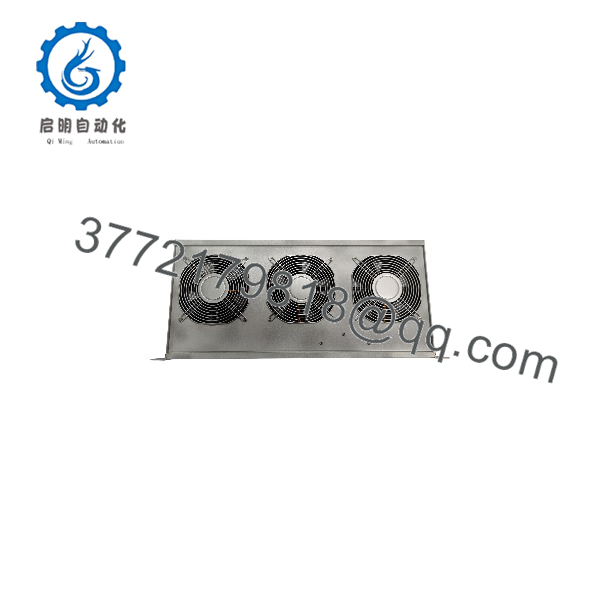
K9203A 996920360
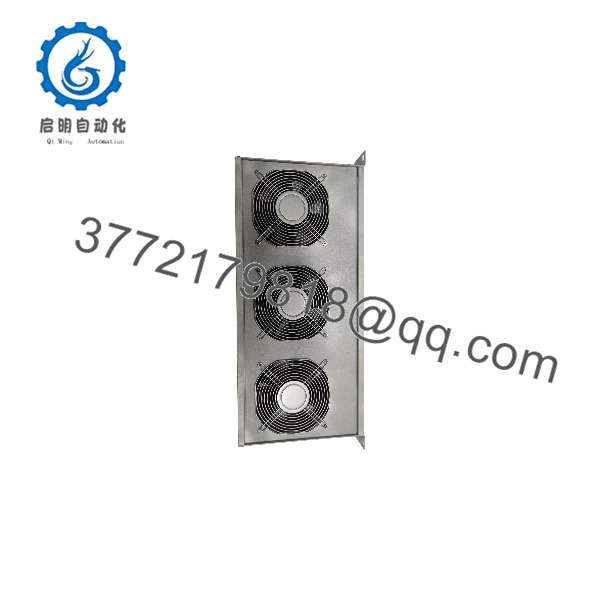
K9203A 996920360
Installation & Configuration Guide
Stage 1: Pre-Installation Preparation — 5–10 Minutes
⚠️ Safety First: Notify operations before maintenance. Place the affected HIMA system in its approved maintenance state and follow the site’s lockout/tagout procedure. Do not assume that the K9203A supports hot-swapping.
Tools Required:
- ESD wrist strap
- Appropriate screwdriver
- Digital multimeter
- Wire labels
- Smartphone or camera for installation photographs
Data Backup:
- Record the complete installed identification: / 996920360.
- Photograph the fan assembly, terminals, connectors, and mounting position.
- Record the existing fan and voltage-monitoring status.
- Photograph the wiring before disconnecting anything.
- Verify that the replacement has three axial fans.
- Confirm the replacement’s electrical specifications against the applicable HIMA documentation.
Stage 2: Removing the Old Module — 5 Minutes
- Place the control system in the approved maintenance state.
- Isolate the applicable power source according to site procedures.
- Verify that the relevant 24 V DC supply is de-energized.
- Apply ESD protection before handling the assembly.
- Photograph all connections before removal.
- Label conductors where required.
- Disconnect the electrical connections without pulling on the wires.
- Release the rack mounting hardware.
- Remove the carefully and keep it available for comparison.
- Inspect the rack opening, connector, terminals, and surrounding wiring.
⚠️ Do not discard the original fan immediately. If the replacement produces a monitoring alarm, the old assembly provides a direct reference for wiring and mechanical configuration.
Stage 3: Installing the New — 5 Minutes
- Compare the replacement with the removed assembly.
- Confirm the marking .
- Confirm order number 996920360.
- Confirm that three axial fans are installed.
- Check the connector and terminal arrangement.
- Confirm that the mechanical dimensions match the existing rack position.
- Install the assembly into the 19-inch rack.
- Secure the mounting hardware.
- Reconnect the 24 V DC supply and monitoring connections exactly as documented.
- Check that cables do not obstruct the fan intake or exhaust path.
Self-Checklist:
- identification confirmed
- 996920360 order number confirmed
- Three axial fans installed
- 24 V DC supply verified
- Wiring matches photographs
- Mounting hardware secured
- Airflow path unobstructed
- Monitoring connections secured
Stage 4: Power-On & Testing — 10 Minutes
- Perform a final visual inspection.
- Check the 24 V DC supply with a multimeter before energizing.
- Restore power according to the approved HIMA procedure.
- Verify that all three fans start.
- Check the fan-operation monitoring indication.
- Check the 24 V monitoring indication.
- Confirm that no new rack cooling or fan fault is reported.
- Allow the assembly to operate continuously while observing fan behavior.
- Verify that abnormal vibration, bearing noise, or intermittent fan operation is absent.
- Return the system to service only after the required maintenance checks are complete.
⚠️ Do not treat a spinning fan as proof of a healthy replacement. The includes monitoring functions. Verify the associated status indication as well as physical fan operation.
Replacement Warning: The is a thermal-management component. A failed or incorrectly wired fan assembly can affect cabinet cooling even if the safety controller itself initially remains operational.
Frequently Asked Questions (FAQ)
What is the HIMA 996920360?
The HIMA , order number 996920360, is a 19-inch rack-mounted circulation fan assembly. It uses three axial fans to provide forced-air ventilation for compatible HIMA rack installations.
How many fans are inside the ?
The uses three axial fans. This is an important identification point when comparing it with other HIMA rack-fan variants.
What voltage does the use?
The documented operating supply is 24 V DC, with a stated voltage tolerance of −15% to +20%. The published maximum current is 750 mA. Always verify the actual unit marking and applicable HIMA documentation before applying power.
What is the airflow rating of the ?
Available technical documentation lists approximately 300 m³/h airflow. Actual cabinet cooling depends on rack layout, cabinet restrictions, filter condition, surrounding temperature, and the condition of all three fans.
Can the be hot-swapped?
Do not assume hot-swap capability. Unless the specific HIMA system documentation for the installed rack explicitly authorizes live replacement, treat the as a power-off maintenance item.
Is 996920360 a CPU, relay, or I/O module?
No. The technical identification supported by the rack-fan documentation is a rack circulation fan assembly. Some third-party websites incorrectly classify this part number as a CPU, safety relay, or counting module. Those descriptions should be disregarded when selecting a replacement.
What should I check before buying a surplus ?
Confirm the complete / 996920360 identification, three-fan configuration, physical condition, connector arrangement, rack dimensions, 24 V DC rating, and fan-monitoring interface. For used or surplus stock, request clear photographs of the nameplate, connectors, fans, and mounting frame.
Is the still available from HIMA?
Availability depends on current OEM lifecycle status and remaining stock. The part is associated with legacy HIMA rack-based systems, so procurement should not rely on a generic “in stock” claim. Ask the supplier to confirm the exact order number and physical inventory condition before issuing a purchase order.
What condition should I specify when purchasing?
For critical replacement inventory, specify the required condition explicitly: New Original / New Surplus, Factory Sealed, or Refurbished and Tested. Do not accept an unspecified “good condition” description for a rack cooling component used in a safety-related installation.



