
 WhatsApp: +86 16626708626
 Email:
  Phone: +86 16626708626
Description
Key Technical Specifications
- Part Types: CPM-E2 and CPM-E3 (two CPU module variants)
- Series: E-Series (EM-II series)
- Compatibility: Upper compatibility with preceding CPU module CPM-E
- Communication Interface: Serial PGM Interface for programming and communication
- Application Platform: Hitachi H-100 series PLC systems
- System Voltage: Most H-100 modules operate at 24V DC or 100–120V AC (verify specific module rating)
- Status: Legacy / Obsolete part
- Availability: Limited stock; subject to prior sale
- Condition Offered: Used, fully tested
- Warranty: 1-year warranty (per seller)
- Price Reference: ~€587.51 (used)
Product Introduction
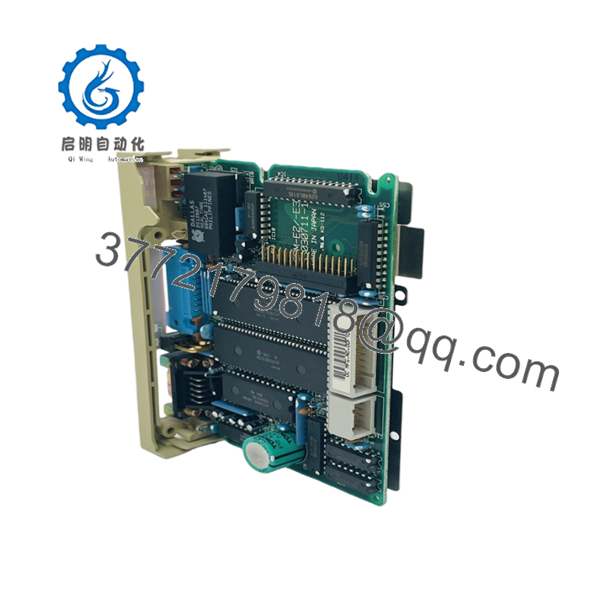
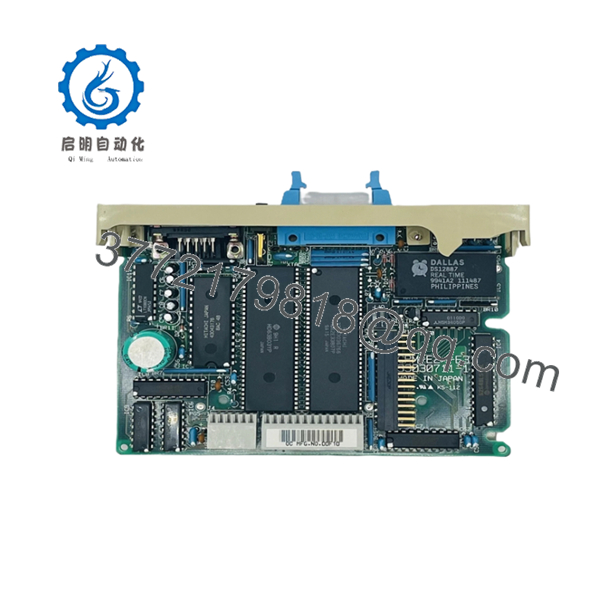
Hitachi CPM-E2/E3 is the CPU controller module for Hitachi’s E-Series (EM-II) PLC systems, commonly deployed in H-100 series industrial automation equipment. It provides the core processing and control logic for the PLC rack and includes a Serial PGM Interface for programming and communication.
The CPM-E2 and CPM-E3 variants offer upper compatibility with the older CPM-E CPU, making them suitable replacements in legacy H-100 systems. Because this is a legacy part, stock is limited and units are typically sold as used, fully tested, with a 1-year warranty.

- CPM-E2/E3
Troubleshooting Quick Reference
| Symptom | Possible Cause | Relevance to this Part | Quick Check Method | Recommendation |
|---|---|---|---|---|
| No LEDs on power-up | Power supply failure or blown fuse | ❌ Low | Measure 24V DC (or 100–120V AC) at CPU input terminals with a multimeter | Check PSU, fuses, and rack power before replacing CPU |
| ERR light flashing (e.g., 1 Hz) | CPU/memory fault or internal error | ✅ High | Read diagnostic buffer via programming software | Usually requires CPU replacement |
| Cannot connect to programmer | Serial PGM interface fault or wiring issue | ✅ High | Check serial cable continuity and connector pins; verify COM settings | Inspect serial interface circuit and cable; test with another programmer |
| PLC runs but no I/O response | I/O module or backplane fault, not CPU | ❌ Low | Check status LEDs on adjacent I/O cards; verify I/O bus continuity | Issue is likely local to I/O rack, not CPU |
| Program not retained after power-off | Memory fault or battery issue (if applicable) | ✅ Medium | Check for battery indicator or memory error in diagnostic buffer | Replace CPU if memory is faulty; check battery if present |
| Communication timeout with master | Firmware/protocol mismatch or baud rate error | ✅ Medium | Verify baud rate, node address, and protocol settings (Serial PGM) | Match old module settings; confirm firmware/protocol version |
If you’re stuck, contact technical support with photos of the nameplate, LED status, wiring, and diagnostic logs from the programming software.
Frequently Asked Questions (FAQ)
Q: Is CPM-E2-E3 a single model, or are CPM-E2 and CPM-E3 separate?A: They are two separate CPU modules: CPM-E2 and CPM-E3. Sellers sometimes list them together as “CPM-E2/E3” or “CPM-E2-E3” because they’re functionally similar and compatible with the same E-Series systems.
Q: Can I hot-swap this CPU module?A: No. Hitachi E-Series CPU modules are not hot-swappable. Removing or installing the CPU while power is on can damage the backplane or the module. Kill the power first, then swap [standard PLC safety practice].
Q: Will my program stay if I replace the CPU?A: Only if the program is stored externally (e.g., in a memory card or master system). The CPU itself holds the active program; swapping it without restoring the program will leave the PLC empty. Always back up the program before pulling the old CPU.
Q: Is CPM-E2/E3 compatible with CPM-E systems?A: Yes, CPM-E2 and CPM-E3 have upper compatibility with the preceding CPM-E CPU module, so they can replace CPM-E in many cases. Still, verify firmware, I/O mapping, and peripheral settings before installation.
Q: Is this part new or used?A: In current market listings, CPM-E3 is typically sold as “Used, Fully Tested” with a 1-year warranty. New original stock is rare because this is an obsolete legacy part.
Q: Why is it cheaper than buying from Hitachi directly?A: Because it’s a legacy/obsolete part no longer in mainstream production. Surplus and used inventory from automation distributors is often cheaper than trying to source new from OEM channels, if available at all
Q: Do I need to match firmware or serial interface settings?A: Yes. For Serial PGM communication, matches baud rate, node address, and protocol settings are critical. I’ve seen projects where a swapped CPU threw a “Communication Timeout” for days just because the serial settings didn’t match the old unit.
Q: Is stock guaranteed?A: No. This is an obsolete module with limited stock. Availability can change quickly, and units are typically “in stock” only until sold. Confirm current availability before committing to a design or maintenance plan.
Keep these checks in mind and you’ll save yourself 90% of typical rework time.



