
 WhatsApp: +86 16626708626
 Email:
  Phone: +86 16626708626
Description
Key Technical Specifications
- Part Number: E12978651
- Brand: Hitachi (Hitachi Euclid / Truck Mfg Ltd)
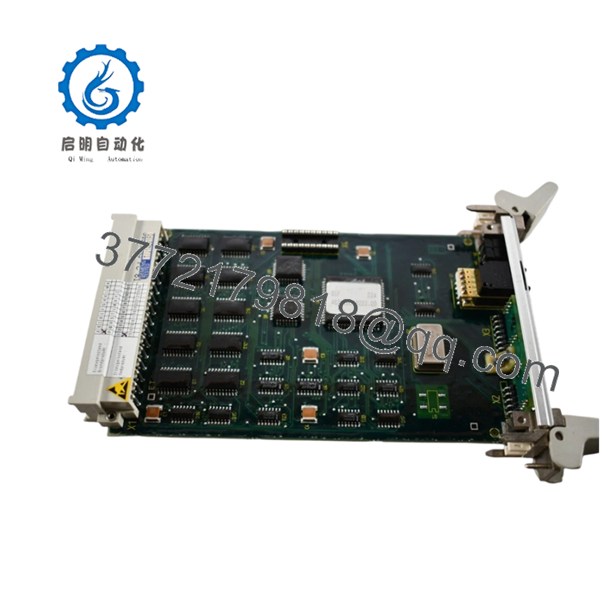
- Product Name: Card DigInter Module PCB Module
- Product Type: PCB Module / Digital Interface Card
- Application: Industrial control system, truck manufacturing equipment
- Condition: New
- Availability: New stock available, limited supply
- Compatibility: Hitachi Euclid systems, Truck Mfg Ltd equipment
- Interface Type: Digital interface (DigInter)
- Form Factor: PCB module (card format)
Product Introduction
Hitachi E12978651 is a Card DigInter (digital interface) PCB module used in Hitachi Euclid industrial control systems and truck manufacturing equipment. This digital interface card provides signal communication and interface functionality for industrial automation and control systems.
The module is a PCB-based interface card designed for integration into Hitachi Euclid control racks or Truck Mfg Ltd equipment. As an obsolete legacy part, stock is limited and units are typically sold as New Original when available.

- E12978651
Troubleshooting Quick Reference
| Symptom | Possible Cause | Relevance to this Part | Quick Check Method | Recommendation |
|---|---|---|---|---|
| No communication on digital bus | Interface card failure or wiring fault | ✅ High | Check digital bus continuity and connector pins at the card terminals | Verify wiring before replacing; test with known-good card if available |
| System throws “DigInter” error | Card DigInter module fault | ✅ High | Read diagnostic buffer in control software for interface error codes | Usually requires PCB module replacement |
| LED not lit on card | Power supply failure to rack/card | ❌ Low | Measure 24V DC (or specified voltage) at card input terminals | Check rack power supply and fuses first |
| Intermittent communication | Loose connector or dirty contact | ✅ Medium | Inspect card connector; clean pins; reseat card firmly | Clean and reseat before replacing; check for bent pins |
| Control system doesn’t recognize card | Card not configured or firmware mismatch | ✅ Medium | Check system configuration for card presence and address settings | Verify card address/configuration matches software setup |
| Erratic digital signals | ESD damage or electrical overload | ✅ High | Inspect PCB for burnt components; measure input/output signal levels | If PCB is damaged, replacement is required; check upstream power |
If you’re stuck, contact technical support with photos of the nameplate, LED status, connector wiring, and diagnostic logs from the control system.
Frequently Asked Questions (FAQ)
Q: Is E12978651 a Hitachi Euclid part or a general Hitachi part?A: It’s specifically a Hitachi Euclid / Truck Mfg Ltd part, used in Hitachi Euclid industrial control systems and truck manufacturing equipment.
Q: Can I hot-swap this PCB module?A: No. PCB interface cards are not hot-swappable. Removing or installing while power is on can damage the backplane or the card itself. Kill the power first, then swap—this is standard practice for industrial PCB modules.
Q: Will my system configuration stay if I replace the card?A: Yes, the system configuration is stored in the controller/master, not on the interface card itself. However, you must ensure the replacement card has the same address and configuration settings (DIP switches, jumpers) as the old one. Take a photo before removal.
Q: Is this part new or refurbished?A: Current listings show this as New Original stock. However, because it’s obsolete, availability is limited and may vary by seller
Q: Why is it harder to find than newer Hitachi parts?A: This is a legacy/obsolete part for Hitachi Euclid and truck manufacturing equipment no longer in mainstream production. Stock exists only as leftover surplus inventory, which is why availability is limited.
Q: Do I need to match firmware or interface settings?A: Yes. For digital interface cards, match the card address, baud rate, and any DIP switch/jumper settings. I’ve seen projects where a swapped interface card caused communication timeouts for days because the node address didn’t match the old unit.
Q: What if the new card doesn’t fit the rack?A: Verify the form factor and connector type match exactly. Even within the same series, PCB revisions can have different edge connectors or mounting holes. Check the manual or compare with the removed card before installing.
Q: Is stock guaranteed?A: No. This is an obsolete PCB module with limited stock. Availability can change quickly, and units are typically “in stock” only until sold. Confirm current availability before committing to a maintenance plan.
Keep these checks in mind and you’ll save yourself 90% of typical rework time.



