
 WhatsApp: +86 16626708626
 Email:
  Phone: +86 16626708626
Description
Key Technical Specifications
| Parameter | Value |
|---|---|
| Manufacturer | Honeywell |
| Part Number | 51403645-100 |
| Product Type | SBHM — Single Board History Module |
| System | Honeywell TDC 3000 |
| Primary Function | Process history data storage |
| Storage Capacity | 1.8 GB per logical drive |
| Logical Drives | Dual logical-drive support |
| Storage Interface | SCSI |
| System Bus | Honeywell LCN |
| Power Source | LCN bus |
| Operating Temperature | -25°C to +70°C, according to secondary technical documentation |
| Humidity | 5–95% RH, non-condensing |
| Installation | TDC 3000 LCN rack |
| Associated Part | 51403698-100 SBHM motherboard assembly |
| Related Drive Assembly | 51403645-600 |
| Replacement Verification | Check complete assembly and revision before installation |
The most consistently reported technical identification is 51403645-100 / 51403698-100 as an SBHM assembly, with 1.8 GB per logical drive, dual logical-drive support, SCSI connectivity, and LCN-bus power.
One important distinction: Honeywell’s official System HINTS lists 51403698-100 as “SBHM MOTHERBOARD ASSY” and 51403645-600 as “DRIVE ASSEMBLY ONLY.” Therefore, do not automatically interpret 51403645-100 as a complete modern controller or generic storage card.
Product Introduction
The Honeywell 51403645-100 is an SBHM (Single Board History Module) associated with the Honeywell TDC 3000 control-system architecture. Its purpose is historical process-data handling, using storage and SCSI-related functions within the legacy LCN-based system environment.
Replacement work requires more than matching the printed part number. Verify the associated 51403698-100 motherboard assembly, drive configuration, LCN installation, and hardware revision. Honeywell’s current documentation separately identifies the SBHM motherboard and drive assembly part numbers.
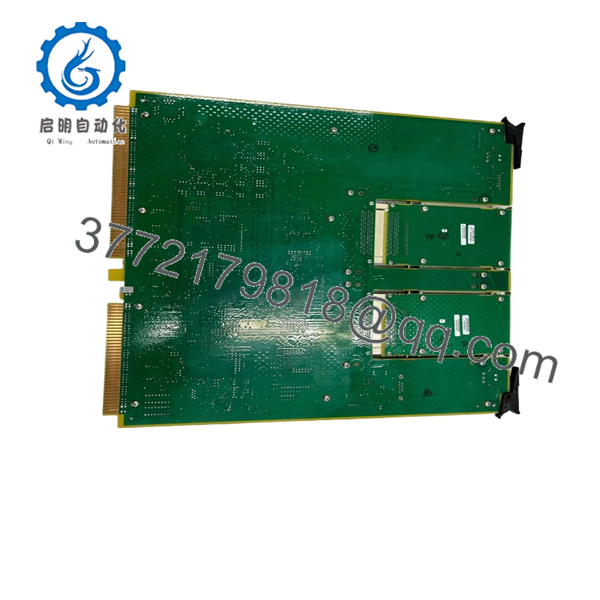
51403645-100
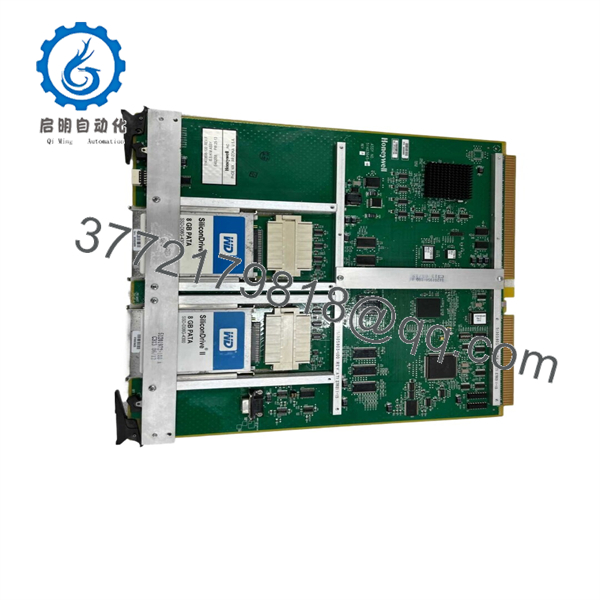
51403645-100
Installation & Configuration Guide
Stage 1: Pre-Installation Preparation — Approximately 10 Minutes
⚠️ Safety First: Notify operations before removing the SBHM. Confirm the affected TDC 3000 history function can be taken out of service. Follow the site’s approved LOTO and Honeywell maintenance procedures.
Tools Required:
- ESD wrist strap
- Appropriate card-retaining screwdriver/tool
- Digital multimeter
- Wire and cable labels
- Smartphone or camera
- Current TDC 3000 system documentation
- Approved maintenance/configuration records
Data Backup:
- Record the complete 51403645-100 part number.
- Photograph the installed SBHM and associated hardware.
- Record the 51403698-100 motherboard assembly identification if present.
- Document the physical rack/card position.
- Record any drive identification, configuration labels, or revision markings.
- Back up applicable historical-data configuration using the site’s approved TDC 3000 procedure.
- Preserve the original module until the replacement has completed commissioning.
⚠️ Do not rely on a supplier description that simply calls 51403645-100 a “controller module.” Several marketplace listings use inconsistent terminology. The stronger evidence identifies it with the SBHM architecture.
Stage 2: Removing the Old Module — Approximately 5 Minutes
- Place the affected history function in the approved maintenance state.
- Follow the applicable TDC 3000 shutdown/isolation procedure.
- Remove the rack cover or retaining hardware as applicable.
- Photograph the card position and associated connections.
- Release the card-retention mechanism.
- Pull the module straight out while supporting the card edges.
- Place the removed module on an ESD-safe surface.
- Inspect the rack connector and mating hardware for contamination or mechanical damage.
- Check the associated SBHM motherboard and drive assembly for visible damage.
Honeywell’s published system documentation treats the SBHM motherboard and drive assembly as distinct hardware items. Do not replace the wrong assembly because the part numbers appear similar.
Stage 3: Installing the New Module — Approximately 5 Minutes
- Verify the replacement label: 51403645-100.
- Confirm the replacement hardware matches the required SBHM configuration.
- Verify the associated 51403698-100 motherboard and applicable drive arrangement.
- Put on a grounded ESD wrist strap.
- Align the module with the correct TDC 3000 rack position.
- Insert the card without forcing the connector.
- Engage the card-retention mechanism.
- Check the board seating and connector engagement.
- Reinstall the rack cover or applicable retaining hardware.
- Confirm that no cable or connector has been disturbed unintentionally.
Self-Checklist:
- 51403645-100 verified
- SBHM identification verified
- 51403698-100 association checked
- Drive configuration documented
- Correct rack position verified
- Card fully seated
- Retaining mechanism secured
- ESD precautions maintained
Stage 4: Power-On & Testing — Approximately 10–20 Minutes
- Complete a final visual inspection before energizing the system.
- Restore power according to the approved TDC 3000 procedure.
- Observe the SBHM and associated system status indications.
- Verify that the system recognizes the history module.
- Confirm the LCN communication path is operating normally.
- Verify the expected storage configuration.
- Check historical data retrieval from a known point.
- Confirm that new historical records are being generated.
- Compare current and historical values against a known-good workstation or operator station.
- Monitor the system for alarms or storage-related faults.
⚠️ Do not treat successful power-up as a completed commissioning test. A history module can power up while still having a storage, SCSI, LCN, or configuration problem. Test both data acquisition and historical-data retrieval before returning the system to normal service.
Frequently Asked Questions (FAQ)
Q1. What is Honeywell 51403645-100?
51403645-100 is associated with Honeywell’s SBHM (Single Board History Module) hardware for the TDC 3000 architecture. The module is intended for historical process-data storage and retrieval rather than ordinary PLC I/O.
Q2. Is 51403645-100 the same as 51403698-100?
No. They are associated with the same SBHM assembly, but Honeywell’s System HINTS identifies 51403698-100 specifically as the SBHM motherboard assembly. Treat the two part numbers as different hardware items unless the applicable documentation identifies them as a complete replacement assembly.
Q3. What is the storage capacity of the SBHM?
Secondary technical documentation identifies 1.8 GB per logical drive with dual logical-drive support for the 51403645-100 / 51403698-100 SBHM configuration.
Q4. Can I hot-swap the 51403645-100?
Do not assume it is hot-swappable. Some TDC 3000 hardware configurations have specific maintenance procedures, but the correct procedure depends on the installed architecture and system revision. Follow the applicable Honeywell maintenance documentation and site procedure before removing the module under power.
Q5. Is 51403645-100 obsolete?
It is legacy TDC 3000 hardware associated with installed-base systems. Honeywell continues to publish System HINTS containing SBHM-related part numbers, including 51403698-100 and 51403645-600, but that does not mean every legacy assembly remains available as new factory stock.
Q6. Why do supplier listings give different specifications for this part?
This part is frequently listed by secondary-market suppliers, and some descriptions incorrectly classify it as a generic controller, I/O module, or driver. For example, one listing describes it as a controller module with digital and analog I/O specifications, while other sources identify it as SBHM history hardware. Those conflicting descriptions should not be used as a substitute for Honeywell documentation.
Q7. What should I verify before ordering 51403645-100?
Provide the supplier with the complete 51403645-100 part number, the TDC 3000 system information, installed SBHM configuration, associated 51403698-100 motherboard identification, drive arrangement, and hardware revision. Request photographs of the actual nameplate and board before purchasing.
For a legacy system, this is one of those cases where matching the first eight digits is not enough. Verify the complete assembly configuration before removing the existing hardware. Honeywell’s own documentation distinguishes the SBHM motherboard and drive assembly components.



