
 WhatsApp: +86 16626708626
 Email:
  Phone: +86 16626708626
Description
Key Technical Specifications
| Parameter | Value |
|---|---|
| Manufacturer | Honeywell |
| Model | 900PSM-0101 |
| Product Type | Redundant Power Status Module |
| System | Honeywell HC900 / ControlEdge HC900 |
| Primary Function | Redundant power status monitoring |
| Supply / Loading | 5 V DC, 22 mA maximum |
| Power Consumption | 0.11 W |
| Heat Dissipation | 0.11 W |
| Status Indication | Green LED directional indicators |
| Mounting | HC900 rack-mounted module |
| Operating Temperature | 0°C to 60°C reported in HC900 documentation |
| Storage Temperature | -40°C to 85°C reported by current product documentation |
| Weight | Approximately 0.5 kg; individual listings vary |
| Redundant Rack Compatibility | Yes |
| Hot-Swap / Live Replacement | Documentation indicates insertion/removal under power is supported |
| Related Power Supplies | 900P01-0101, 900P24-0101 |
Honeywell documentation identifies the 900PSM-0101 as the redundant power status module and specifies a 5 V, 22 mA maximum load. A Honeywell ControlEdge specification lists its power consumption and heat dissipation at 0.11 W.
The HC900 installation documentation also lists the 900PSM-0101 as the redundant power status module used with redundant-power architectures.
Product Introduction
The Honeywell 900PSM-0101 is a redundant power status module for Honeywell HC900 control systems. It monitors the status of redundant power supplies and provides front-panel LED indication, allowing maintenance personnel to identify power-path status without replacing the power supplies themselves.
The module has a very low 5 V loading requirement of 22 mA maximum and is specified at 0.11 W power consumption. It is intended for racks configured for redundant power and is documented as supporting insertion and removal under power.
Installation & Configuration Guide
Stage 1: Pre-Installation Preparation — About 5 minutes
⚠️ Safety First: Although documentation indicates that the 900PSM-0101 can be inserted and removed under power, do not assume every site configuration permits live work. Follow the plant’s electrical safety procedure, OEM instructions, and applicable LOTO requirements. If the rack supplies a safety function, obtain operations approval before disturbing the module.
Tools Required:
- ESD wrist strap
- PH1 screwdriver if required by the rack hardware
- Digital multimeter
- Wire labels if adjacent wiring must be disturbed
- Smartphone or camera for configuration/reference photographs
Data Backup:
- Record the exact module number: 900PSM-0101.
- Photograph the complete rack before removal.
- Photograph the module front and surrounding power-supply arrangement.
- Record the installed power-supply models, particularly 900P01 or 900P24 variants.
- Record existing alarm/diagnostic status in the interface.
- Keep the removed module until the replacement has passed functional checks.
There normally is no user program to download into the 900PSM-0101 itself. It is a power-status monitoring module rather than the controller CPU.
Stage 2: Removing the Old Module — About 2–5 minutes
- Confirm the replacement model is 900PSM-0101.
- Verify that the rack is the appropriate redundant-power configuration.
- Photograph the installed position and LED condition.
- Follow the site’s approved procedure for either powered or de-energized replacement.
- Release the module’s retaining mechanism.
- Pull the module straight out of the rack. Do not twist the PCB against the backplane connector.
- Inspect the module connector and rack connector for contamination, bent contacts, or physical damage.
⚠️ Do not force the module. A damaged backplane connector can turn a simple module replacement into a rack-level repair.
Keep the old module for reference until the replacement has completed its operational checks.
Stage 3: Installing the New Module — About 3 minutes
- Put on the grounded ESD wrist strap before handling the replacement.
- Confirm the label reads Honeywell 900PSM-0101.
- Inspect the connector for bent or contaminated contacts.
- Align the module with the correct rack position.
- Insert the module straight into the backplane connector.
- Apply even pressure until the module is fully seated and the retaining mechanism locks.
- Confirm that adjacent power modules remain fully seated.
Unlike an addressable communications module, the 900PSM-0101 does not require the usual node-address/DIP-switch cloning procedure. The important configuration check is the correct rack architecture and compatible redundant power arrangement.
Self-Checklist:
- Exact model verified
- ESD precautions applied
- Connector inspected
- Module fully seated
- Retaining mechanism locked
- Adjacent power modules secure
Stage 4: Power-On & Functional Testing — About 5–10 minutes
- If the system was powered down, restore power according to the plant startup procedure.
- Observe the green directional LED indicators on the 900PSM-0101.
- Confirm the expected redundant-power status indication.
- Check the controller diagnostics for new power-status alarms.
- Verify that the redundant power supplies report their expected operating condition.
- If the system is online, confirm that no new rack or power redundancy diagnostic has appeared.
- Record the replacement date, module serial number, and observed LED status for maintenance records.
⚠️ Do not diagnose the 900PSM-0101 in isolation. If the module indicates an abnormal power condition, check the associated redundant power supplies, rack connections, and power distribution before condemning the status module.
Important compatibility note: Honeywell documentation distinguishes several generations and model revisions within the /ControlEdge family. Verify the exact rack, power-supply, and hardware revision against the applicable OEM documentation before installation. Honeywell has also introduced newer hardware revisions for some components, so model-number matching matters.
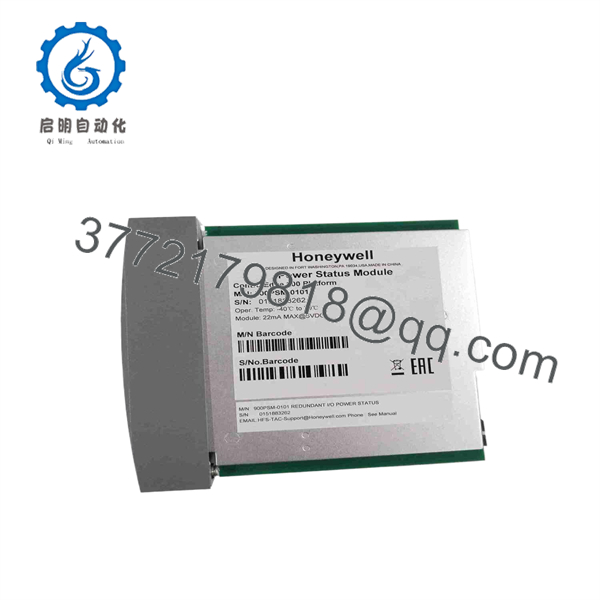
900PSM-0101
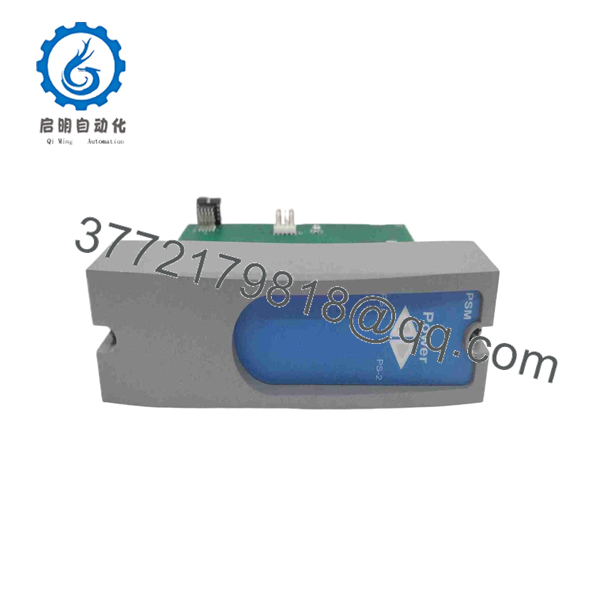
900PSM-0101
Frequently Asked Questions (FAQ)
Can the Honeywell 900PSM-0101 be hot-swapped under power?
Honeywell documentation indicates that the 900PSM-0101 supports insertion and removal under power. However, that does not mean every plant should perform the replacement live. Site electrical procedures, hazardous-area rules, safety-system requirements, and the exact rack configuration take precedence.
Is the 900PSM-0101 a power supply?
No. It is a Redundant Power Status Module. The actual power supplies are separate modules such as the 900P01-0101 and 900P24-0101. The 900PSM-0101 monitors the redundant power arrangement and provides status indication.
Will replacing the 900PSM-0101 erase my PLC program?
Normally, no. The 900PSM-0101 is not the control processor and does not contain the application program. The controller’s application resides in the appropriate CPU/controller hardware. Nevertheless, maintain a current project backup before performing control-system maintenance.
Does the 900PSM-0101 require firmware configuration?
It is not comparable to a programmable CPU or communications module that normally requires application firmware/configuration downloads. The critical checks are the correct model, rack compatibility, physical seating, redundant power arrangement, and resulting status indication.
Is Honeywell 900PSM-0101 obsolete?
The part remains documented in /ControlEdge technical material, but it belongs to a legacy-generation control platform. Honeywell’s later ControlEdge documentation lists newer redundant power-status hardware such as 900PSM-0200, while Honeywell’s technical update identifies newer hardware revisions for several components. Do not substitute 900PSM-0200 solely because the model numbers look similar; verify the rack and system revision first.
Is a “new” 900PSM-0101 genuinely factory-new?
That depends on the seller’s physical inventory. Current aftermarket listings show new, never-used, and refurbished examples under the same model number. One listing specifically distinguishes “New Product,” “Never Used Original Packaging,” and “Refurbished” stock. Ask for the actual label, serial/date code, packaging condition, and test documentation before treating surplus inventory as factory-sealed.
Why is the aftermarket price lower than Honeywell list pricing?
Legacy industrial automation parts can trade below historical OEM list pricing because distributors may hold surplus inventory, discontinued stock, or previously purchased excess material. Price alone does not establish authenticity or condition. For a critical spare, I would verify the full model number, revision, serial/date code, physical condition, and test status before making the purchasing decision.



