
 WhatsApp: +86 16626708626
 Email:
  Phone: +86 16626708626
Description
Key Technical Specifications
| Parameter | Value |
|---|---|
| Manufacturer | Honeywell |
| Model Number | CC-IP0101 |
| Common Material Number | 51410056-175 |
| Product Type | Series 8 PROFIBUS DP Gateway Module |
| Host System | Honeywell Experion PKS / C300 Controller |
| Gateway Role | PROFIBUS DP Master |
| PROFIBUS Networks | Two independent DP networks per module |
| PROFIBUS Protocol | DP V0 cyclic process data; DP V1 Class-2 access for Honeywell FDM functions |
| PROFIBUS DP V2 | Not supported in the referenced Series 8 PGM release |
| Supported Baud Rates | 9.6 Kbps, 19.2 Kbps, 93.75 Kbps, 187.5 Kbps, 500 Kbps, 1.5 Mbps, 3 Mbps, 6 Mbps, 12 Mbps |
| PROFIBUS Address Range | 0–127; slave addresses normally 3–125 |
| Maximum Stations | Up to 125 theoretical stations per DP network; actual capacity depends on topology, cycle time, and I/O data load |
| DP Process Data Capacity | Up to 3.5 KB of input data per DP network |
| Maximum Data Per Slave | Up to 244 bytes input and 244 bytes output, subject to configuration |
| Maximum PGM Connections Per C300 | Four PGMs or redundant PGM pairs, providing up to eight DP networks |
| Supervisory Network | Honeywell Fault Tolerant Ethernet (FTE) node |
| FTE Connections | Dual CAT5e ports: FTE A and FTE B |
| PROFIBUS Connections | Two 9-pin D-sub female connectors |
| Redundancy | Optional; requires two modules, two IOTAs, and a redundancy synchronization cable |
| Supply Voltage | 24 V DC through the Series 8 power system |
| Module Current Rating | 430 mA |
| Operating Temperature | 0 to 60 °C |
| Storage Temperature | −40 to 85 °C |
| Mounting | Standard Series 8 carrier assembly with dedicated 6-inch IOTA |
| IOTA Requirement | Compatible Series 8 PGM IOTA; verify installed IOTA part number before purchase |
| Hot Removal/Insertion | Supported by the Series 8 PGM specification; follow site procedures and validate redundancy state first |
| Hazardous-Area Certifications | Class I, Division 2, Groups A–D, T4; Class I, Zone 2, AEx/Ex nA IIC T4, depending on coated or uncoated assembly and site approval |
| Firmware/Engineering Tools | Requires compatible Experion release, Control Builder strategy, SYCON.net configuration, and slave GSD files |
Honeywell’s Series 8 PGM documentation identifies the gateway as a two-network PROFIBUS DP master that interfaces with a C300 controller through FTE. It uses a dedicated 6-inch Series 8 IOTA, supports optional redundancy, and operates from the standard Series 8 24 V DC power arrangement.
Product Introduction
The Honeywell CC-IP0101, commonly referenced as 51410056-175, is a Series 8 PROFIBUS DP gateway module for connecting Honeywell Experion PKS C300 control systems to PROFIBUS DP field devices. It is used for integrating remote I/O, variable-frequency drives, motor-control devices, package skids, analyzers, and other PROFIBUS DP slave equipment into a C300 control strategy.
This CC-IP0101 gateway supports two independently configured DP networks, selectable communication rates from 9.6 Kbps to 12 Mbps, FTE connectivity, and optional module redundancy. It is selected when an existing Experion C300 system needs native cyclic DP data exchange without replacing field devices or redesigning the control architecture.
Troubleshooting Quick Reference
| Symptom | Possible Cause | Relevance to this Part | Quick Check Method | Recommendation |
|---|---|---|---|---|
| No module status indication after power-up | Series 8 power issue, header-board issue, incorrect IOTA seating, failed module | ✅ High | Measure the cabinet’s 24 V DC Series 8 supply at the power distribution point. Inspect the I/O Link/header connections and fully reseat the CC-IP0101 on its IOTA with power isolated. | Check cabinet power, fuse protection, header-board connections, and IOTA first. Replace the gateway only after confirming correct supply and mounting. |
| cannot see the gateway on FTE | Incorrect FTE device index, damaged CAT5e lead, FTE switch issue, duplicate address | ✅ High | Record the three rotary-switch positions. Compare the configured FTE index with the Experion database. Verify both FTE A and FTE B links and check switch port status. | Correct duplicate or incorrect FTE addressing. Replace cables or test on a known-good FTE port before replacing the module. |
| Both PROFIBUS networks are offline | Gateway fault, IOTA connection issue, /FTE communication loss, configuration error | ✅ High | Check module diagnostics in Experion and verify FTE communication first. Inspect both DB9 network connectors and confirm that the configured PGM is assigned to the intended . | If FTE is healthy but both DP interfaces remain unavailable after a controlled restart, isolate and replace the CC-IP0101 with a verified compatible unit. |
| One DP network is offline but the other operates normally | Bad PROFIBUS cable, missing termination, shorted shield, incorrect baud rate, failed slave | ❌ Usually external | Inspect the affected DB9 connector and measure continuity through the RS-485 trunk. Confirm exactly two active terminations on the segment. Compare configured baud rate with the existing field network. | Do not condemn the gateway first. The fault is usually in the fieldbus trunk, termination, connector, or a slave device. |
| Intermittent DP slave dropouts | Excessive segment length, poor shield bonding, wrong termination, noise, duplicate node address | ❌ Usually external | Review slave diagnostics and identify whether dropouts occur on one segment or both. Check shield grounding against the site design, inspect connectors, and verify each slave address. | Correct topology, termination, shielding, and addressing. If only one port repeatedly fails with a known-good cable and test device, investigate the gateway port. |
| “Configuration mismatch” or device parameter fault | Incorrect GSD file, wrong slave revision, changed telegram layout, byte-offset error | ❌ Low | Compare the installed slave firmware and GSD file revision against the SYCON.net project. Verify input/output lengths, slot configuration, and zero-based byte/bit offsets. | Update the engineering configuration rather than replacing hardware. Keep a backup of the working configuration before changes. |
| Process values are wrong, swapped, or scaled incorrectly | Incorrect PDC/PIOMB mapping, data-type mismatch, endian issue, wrong channel assignment | ❌ Low | Compare raw PROFIBUS bytes with the device manual. Confirm whether the device uses 8-, 16-, or 32-bit values, signed/unsigned format, IEEE floating point, and byte order. | Correct the DSB, PDC, PIOMB, and channel configuration. Hardware replacement will not fix a mapping error. |
| Redundant pair does not synchronize or backup will not assume control | Missing sync cable, mismatched FTE address pairing, different configurations, failed backup IOTA/module | ✅ High | Confirm the orange CAT5e redundancy sync cable is installed between the two IOTAs. Verify the primary uses an odd FTE device index and the backup uses the next even index. | Verify matching configuration and physical redundancy wiring. Test controlled switchover only under an approved maintenance procedure. |
| New replacement unit will not communicate after installation | Firmware/configuration mismatch, IOTA incompatibility, rotary-switch settings not copied, missing device qualification | ✅ High | Photograph and document the removed module’s rotary-switch settings, installed IOTA model, Experion release, gateway configuration, and installed GSD files before replacement. | Match the existing installation exactly. Request confirmation of compatibility before ordering when the installed system uses an older Experion release. |
The CC-IP0101 itself is not the first suspect when only one slave or one trunk segment fails. Start with termination, shielding, node addresses, GSD revision, and the configured process-data map. Honeywell’s PGM documentation specifically notes that actual station capacity depends on memory and latency, while each network can use a separate baud rate.
❗ Field warning: Take a clear photo of the old module’s three FTE rotary switches before removal. Seriously. A replacement can power up normally and still disappear from the control network because its FTE index does not match the Experion configuration.
❗ Field warning: Do not wire or terminate PROFIBUS from memory. The bus requires correct RS-485 topology and exactly two active terminations per electrical segment. A third terminator or an unterminated end can create intermittent failures that look like a bad gateway.
❗ Field warning: Before installing a replacement, verify the total Series 8 24 V DC load and keep at least a 20% supply margin. The referenced PGM specification lists a 430 mA module current rating.
❗ ESD warning: Wear a grounded wrist strap and place the module only on an ESD-safe surface. I have seen an expensive control card fail immediately after being handled on a dry winter day without proper grounding. Use the strap.
If you are stuck, provide technical support with clear photos of the module label, IOTA label, rotary-switch settings, FTE and DP wiring, diagnostic messages, and the affected slave diagnostics. That information cuts the troubleshooting cycle from hours to minutes.
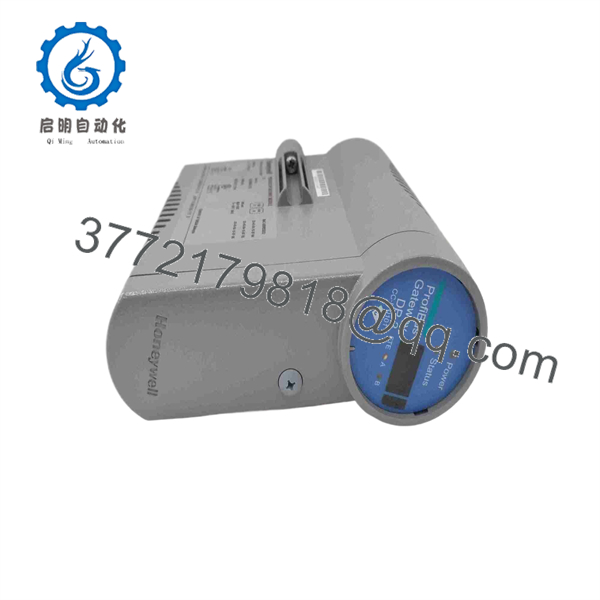
CC-IP0101
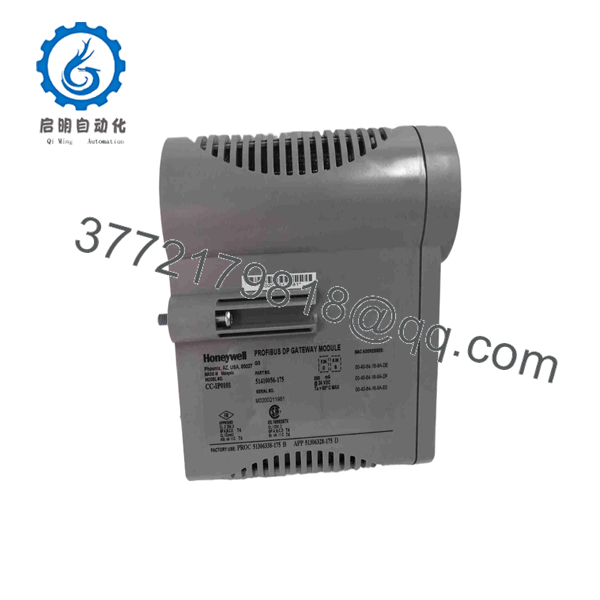
CC-IP0101
Frequently Asked Questions
What is the Honeywell CC- used for?
The Honeywell CC- is a PROFIBUS DP gateway used to connect PROFIBUS DP slave devices to a Honeywell Experion PKS controller. It operates as the DP master and transfers cyclic process data between field equipment and the control strategy. Typical connected devices include remote I/O stations, drives, package equipment, valve systems, and third-party automation panels.
Does the CC- support two separate PROFIBUS DP networks?
Yes. One CC- gateway supports two independent PROFIBUS DP networks through two DB9 connectors on the associated IOTA. Each network can have its own baud rate. The supported range is 9.6 Kbps through 12 Mbps. Confirm the existing fieldbus topology, device count, telegram sizes, and scan-time requirements before ordering.
Can I use the CC- with any Honeywell controller?
No. This is not a general-purpose Ethernet-to-PROFIBUS converter. It is a Honeywell Series 8 gateway intended for Experion systems using a controller and compatible FTE architecture. Verify your controller type, Experion release, installed IOTA, FTE configuration, and engineering database before purchase. A -based system is the key compatibility requirement.
Can I hot-swap the CC-?
The Series 8 PGM specification lists module removal and insertion under power as supported. That does not mean you should pull it casually during production. If the gateway is nonredundant, removing it takes both connected DP networks out of service. If it is redundant, verify the backup is healthy, synchronized, and actually carrying the standby role before touching the primary unit. Follow your plant’s management-of-change and maintenance procedure.
Will I lose the PROFIBUS configuration when I replace the module?
The fieldbus configuration is normally managed in the Experion engineering environment and associated tools, not stored solely as an irreplaceable setting inside the physical gateway. Still, back up the project before removal. Record the FTE device index, gateway instance, DP network settings, installed GSD files, slave addresses, telegram layouts, DSB/PDC mappings, and PIOMB channel assignments. To be honest, rebuilding a missing mapping at 3:00 AM is a hassle, so save the working project first.
Why does a replacement CC- power up but fail to communicate?
The most common causes are not a defective module. Check the FTE rotary-switch index, whether the correct IOTA is installed, FTE A/B network connections, configuration assignment to the , PROFIBUS baud rate, slave addresses, termination, and GSD file revision. I have seen a gateway replacement create a “communication timeout” that lasted two days because the replacement was installed with a different address setting than the original unit. Photograph everything before removal.
Is the CC- compatible with PROFIBUS DP V1 and DP V2 devices?
For standard control data, the PGM supports PROFIBUS DP V0 cyclic process-data exchange. The Series 8 PGM specification also describes DP V1 Class-2 access through Honeywell Field Device Manager using vendor DTMs, while DP V2 was not supported in the cited release. A DP V1-capable slave can still provide DP V0 cyclic data, but do not assume acyclic DP V1 parameters will map directly into control logic. Confirm the exact application requirement before purchase.
Is this unit new, refurbished, or factory sealed?
Condition must be stated on the actual quotation and packing documentation. For a New Original / New Surplus unit, request photos of the product label, serial number, packaging, seals, and included accessories before payment. For a refurbished unit, request the test report, firmware verification record, communication test results, and warranty terms. Do not accept a vague “used” or “good condition” description for a communication module.
Why can surplus inventory cost less than factory supply?
New-surplus inventory commonly comes from project cancellations, plant shutdowns, excess MRO stock, or distributor inventory liquidation. Lower cost does not automatically mean counterfeit or used, but it does mean you should verify traceability. Ask for label photos, serial-number records, anti-counterfeit inspection details, storage history, and a written warranty.
What test documentation should I request before buying?
Request a written inspection and test report that includes:
- Inbound traceability review against packing lists or customs documentation
- Serial-number and label verification
- Visual inspection for corrosion, scratches, rework marks, damaged connectors, or UV yellowing
- Test-rack identification, ideally a compatible Honeywell Series 8/ or equivalent validation environment
- Power-on status and boot verification
- FTE communication verification
- PROFIBUS DP communication test on both network ports
- Firmware version record, if readable and relevant to the installed environment
- Rotary-switch and configuration-setting photos
- Final QC sign-off, ESD packaging confirmation, and packing photos
For a tested unit, ask whether the supplier can provide test photos or video on request. A credible supplier should be able to show what was tested instead of simply saying “working.”



