
 WhatsApp: +86 16626708626
 Email:
  Phone: +86 16626708626
Description
Key Technical Specifications
| Parameter | Value |
|---|---|
| Manufacturer | Honeywell |
| Type numbers | FS-IO-0001, FC-IO-0001 |
| Common designation | IO-0001 I/O Extender Module |
| System platform | Honeywell Safety Manager / Safety Manager SC |
| Primary function | Transfers Control Processor communication to I/O modules in the I/O chassis |
| Installation location | I/O chassis (IOCHAS-0001S or IOCHAS-0001R) |
| Slot position, non-redundant chassis | Slot 21 (one IO-0001 per chassis) |
| Slot position, redundant chassis | Slots 20 and 21 (two IO-0001 modules per chassis) |
| Space requirement | 4 TE × 3 HE (4 HP × 3U) |
| Power requirement | 5 V DC, 35 mA |
| Ripple content | Less than 50 mV peak-to-peak |
| Module connector code | Holes A5, A7 |
| Chassis connector code | Large pins A5, A7 |
| I/O bus function | Provides parallel communication link between Control Processor and I/O modules via horizontal I/O bus |
| Approvals | CE, TUV, UL, CSA, FM |
| Chassis address | Configured via jumper settings (CA2/CA3) for chassis identification |
| Compatible I/O chassis | IOCHAS-0001S (single) and IOCHAS-0001R (redundant) |
| Replacement requirement | Match FC-IO-0001/IO-0001, verify slot position, redundancy mode, chassis address jumpers, and backplane compatibility |
Honeywell documentation identifies FC-IO-0001 (IO-0001) as the I/O Extender Module used in Safety Manager I/O chassis. A non-redundant I/O chassis uses one module in slot 21, while a redundant chassis uses two modules in slots 20 and 21. The module requires 5 V DC at 35 mA and uses a key-coded connector with holes A5 and A7.
Product Introduction
The Honeywell FC-IO-0001, also known as IO-0001, is an I/O Extender Module for Honeywell Safety Manager and Safety Manager SC systems. It sits in the I/O chassis and acts as the communication bridge between the Control Processor and the individual I/O modules in that chassis.
The module is not a field I/O card. It does not connect directly to field sensors or final elements. Instead, it drives the horizontal I/O bus inside the I/O chassis, allowing the Control Processor to exchange data with digital and analog I/O modules. Confirm whether the chassis is non-redundant or redundant, because that determines whether one or two IO-0001 modules are required.
Troubleshooting Quick Reference
| Symptom | Possible Cause | Relevance to This Part | Quick Check Method | Recommendation |
|---|---|---|---|---|
| Safety Manager reports I/O chassis communication fault or missing chassis | Failed IO-0001 module, loose flat cable, poor backplane connection, power issue, wrong chassis address | ✅ High | Check Safety Manager diagnostics for I/O bus status and chassis presence. Inspect the horizontal I/O bus flat cable, connector seating, and backplane contacts. Verify 5 V DC supply at the I/O chassis. | Correct cable and power faults first. Replace IO-0001 only after known-good cabling and power still show a communication fault. |
| All I/O points in one chassis show bad quality | IO-0001 failure, chassis power loss, backplane fault, flat cable disconnected, chassis address conflict | ✅ High | Confirm chassis power and I/O bus status. Compare the chassis address jumper settings with the configuration. Inspect the flat cable and connector retention. | Restore power and cabling before replacing the module. A single bad flat cable can look like a failed IO-0001. |
| Redundant I/O chassis shows one side failed | One IO-0001 module failed, connector issue, jumper mismatch, backplane slot fault | ⚠️ Medium | Check diagnostics for each redundant path. Inspect both IO-0001 modules in slots 20 and 21. Compare jumper settings and seating. | Swap modules only under the approved procedure. If the fault follows the module, replace it. |
| Intermittent I/O communication | Loose flat cable, vibration, heat, marginal power, backplane oxidation, connector wear | ⚠️ Medium | Inspect cable strain relief, connector tightness, and backplane condition. Monitor chassis temperature and supply voltage. Reseat connectors only after making a configuration backup. | Improve cable management and cooling. Replace worn connectors or backplane hardware as needed. |
| New IO-0001 does not restore communication | Wrong slot position, incorrect chassis address, configuration mismatch, backplane damage, ESD damage | ✅ High | Verify slot 21 for non-redundant or slots 20 and 21 for redundant chassis. Check chassis address jumpers against the approved table. Confirm Safety Manager configuration matches the physical layout. | Do not force a module into the wrong slot. Restore the correct configuration and test one chassis at a time. |
| Module area is hot or shows physical damage | Overvoltage, short circuit, prior electrical event, contaminated cabinet, damaged backplane | ✅ High | Isolate power safely. Inspect the module, connector, and backplane for heat marks, discoloration, or damaged pins. Measure supply voltage before re-energizing. | Correct the electrical fault before installing a replacement. Do not re-apply power to a damaged backplane. |
| Safety Manager shows I/O bus fault after maintenance | Flat cable reversed or partially seated, wrong module type, missing IO-0001, incorrect chassis address, configuration not restored | ✅ High | Compare the installed hardware with the approved drawing. Verify that each I/O chassis has the correct number of IO-0001 modules and correct slot positions. | Document and photograph the original layout before removal. Perform a point-by-point I/O checkout after replacement. |
Field note: The IO-0001 is often blamed when the real fault is a loose horizontal I/O bus flat cable or a wrong chassis address. Before replacing the module, check the flat cable, connector seating, and jumper settings. I have seen an entire chassis marked bad because one ribbon cable was half-seated.
If you need technical support, provide photos of the FC-IO-0001 label, chassis type, slot position, flat cable routing, jumper settings, Safety Manager diagnostics, and any related alarm text.
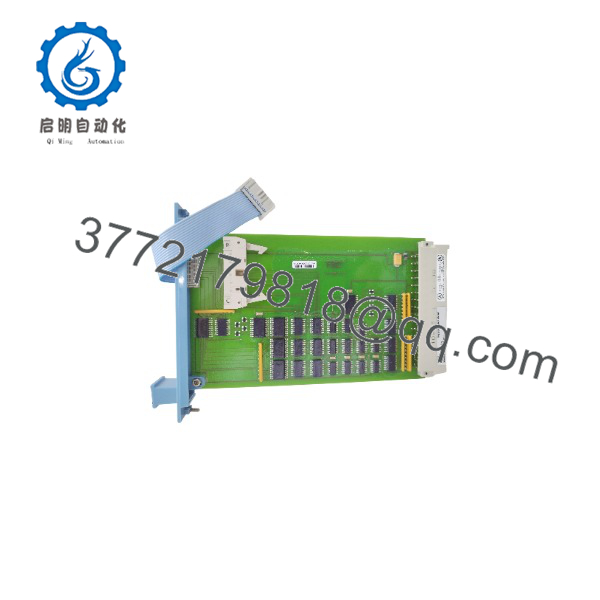
FC-IO-0001 CCV1
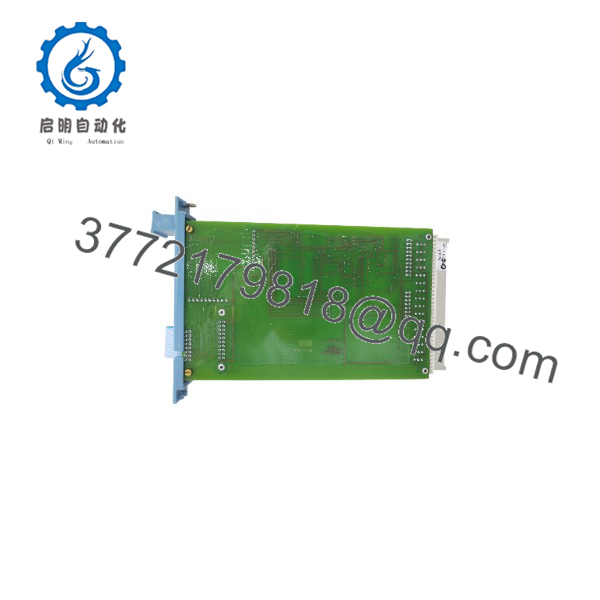
FC-IO-0001 CCV1
Frequently Asked Questions
What does the Honeywell FC-IO-0001 do?
The FC-IO-0001 (IO-0001) is an I/O Extender Module for Honeywell Safety Manager I/O chassis. It transfers Control Processor communication to the I/O modules in the chassis via the horizontal I/O bus. It is not a field I/O card and does not connect directly to sensors or actuators.
Where is FC-IO-0001 installed?
The module is installed in the I/O chassis, not the controller chassis. In a non-redundant I/O chassis (IOCHAS-0001S), one IO-0001 is located in slot 21. In a redundant I/O chassis (IOCHAS-0001R), two IO-0001 modules are located in slots 20 and 21.
How many FC-IO-0001 modules are in a redundant I/O chassis?
A redundant I/O chassis uses two IO-0001 modules, one in slot 20 and one in slot 21. Both modules must be present and healthy for full redundant I/O bus operation.
What power does FC-IO-0001 require?
The module requires 5 V DC at 35 mA, with ripple content less than 50 mV peak-to-peak. This power is supplied through the I/O chassis backplane. Verify chassis power before assuming the module has failed.
What is the horizontal I/O bus?
The horizontal I/O bus is the internal communication path inside the I/O chassis that connects the IO-0001 module to the individual I/O modules. The IO-0001 drives this bus, allowing the Control Processor to exchange data with field I/O cards. The bus uses flat cables and shielded backplane construction for EMC/RFI immunity.
Can I hot-swap FC-IO-0001?
Do not hot-swap it. The module is part of the Safety Manager I/O communication path. Removing it can cause all I/O points in that chassis to go bad, potentially affecting safety-related functions. Follow the approved Safety Manager maintenance procedure, manage process risk, and use lockout/tagout where required.
Why are all I/O points in one chassis bad?
Start with the common infrastructure:
- Check I/O chassis power and 5 V DC supply.
- Inspect the horizontal I/O bus flat cable and connectors.
- Verify the IO-0001 module is present and correctly seated.
- Confirm chassis address jumper settings match the configuration.
- Review Safety Manager diagnostics for I/O bus and chassis status.
If power, cabling, and configuration are correct and the chassis still fails, the IO-0001 module or backplane becomes a credible suspect.
Is FC-IO-0001 compatible with other Honeywell DCS platforms?
No. The FC-IO-0001 is specific to Honeywell Safety Manager / Safety Manager SC I/O chassis. Do not use it as a generic I/O extender for other Honeywell DCS or PLC families. Confirm the chassis type and approved hardware list before ordering.
Is this FC-IO-0001 New Surplus or Refurbished?
The condition must be stated explicitly. New Original / New Surplus means unused legacy inventory with verified labels, clean connectors, and documented storage inspection. Refurbished (tested) means a previously used module that has been inspected and functionally checked.
For a refurbished FC-IO-0001, request actual-unit photos, label verification, connector inspection, 5 V DC power-on test, I/O bus communication verification with compatible chassis, jumper-setting check, and a written test report. Test videos and photos should be available upon request.
What should I verify before ordering FC-IO-0001?
- Exact module label: FC-IO-0001 / IO-0001 and hardware revision
- I/O chassis type: IOCHAS-0001S (single) or IOCHAS-0001R (redundant)
- Slot position: 21 for single, 20 and 21 for redundant
- Chassis address jumper settings (CA2/CA3)
- Horizontal I/O bus flat cable type and routing
- Safety Manager configuration and I/O chassis definition
- Existing diagnostics, alarms, and event logs
- Required condition: New Original/New Surplus or Refurbished (tested)
Keep these checks in mind and you will avoid most FC-IO-0001 replacement rework.



