
 WhatsApp: +86 16626708626
 Email:
  Phone: +86 16626708626
Description
Key Technical Specifications
| Parameter | Specification / Value |
| Manufacturer | Honeywell Safety Management Systems |
| Part Number | FS-SAI-1620MA |
| Alternative Part ID | 51199929-100 / SAI-1620MA |
| System Compatibility | Honeywell Safety Manager / Fail Safe Control (FSC) Systems |
| Input Channels | 16 galvanically isolated channels |
| Signal Range | 0 to 20 mA / 4 to 20 mA DC |
| Safety Integrity Level | Up to SIL 3 (IEC 61508 / IEC 61511) |
| Resolution | 12-bit A/D conversion |
| Operating Voltage | 24 V DC (backplane powered) |
| Power Dissipation | 4.5 W (typical at nominal load) |
| Operating Temperature | −10°C to +60°C (14°F to 140°F) |
| Storage Temperature | −40°C to +85°C (−40°F to 185°F) |
| Relative Humidity | 5% to 95% non-condensing |
| Dimensions (H × W × D) | 300 mm × 30 mm × 220 mm (11.8 in × 1.2 in × 8.7 in) |
| Approximate Weight | 0.85 kg (1.87 lbs) |
Product Introduction & Supply Chain Strategy
The Honeywell FS-SAI-1620MA is a high-integrity 16-channel safe analog input module designed for Honeywell Safety Manager and Fail Safe Control (FSC) safety instrumented systems (SIS). It processes 0-20 mA and 4-20 mA field signals from pressure transmitters, temperature sensors, flow meters, and gas detectors across Emergency Shutdown (ESD) and Fire & Gas (F&G) applications. Built with internal self-test diagnostics and fault-tolerant architecture, the card monitors loop current integrity and reports open-circuit or short-circuit faults back to the central controller.
Securing a New Surplus FS-SAI-1620MA provides a direct TCO advantage for facilities running legacy Honeywell safety platforms. Because these modules are discontinued by the OEM, finding genuine, zero-wear replacement stock prevents costly emergency system shutdowns or forced DCS/SIS platform migrations. Refurbished or pulled input cards frequently carry degraded electrolytic capacitors and invisible thermal stress from continuous 24/7 service. A single faulty analog input channel on a used card can lead to false trips or unread emergency transmitter signals, triggering unplanned outage costs that eclipse the cost of the spare part. Installing a factory-sealed New Surplus module preserves SIL 3 loop ratings and guarantees immediate plug-and-play restoration.
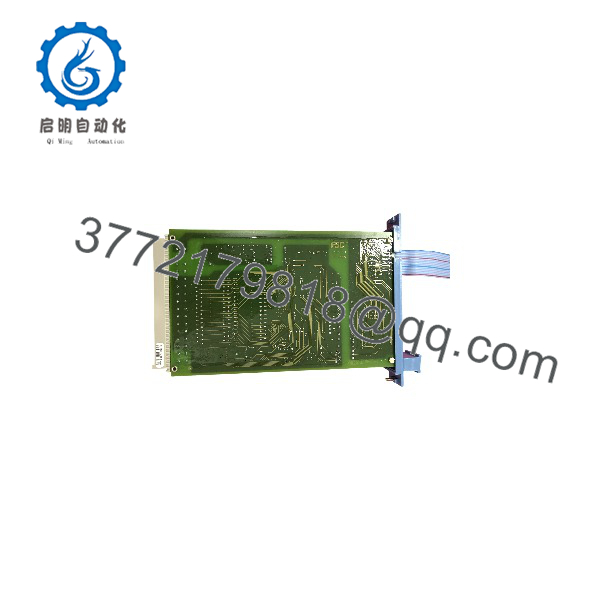
FS-SAI-1620MA
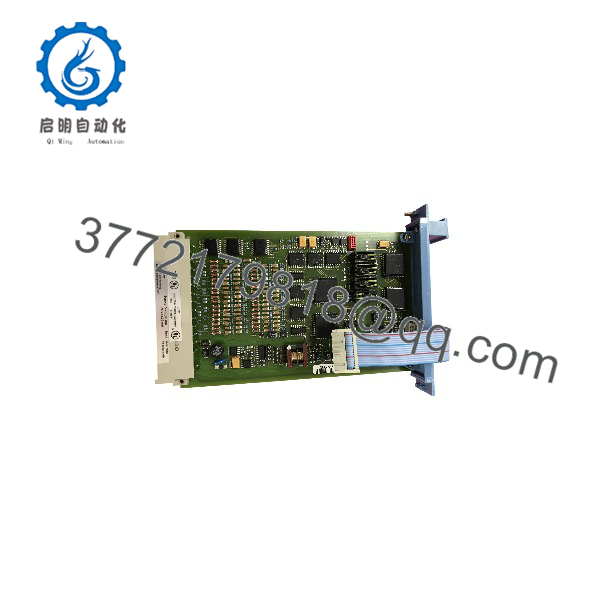
FS-SAI-1620MA
Installation & Configuration Guide
1.Pre-Installation (Preparation & Safety):Prepare ESD protection and isolate loop power.
Put on an ESD wrist strap attached to the cabinet earthing point before opening ESD-protective packaging. Identify the target chassis slot based on the Safety Manager system configuration topology. If hot-swapping under live conditions, verify that system redundancy is active and that the channel loop power to field transmitters is safely managed according to plant safety procedures.
2.Removal of Existing Module:Extract the legacy module safely from the chassis.
Unlatch the top and bottom retaining levers on the legacy input module. Smoothly slide the card straight out of the slot along the guide rails, taking care not to twist or apply lateral pressure that could damage backplane connector pins or adjacent I/O modules. Place the removed card in an ESD-shielded bag immediately.
3.Installation (DIP Switch Verification & Mounting):Verify addressing and secure physical connection.
Examine the DIP switch settings and jumper configurations on the side of the new FS-SAI-1620MA to ensure they match the legacy module’s node address and channel parameters exactly. Align the module with the guide rails in the subrack, slide it inward until the backplane edge connector engages, and press the locking levers shut to firmly seat the card.
4.Power-On & Functional Verification:Check LED diagnostics and signal conversion.
Observe the front panel diagnostic LEDs as the module initializes. Confirm that the green RUN LED illuminates steady and the fault/error LEDs remain off. Using the Safety Manager engineering workstation, verify live loop current values across all 16 channels to ensure accurate 4-20 mA scaling and zero channel communication errors.
Firmware/Software Versions & Upgrade Notes
The FS-SAI-1620MA operates on onboard microcode designed to interface transparently with Honeywell Safety Manager (R100 through R310) and FSC software environments (FSC v7.0 to v11.x).
- Hardware Revision Alignment: Confirm that the module revision level (e.g., Rev C/D) matches the revision matrix defined in your system’s Safety Manual. Using mismatched I/O hardware revisions in a redundant pair can cause channel synchronization alarms.
- Firmware Handshake: The onboard I/O processor automatically exchanges status flags with the Central Processing Unit. No separate user-uploaded firmware flash is required for this hardware swap.
- Upgrade Caution: Never alter controller firmware or system software versions during an emergency I/O module replacement. Always complete the physical card swap, clear channel faults, and confirm healthy execution on the current system software baseline before undertaking scheduled maintenance updates.
Frequently Asked Questions (FAQ)
Is this Honeywell FS- module brand new, or has it been used previously?
This module is 100% Brand New Surplus. It has never been installed in a live control panel, never energized in a process facility, and never pulled from a decommissioned skid. It comes from unused project stock and excess inventory, stored in static-shielded packaging to maintain factory-grade reliability.
Why is buying New Surplus safer than buying a refurbished analog input module?
Analog input modules in safety systems process critical loop signals around the clock. Refurbished modules often suffer from component aging, dried-up capacitors, and thermal stress on A/D converters that cause measurement drift or latent channel failure. Buying New Surplus ensures factory-fresh component life, accurate 12-bit conversion, and full compliance with SIL 3 loop requirements.
Can the FS- be hot-swapped while the system is running?
Yes, Honeywell Safety Manager subracks support online module replacement (hot-swapping) for redundant I/O configurations. However, technicians must follow site-specific Safety Instrumented System (SIS) override procedures and wear grounded ESD wrist straps during the procedure to prevent static damage to the backplane.
How do you verify the condition and authenticity of the module before shipping?
Every FS- undergoes a standardized quality control inspection. Our technicians check serial numbers against OEM records, perform high-magnification inspections of the backplane connector pins, verify component integrity, and re-seal the unit in anti-static ESD packaging before dispatch.
What warranty is provided with this New Surplus input module?
We back this FS- with a comprehensive 1-year warranty from the date of delivery. If any channel fault or hardware defect occurs during installation or operation, we will provide a direct replacement or issue a full refund.



