
 WhatsApp: +86 16626708626
 Email:
  Phone: +86 16626708626
Description
Key Technical Specifications
| Parameter | Value / Specification |
| Manufacturer | Honeywell Process Solutions |
| Part Number | HCIX15-TE-FA-NC |
| Display Size | 15.0-inch TFT LCD |
| Touchscreen Type | Resistive Touchscreen Panel |
| Input Voltage | 24 V DC (±10%) |
| System Compatibility | Honeywell Experion PKS, PlantScape, and DCS systems |
| Front Panel Rating | NEMA 4X / IP65 water-resistant and dust-tight front bezel |
| Operating Temperature | 0 °C to +50 °C (32 °F to 122 °F) |
| Storage Temperature | −20 °C to +60 °C (−4 °F to 140 °F) |
| Relative Humidity | 10% to 90% non-condensing |
| Mounting Format | Industrial Panel Cutout / Flush Enclosure Mount |
| Communication Ports | Dual Ethernet RJ-45, RS-232/485 Serial, USB Ports |
Product Introduction & Supply Chain Strategy
The Honeywell HCIX15-TE-FA-NC is a high-performance 15-inch industrial touch panel PC engineered for real-time visualization, control, and data entry across process automation environments. Designed to interface directly with Honeywell Experion PKS platforms and distributed control networks, it processes operator inputs and system alarms under demanding chemical, oil and gas, and manufacturing plant conditions.
Securing a New Surplus Honeywell HCIX15-TE-FA-NC terminal maintains your plant’s operational continuity without waiting on long OEM lead times or risking unannounced supply line bottlenecks. While refurbished touch panels often suffer from degraded backlight CCFL/LED lifespans, worn touchscreen digitizer layers, and brittle front bezels, purchasing genuine New Surplus guarantees full factory brightness, uncompromised NEMA 4X environmental sealing, and pristine touch sensitivity.
Installation & Configuration Guide
Stage 1: Pre-Installation (Prep & Safety)
- De-energize the enclosure and execute full Lock-Out/Tag-Out (LOTO) on the 24 V DC power feeder circuit.
- Put on an anti-static wrist strap grounded to the panel chassis to prevent static discharge to exposed internal connectors.
- Verify the panel cutout dimensions match the HCIX15 chassis specifications and ensure the mounting gasket is intact and free of debris.
Stage 2: Removal
- Disconnect the 24 V DC power block, Ethernet drops, and serial communication cables from the back of the existing unit.
- Loosen and remove the rear panel mounting clamps securing the HMI bezel against the enclosure door.
- Carefully support the panel from the front and pull the unit straight out of the cutout slot. Place the old terminal directly into ESD protective packaging.
Stage 3: Installation (Clone & Seat)
- Ensure the new sealing gasket is installed around the front bezel perimeter to guarantee NEMA 4X/IP65 sealing.
- Carefully guide the new Honeywell HCIX15-TE-FA-NC into the enclosure cutout from the front panel side.
- Install all rear panel retaining clips evenly, tightening them in a cross pattern to ensure uniform pressure against the panel gasket without warping the frame.
Stage 4: Power-On & Testing
- Reconnect the communication lines and the 24 V DC power harness, ensuring proper polarity (+24 V, GND, Earth).
- Apply power to the system. Confirm the LCD backlight ignites cleanly and the boot loader initializes the operating system.
- Perform a screen calibration test by touching target points on the screen and verifying prompt execution on the host DCS/PLC network.
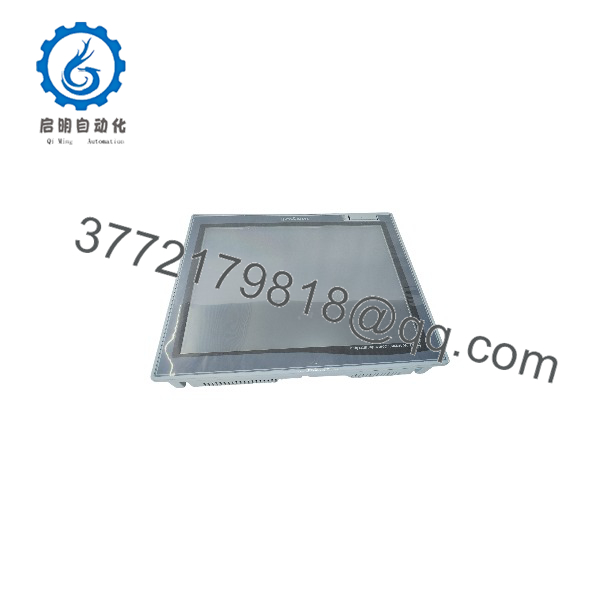
HCIX15-TE-FA-NC
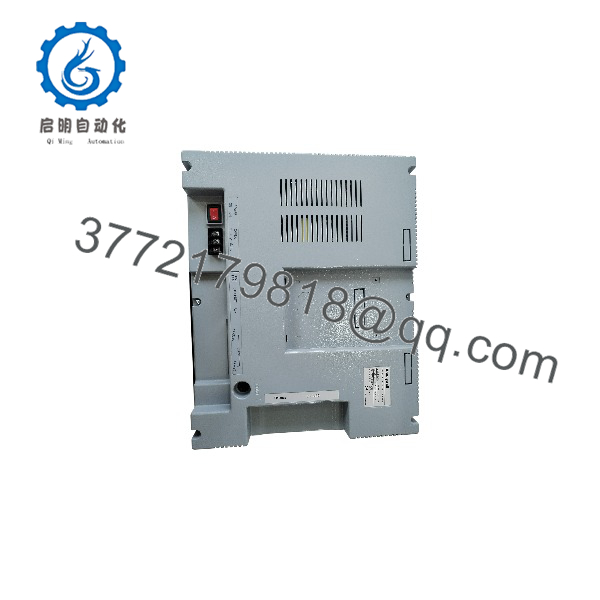
HCIX15-TE-FA-NC
Firmware/Software Versions & Upgrade Notes
- Firmware Baseline: The HCIX15-TE-FA-NC requires an operating system build and runtime client compatible with your specific Honeywell Experion software release.
- Display Driver Alignment: Ensure the host workstation image or embedded runtime matches the screen resolution and touch controller hardware revision built into the HCIX15 series.
- Firmware Mismatch Risks: Running an unaligned runtime image can cause touch digitizer drift, serial communication drops, or display scaling errors on critical process mimic screens.
- Update Precaution: Backup network configurations, static IP assignments, and node names before replacing an active terminal. Flash updates should be executed offline prior to production deployment.
Frequently Asked Questions (FAQ)
Q: How can I verify that this Honeywell HCIX15-TE-FA-NC unit is genuinely New Surplus?
A: All our New Surplus stock is 100% unused and verified. The unit includes original Honeywell factory packaging, pristine touch screen surfaces without micro-scratches, untouched terminal block pins, original factory serial tags, and intact environmental gaskets. It has never been installed in an active plant or subjected to repair work.
Q: Why should I choose New Surplus over a lower-cost refurbished touch panel?
A: Refurbished HMIs frequently retain aged LCD backlights that fade rapidly, as well as resistive touch digitizers with degraded touch sensitivity in high-use areas. A failed panel display can cause immediate operator blindness during critical process events, leading to thousands of dollars per minute in downtime. Buying New Surplus gives you 100% OEM reliability and a full product lifespan at a lower cost than factory list price.
Does the require additional licensing to boot?
A: The panel hardware boots into its native operating environment. However, application-level HMI client licenses or Honeywell Experion station licenses depend on your system architecture and may reside on the primary server or require key activation on the station.
Q: Is this unit hot-swappable in a hazardous or live environment?
A: No. Powering off the 24 V DC feed prior to wiring or removing the module is required. Disconnecting terminal blocks while energized creates arc risks and can cause communication faults across the connected serial/Ethernet bus.
Q: How does the front panel hold up against washdowns and harsh chemical exposure?
A: When properly installed with an uncompromised perimeter gasket, the front bezel meets NEMA 4X and IP65 standards. It is rated to resist dust ingress, hose-directed washdowns, and typical industrial airborne contaminants.
Q: What warranty is provided with this unit?
A: We back this panel PC with a full 1-Year Warranty. Every unit undergoes complete visual, power-on, and input response testing before dispatch.



