
 WhatsApp: +86 16626708626
 Email:
  Phone: +86 16626708626
Description
Key Technical Specifications
| Parameter | Value / Specification |
| Manufacturer | Bosch Rexroth / Indramat |
| Model Code | CLM01.1-P-E-2-0 |
| Control Axes | Up to 2 independent or synchronized axes |
| Operating Voltage | 24 V DC (±15%) |
| Current Consumption | 1.5 A maximum |
| Serial Communication | RS232 / RS485 (selectable baud rates up to 19.2 kbps) |
| Encoder Inputs | Incremental / EnDat feedback interfaces |
| Digital Inputs / Outputs | 16 Digital Inputs / 16 Digital Outputs (24 V DC logic) |
| Display / Keypad | Integrated LCD status display and operator membrane keypad |
| Operating Temperature | 0°C to +45°C (32°F to 113°F) |
| Enclosure Rating | IP20 (panel mount chassis) |
| Weight | Approximately 2.8 kg (6.2 lbs) |
Product Introduction
The Bosch Indramat CLM01.1-P-E-2-0 is a high-performance modular axis positioning controller designed for precision motion control in automated manufacturing environments. It interfaces directly with Indramat AC servo drives (such as the INDRAMAT TVM, KDV, or DDS series) to execute complex multi-axis motion profiles, roll feeds, shear-to-length systems, and transfer lines without needing an overarching PLC for trajectory calculations.
Engineered with dual-axis capability, the CLM01 card reduces cycle times by processing real-time encoder feedback directly on the unit. Its integrated display and operator keypad allow for on-site parameter adjustments, diagnostics, and program entry, making it an extremely dependable standalone motion controller for demanding industrial plants.
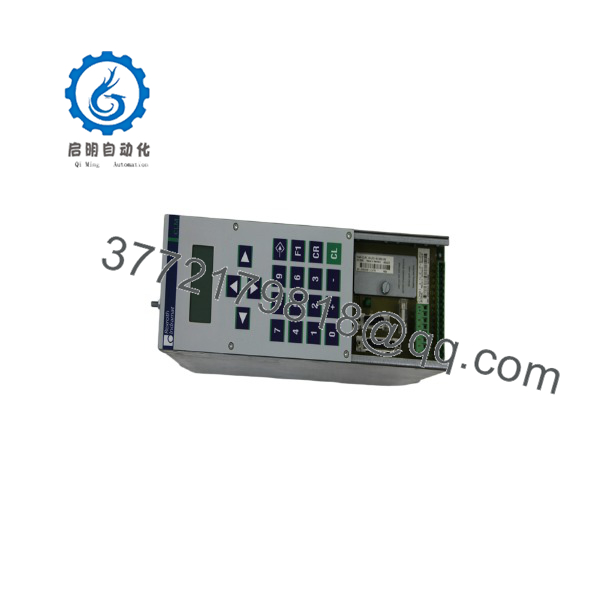
CLM01.1-P-E-2-0
Troubleshooting Quick Reference
| Symptom | Possible Cause | Relevance to this Part | Quick Check Method | Recommendation |
| Display Dark on Power-up | Missing or out-of-spec 24 V DC supply voltage | ❌ Low | Measure voltage across the 24 V and 0 V input terminals using a multimeter. | Verify external power supply output and check main chassis fuses before replacing card. |
| Diagnostic Code “Clear Memory” / Error | Backup lithium battery depleted or corrupted EEPROM | 🟡 Medium | Check onboard battery voltage (should read > 3.0 V DC) with main power disconnected. | Replace memory backup battery; reload system parameters via RS232 interface. |
| Position Lag / “Lag Error” Alarm | Axis binding, encoder cable noise, or bad gain settings | 🟡 Medium | Inspect mechanical ball screw/drive line; check encoder cable shield grounding. | Check drive mechanical load first; adjust drive parameters in CLM setup menu if mechanics are sound. |
| Comms Failure (RS232/485) | Baud rate mismatch or incorrect pinout cable wiring | ✅ High | Verify baud rate settings in CLM operator panel; test cable Continuity. | Match host PC baud rate or replace custom null-modem serial cable with correct Indramat pinout. |
Note: Always back up your parameter files before attempting hardware swaps. If you encounter persistent memory checksum errors after replacing a unit, ensure your parameter module (EPROM or plug-in firmware card) is fully seated. Contact technical support with your exact software version code for parameter recovery assistance.
Frequently Asked Questions (FAQ)
Can I transfer the parameter memory card from my old CLM01 to this replacement unit?
Yes. The CLM01 uses a removable firmware/parameter plug-in module. You can physically swap your original parameter card into the replacement CLM01 chassis to retain your custom motion programs, axis scale factors, and line configurations. Make sure power is completely disconnected before removing or inserting the memory module.
What causes the common “EPROM Error” on startup?
This error typically points to either a loose parameter module or physical corrosion on the module socket contacts. Power down the system, remove the firmware module, clean the card edge contacts with an electrical contact cleaner, reseat it firmly into the slot, and restore power. If the error persists, the parameter module itself may be corrupted.
Does the .1-P-E-2-0 support analog drive interfaces?
Yes. The unit provides analog speed command outputs (typically ±10 V DC) to command closed-loop velocity to Indramat or third-party analog servo drives, using incoming encoder feedback from the motor or load to close the position loop onboard.
Why buy New Surplus hardware instead of migrating to a modern control platform?
Migrating away from an established Indramat system often requires re-engineering the PLC software, replacing servo drives, rewiring cabinets, and risking days of production downtime. Installing a direct-replacement New Surplus controller restores your machine to full operation in minutes at a fraction of the cost of a full panel retrofit.
What is the single most common mistake techs make when swapping out a unit?
Forgetting to match DIP switches and serial jump settings. Technicians often pull a unit and install the new one without verifying the hardware jump configurations on the board, which alters RS232 vs. RS485 modes or changes node addressing. Take clear photos of all switch positions on the old board and mirror them on the replacement unit before applying power.



