WhatsApp: +86 16626708626
 Email:
 Phone: +86 16626708626
Description
Key Technical Specifications
- Device Type: Three-Phase AC Variable Frequency Drive
- Input Voltage Range: Three-phase 380 V to 480 V AC (−15% to +10%)
- Rated Power Capacity: 18.5 kW (Heavy Duty / G Type) / 22 kW (Light Duty / P Type)
- Rated Output Current: 37 A (Heavy Duty) / 45 A (Light Duty)
- Output Frequency Range: 0 to 500 Hz
- Control Mode: V/F Control for asynchronous induction motors
- Overload Capacity: 150% for 60 seconds (Heavy Duty); 110% for 60 seconds (Light Duty)
- Communication Protocols: Modbus-RTU, CANlink, optional CANopen / Profibus-DP
- Operating Temperature: −10 to +50 °C (derating required above 40 °C)
- Enclosure Rating: IP20
- Dimensions (W x H x D): 230 mm x 380 mm x 200 mm (Frame Size T6)
- Weight: 17.5 kg
Product Introduction
The Inovance MD290T18.5G22P is an industrial-grade variable frequency drive engineered for precise speed and torque control of three-phase asynchronous induction motors. It handles demanding automation tasks across material handling, machine tooling, packaging, and fluid management systems.
Engineered with built-in process configurations for fans and pumps, this drive features an integrated dynamic braking unit, flying start capabilities, and robust three-proof conformal coating on internal circuit boards to withstand harsh industrial operating conditions.
Installation & Configuration Guide
Stage 1: Pre-Installation Preparation
- ⚠️ Safety First: Notify plant operations of drive downtime, lock out and tag out (LOTO) the primary 480 V AC power feed, and wait at least 5 minutes for the DC bus filter capacitors to fully discharge before opening the terminal compartment.
- Tools Required: ESD wrist strap, insulated metric hex and screwdriver sets, Digital Multimeter (Fluke 115 or equivalent), wire strippers, torque screwdriver.
- Data Backup: Record existing parameter configurations via keypad or commissioning software, note motor nameplate data, and photograph incoming power and motor cable terminations.
Stage 2: Removing the Old Unit
- Verify zero voltage across input terminals (R/L1, S/L2, T/L3) and DC bus terminals using a high-voltage multimeter.
- Clearly label all incoming power cables, motor leads, control wiring, and external communication lines before disconnecting them.
- Loosen mounting bolts, support the weight of the chassis (17.5 kg), and lift the unit off its backplate or DIN bracket.
- Inspect the panel mounting surface for residual dust, debris, or moisture accumulation.
- Self-Check: Confirm all wires are clearly identified. Keep the old drive accessible for reference until the new unit is fully commissioned.
Stage 3: Installing the New Unit
- Ground yourself with an ESD strap and confirm that the replacement drive model and voltage ratings match your application specifications.
- Mechanical Mounting: Mount the MD290 securely onto a vertical, fire-resistant surface, ensuring proper vertical clearance above and below the chassis for unimpeded natural airflow.
- Terminate incoming 3-phase power to R/L1, S/L2, T/L3 and motor leads to U/T1, V/T2, W/T3. Ensure shielding ground wires are bonded securely to the EMC grounding plate.
- Torque all power terminals to manufacturer specifications to prevent high-resistance joints and localized overheating.
- Self-Check: Check that all terminal screws are torqued down, control wiring is separated from high-voltage power runs, and cabinet ventilation filters are clean.
Stage 4: Power-On & Testing
- Pre-Power Check: Measure insulation resistance (Megger test) on motor lines to ground, ensuring no short circuits exist in the field cabling.
- Power-On Steps:
- Close the upstream circuit breaker to energize the drive input while keeping the motor decoupled if possible.
- Observe the LED keypad display and status indicators (Confirm normal boot sequence and absence of fault codes).
- Enter motor nameplate parameters (Voltage, Current, Frequency, RPM, Power) into the parameter groups.
- Perform a brief unloaded spin test, verifying correct motor rotation direction and stable output current.
- ⚠️ Troubleshooting Note: If an overvoltage (
OU) or overcurrent (OC) fault trips during acceleration, adjust the acceleration ramp time or verify that V/F curves and motor parameters match the connected machine load.
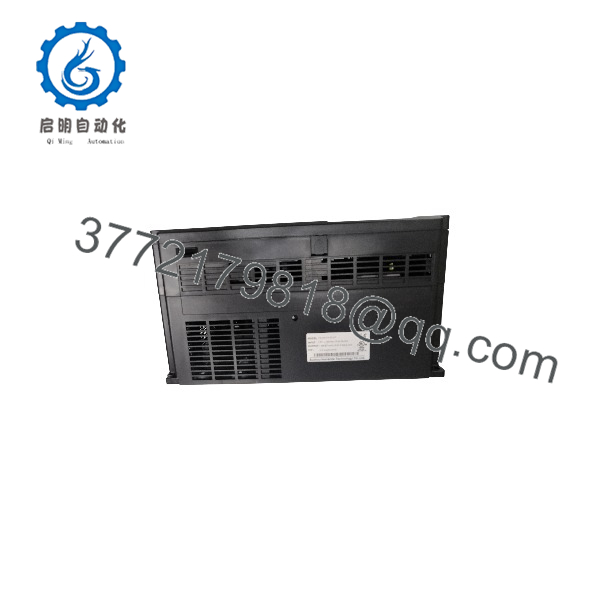
MD290T18.5G22P
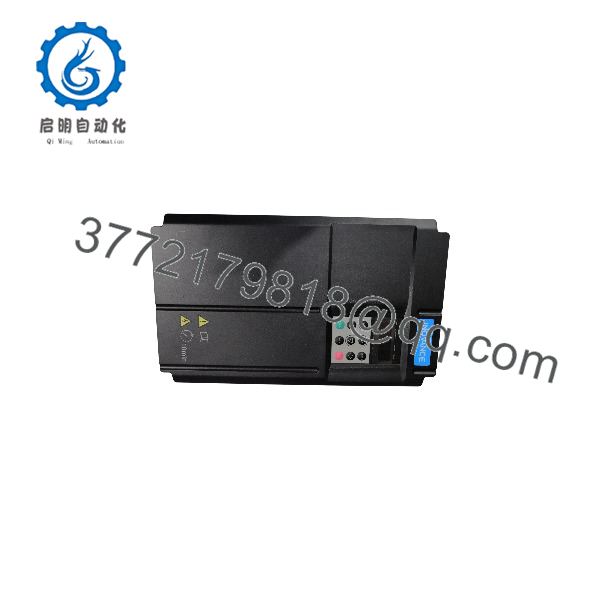
MD290T18.5G22P
Frequently Asked Questions (FAQ)
Can this VFD be hot-swapped under power?
Honestly, attempting to disconnect or replace a medium-power 18.5 kW drive while the input lines are energized will cause severe electrical arcing, destroy internal IGBT components, and present a catastrophic safety hazard. Always de-energize and lock out the main power feed before touching any power or control terminals.
Is this model obsolete, and is it genuinely new?
Inovance MD290 drives are widely deployed across modern industrial applications with robust manufacturing support. Units designated as “New Original” or “New Surplus” are factory-fresh hardware items that have never been put into active industrial service, acquired from verified overstock channels or project liquidations.
What is the direct replacement if this exact model is out of stock?
You must match the exact power class (18.5 kW Heavy Duty / 22 kW Light Duty) and voltage class (380–480 V). Substituting an under-rated drive will result in thermal overload faults under heavy industrial starting loads.
Will I lose my configuration parameters when swapping the drive?
Yes. The parameter configuration and custom application logic reside in the internal non-volatile memory of the specific drive unit. Unless you back up the parameter set to an external keypad memory stick or commissioning software tool beforehand, you must manually re-enter or transfer the configuration parameters during a swap.
Why is your price lower than the OEM factory list price?
Surplus automation suppliers acquire brand-new excess inventory from factory overstock, plant automation redesigns, and canceled capital projects. Bypassing traditional multi-tier distribution channels allows us to offer maintenance teams immediate component availability at significantly reduced price points.