
 WhatsApp: +86 16626708626
 Email:
  Phone: +86 16626708626
Description
Key Technical Specifications
- Manufacturer: Keyence
- Series: KV-7000 (successor to the KV-5500, per Keyence’s own migration path)
- Instruction Set: 331 types / 697 total instruction variants (basic: 80 types/181; application: 50 types/67; operational: 125 types/318; extended: 76 types/131)
- Instruction Execution Speed: Basic instructions min. 0.96 ns; application instructions min. 5.75 ns
- CPU Memory Capacity: 64 MB
- Program Capacity: approx. 1,500k steps
- Maximum Units Installed: 16 units (KV-7000 series expansion only); 48 units when mixing KV-7000 with KV-5000/3000 series expansion via the KV-EB1 expansion unit
- Maximum I/O Points: 3,072 points max (when expanded with KV-EB1S/KV-EB1R, 2 units, 64 points each)
- Internal Current Consumption: 200 mA or less
- Power Voltage: 24 Vdc
- Communication: Built-in EtherNet/IP port
- Programming Software: KV STUDIO (Keyence’s own ladder/programming environment — not GX Works2, which is Mitsubishi Electric software and does not program this unit)
- Agency Approvals: UL / CSA standard conformity
Product Introduction
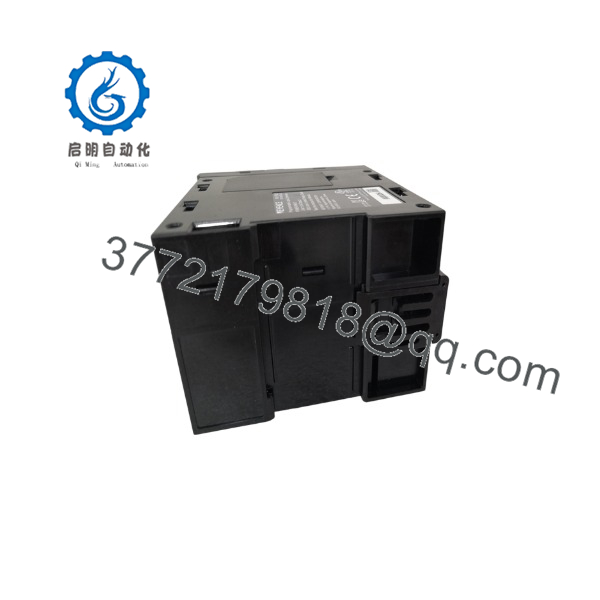
The Keyence KV-7500 is a CPU unit in the KV-7000 series, built as the direct successor to the older KV-5500, with a built-in EtherNet/IP port for direct network integration. It delivers 64 MB of CPU memory, approximately 1,500k steps of program capacity, and basic instruction execution as fast as 0.96 ns, supporting up to 3,072 I/O points when fully expanded.
Note that the KV-7000 series dropped the integrated motion-axis I/O found on some earlier Keyence CPU units — if your application needs servo or stepper axis control, you’ll need to add a separate PCU (Position Control Unit) module rather than relying on onboard axis control. Buyers migrating from a KV-5500 or KV-3000 system choose the KV-7500 specifically for backward expansion compatibility (via the KV-EB1 expansion unit) alongside the performance gains of the newer platform.
KV-7500
Troubleshooting Quick Reference
| Symptom | Possible Cause | Relevance to this Part | Quick Check Method | Recommendation |
|---|---|---|---|---|
| CPU won’t power up, no status LED | Loss of 24 Vdc supply | ❌ Low | Measure the 24 Vdc input terminals with a multimeter | Check upstream power supply before replacing |
| Ethernet/IP communication fails, CPU otherwise runs fine | Network cabling, switch, or IP configuration issue | ❌ Low | Ping the unit’s configured IP address; check cable/link light | Verify network config before condemning the CPU |
| Program won’t download from KV STUDIO | Wrong COM port/USB driver, or program capacity exceeded | ❌ Low | Confirm KV STUDIO connection settings and check program size against 1,500k step capacity | Rule out software/config issues before hardware |
| I/O points not responding, CPU status normal | Expansion unit addressing or wiring fault | ❌ Low | Check expansion unit connection and I/O point assignment in KV STUDIO | Isolate to the specific expansion unit, not the CPU |
| Intermittent CPU faults or unexpected resets | Internal CPU fault (rare) or power supply instability | ✅ High | Monitor 24 Vdc supply stability under load; check CPU error log in KV STUDIO | Replace CPU if power supply confirmed stable and fault persists |
Most “faulty PLC” calls on this class of CPU trace back to network configuration, expansion wiring, or power supply stability rather than the CPU module itself. Check the diagnostic/error log in KV STUDIO first. If you’re still stuck, contact technical support with the error code, network configuration, and a description of when the fault occurs.
Frequently Asked Questions (FAQ)
Is the KV-7500 still in current production?
Yes — it’s an active part of Keyence’s current KV-7000 series catalog, not a discontinued legacy part. You can source it new through Keyence’s distribution channels in addition to the surplus/refurbished market.
Can I use this as a direct replacement for my KV-5500?
The KV-7000 series was released specifically to succeed the KV-5500, so migration is supported, but check your existing program and any axis-control setup first — the KV-7000 series doesn’t include the integrated motor-axis I/O some older units had, so if you were using onboard axis control, you’ll need to add a PCU module.
What software do I program this with?
Keyence’s own KV STUDIO software — not GX Works2, which is Mitsubishi Electric’s programming environment for a different manufacturer’s PLCs entirely. If a listing tells you otherwise, that’s incorrect.
Why is this cheaper than buying new from Keyence?
If you’re looking at surplus or refurbished stock, it’s priced below new because it’s not sourced through Keyence’s direct new-unit channel. Ask your supplier directly whether it’s “Never Used – Original Packaging,” “Never Used – Reseller Packaging,” or “Refurbished” — these carry different pricing and different confidence levels on internal component condition.
Does swapping the CPU retain my program and configuration?
No — you’ll need to reload your ladder program via KV STUDIO onto the replacement unit. Back up your existing program and configuration before removing the old CPU.
Is it hot-swappable?
No — power down the rack before removing or installing a CPU unit. Pulling a live CPU risks a fault on connected I/O and any motion or servo axes under its control.
What warranty applies to a new or refurbished unit?
This varies by seller — some resellers offer a 90-day warranty on surplus stock, others (like Radwell) apply their own 1-year warranty in place of the factory term. Confirm the applicable warranty for your specific purchase in writing, especially for a refurbished unit.



