
 WhatsApp: +86 16626708626
 Email:
  Phone: +86 16626708626
Description
Key Technical Specifications
| Parameter | Value |
|---|---|
| Manufacturer | Kollmorgen |
| Part Number | 63025-01D |
| Series | LS5-F Navigator / LS5-F |
| Product Description | Navigator tough laser navigation sensor |
| Sensor Type | Rotating laser sensor |
| Application | AGV navigation / industrial navigation |
| Environmental Design | For rough conditions |
| Reflector Type | Flat reflectors supported |
| Mounting | Mountable |
| Height | 170 mm |
| Width | 170 mm |
| Length | 170 mm |
| Weight | 2.30 kg |
| Manufacturer Status | Discontinued |
| Operating Voltage | Not verified from available authoritative documentation |
| Communication Interface | Not verified |
| Scan angle / field of view | Not verified from available authoritative documentation |
| Operating temperature | Not verified |
The 170 mm dimensions and 2.30 kg weight are listed by UNIS Group. Radwell identifies the part as a discontinued LS5 F Navigator rotating laser scanner designed for rough conditions and supporting flat reflectors.
Do not substitute voltage, communication protocol, scan frequency, field of view, connector pinout, or environmental limits from unrelated LS5-family products without checking the equipment documentation for the exact 63025-01D revision.
Product Introduction
The Kollmorgen 63025-01D is an LS5-F Navigator rotating laser sensor used for laser-based navigation applications, including automated guided vehicle (AGV) systems. Available equipment records describe it as a mountable sensor intended for rough operating conditions and compatible with flat reflectors.
This model is now treated as a discontinued component, making exact part-number matching important when maintaining an installed LS5-F system. Before replacement, verify the complete part number, mechanical mounting, connector arrangement, reflector configuration, and system-specific configuration rather than selecting a replacement solely because it belongs to the LS5 family.
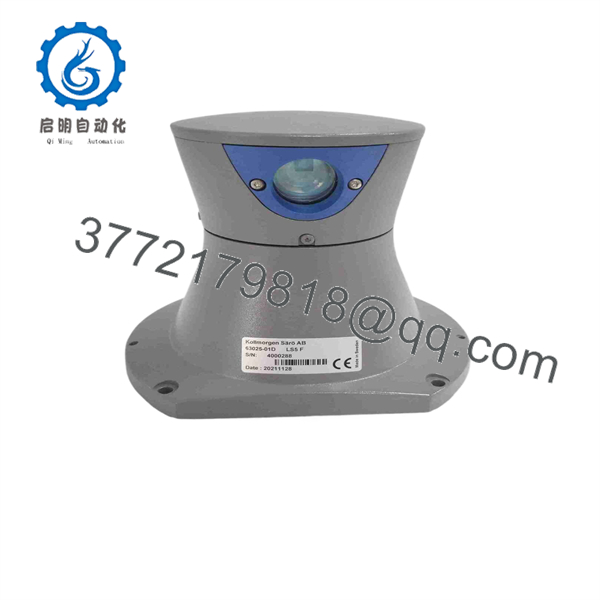
63025-01D
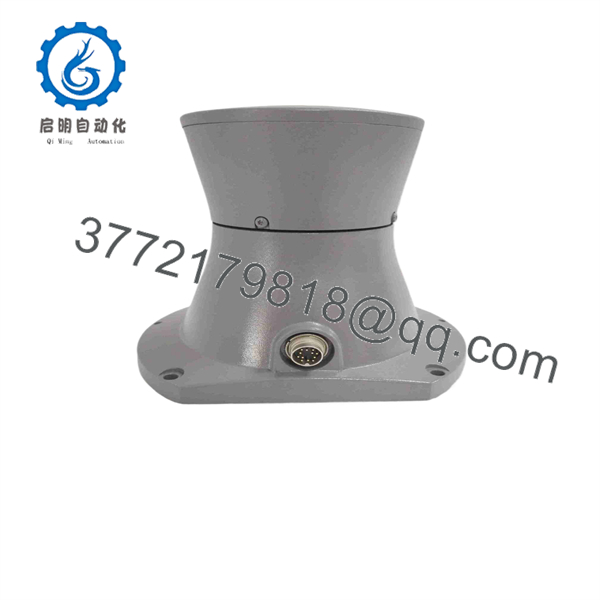
63025-01D
Installation & Configuration Guide
Stage 1 — Pre-Installation
Estimated time: 15–30 minutes
- Apply the site’s lockout/tagout (LOTO) procedure before removing the existing navigation sensor.
- Record the existing sensor’s complete label information, including:
- Model number
- Serial number
- Hardware revision
- Connector labels
- Photograph the installed orientation before removal.
- Record the sensor’s physical mounting position and reflector arrangement.
- Prepare:
- ESD wrist strap
- Multimeter
- Appropriate screwdriver set
- Cable labels
- Smartphone or camera
- If the AGV/navigation controller stores configuration parameters associated with the scanner, back up those parameters before replacement.
⚠️ Do not assume that another LS5-family sensor is a direct electrical replacement for 63025-01D. The exact suffix matters.
Stage 2 — Remove the Existing Sensor
Estimated time: 15–20 minutes
- Confirm that the AGV or navigation equipment is fully stopped.
- Isolate the applicable power sources.
- Wait for the equipment’s specified discharge period before touching electrical connections.
- Label every cable before disconnecting it.
- Photograph connector orientation and cable routing.
- Release the mechanical mounting hardware.
- Remove the existing scanner without twisting or striking the sensor housing.
- Inspect the mounting surface for:
- Mechanical damage
- Contamination
- Loose fasteners
- Cable damage
- Connector corrosion
Keep the original 63025-01D available until the replacement has completed commissioning.
Stage 3 — Install the Replacement
Estimated time: 20–30 minutes
- Confirm that the replacement label reads Kollmorgen 63025-01D.
- Compare the replacement against the removed unit before connecting power.
- Verify the mechanical mounting pattern and sensor orientation.
- Reinstall the sensor in the same physical orientation.
- Reconnect cables according to the original wiring documentation.
- Check that connectors are fully seated and mechanically secured.
- Confirm that no cable is under excessive tension or positioned in the scanner’s moving area.
- Recheck reflector positions if the navigation system uses fixed reflectors.
Pre-Power Checklist
- Exact 63025-01D part number verified
- Mechanical orientation verified
- Connector arrangement verified
- Cable routing verified
- Reflector arrangement documented
- Configuration backup completed
- No loose hardware
- No damaged connectors
⚠️ Do not power the unit merely because the connector physically fits. Confirm the electrical interface from the original Kollmorgen documentation or the machine’s electrical drawings first.
Stage 4 — Power-On and Functional Testing
Estimated time: 30–60 minutes
- Verify the supply circuit with a multimeter before energizing the navigation system.
- Power the system according to the OEM startup procedure.
- Observe the scanner and controller for abnormal status indications.
- Check whether the navigation controller recognizes the sensor.
- Verify the scanner’s navigation data or diagnostic status through the applicable controller software.
- Confirm that the sensor detects the intended reflector arrangement.
- Perform a controlled stationary test before allowing the AGV to move.
- Conduct a low-speed navigation test in a controlled area.
- Compare navigation behavior against the original unit.
- Record the final sensor serial number and replacement date in the maintenance history.
⚠️ If the controller reports communication, navigation, or sensor errors after replacement, stop the vehicle test. Check configuration, wiring, sensor orientation, and the exact hardware revision before attempting further operation.
FAQ
Q1. What is Kollmorgen 63025-01D?
The 63025-01D is identified as a Kollmorgen LS5-F Navigator rotating laser sensor/scanner intended for navigation applications and rough operating conditions. It is associated with AGV/navigation equipment rather than a conventional servo drive.
Q2. Is 63025-01D discontinued?
Yes. Radwell explicitly lists 63025-01D as discontinued by the manufacturer. This makes existing-stock units and tested replacement inventory particularly relevant for legacy LS5-F installations.
Q3. What are the physical dimensions?
UNIS Group lists the unit at approximately 170 mm × 170 mm × 170 mm, with a listed weight of 2.30 kg.
Q4. Is 63025-01D a direct replacement for another LS5 model?
Not automatically. Other LS5/ part numbers may have different hardware configurations, revisions, or system compatibility. For a replacement, compare the complete part number, mounting arrangement, connectors, configuration, and the original machine documentation.
Q5. Can the unit be installed without changing the AGV configuration?
That depends on the host navigation system. The physical replacement may be straightforward, but the controller may require configuration verification or parameter restoration. Do not assume that replacing the hardware alone completes the commissioning process.
Q6. What condition should I specify when purchasing a 63025-01D?
For a legacy discontinued sensor, specify the required condition explicitly: factory-sealed/new original, new surplus, used/tested, refurbished, or repair/exchange. Supplier listings show that multiple conditions are available depending on stock.
Q7. What specifications should be confirmed before ordering?
At minimum, confirm:
- Exact part number: 63025-01D
- Navigator compatibility
- Hardware/revision information
- Connector configuration
- Mechanical mounting
- Reflector arrangement
- Required electrical interface
- Navigation-controller compatibility
- Actual unit condition
- Warranty and lead time
Publicly available sources do not provide enough reliable evidence to state the exact supply voltage, communication protocol, scan rate, connector pinout, or complete environmental specification for this exact suffix. Those values should be confirmed against Kollmorgen documentation or the installed system drawings before procurement or commissioning.



