
 WhatsApp: +86 16626708626
 Email:
  Phone: +86 16626708626
Description
3. Key Technical Specifications
| Parameter | Value |
|---|---|
| Continuous Output Current | 12 ARMS (40 °C ambient) |
| Peak Output Current | 30 ARMS (3 s minimum from zero) |
| Input Voltage | 120/240 VAC, 1- or 3-phase (0–264 VAC max) |
| Nominal Bus Voltage | 155 VDC (120 VAC) / 320 VDC (240 VAC) |
| Continuous Output Power | Up to 4000 W (240 VAC 3-phase) |
| Peak Output Power (1 s) | 10 000 VA (240 VAC 3-phase) |
| Current Loop Bandwidth | 5 kHz |
| Velocity Loop Bandwidth | Up to 800 Hz |
| Feedback Support | SFD (Smart Feedback Device), 24-bit resolution |
| Communication | Pre-installed SynqNet option card with RJ-45 connectors |
| Output Current Ripple Frequency | 16 kHz |
| Motor Inductance Range | 0.9–45 mH |
| Weight | Approx. 1.33 kg |
| Pollution Degree | 2 |
4. Product Introduction
The Kollmorgen S21260-SRS is a compact brushless servo drive from the S200 series. It delivers 12 ARMS continuous and 30 ARMS peak current from a 120/240 VAC supply and includes a factory-installed SynqNet option card with standard RJ-45 connectors.
Motion-control engineers choose the S21260-SRS for applications requiring high dynamic response, tight current-loop bandwidth, and networked multi-axis coordination. The drive pairs with Kollmorgen SFD motors for 24-bit feedback resolution and supports velocity and torque modes. As a discontinued configuration, remaining New Surplus units continue to support existing machines in packaging, semiconductor, medical, and electronic-assembly systems.
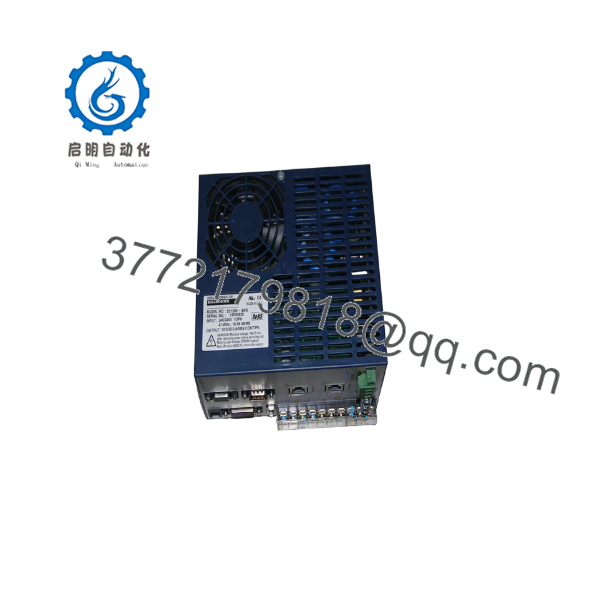
S21260-SRS
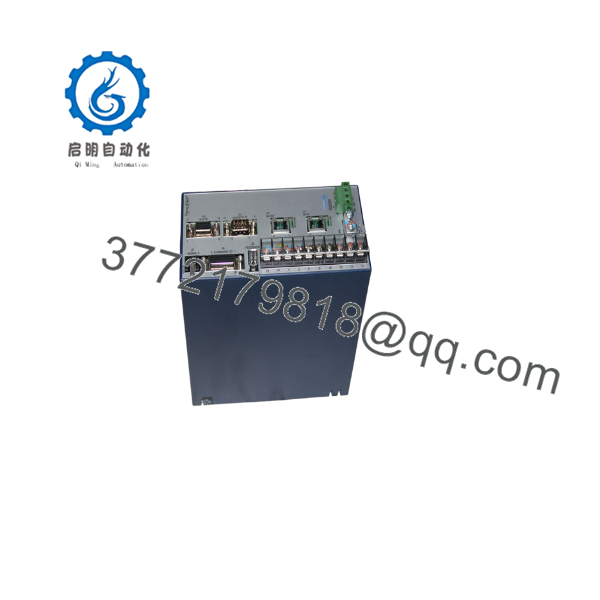
S21260-SRS
5. Installation & Configuration Guide
Stage 1: Pre-Installation Preparation (≈10 min)
⚠️ Safety First: Disconnect all AC power and lock out/tag out the supply. Wait for the DC bus capacitors to discharge (verify with a multimeter).
Tools Required: ESD wrist strap, torque screwdriver, multimeter, fiber or copper network cables (as applicable), motor power and feedback cables, smartphone for photos of existing wiring and switch settings.
Data Backup: Record existing SynqNet node address, current limits, and any saved drive parameters. Photograph motor power, feedback, and network connections.
Stage 2: Removing the Old Drive (≈10 min)
- Confirm the DC bus is fully discharged.
- Label and disconnect motor power leads, feedback cable, SynqNet RJ-45 cables, and AC input power.
- Remove mounting hardware and carefully withdraw the drive from the panel or DIN rail.
- Inspect connectors and mounting surface for damage or debris.
⚠️ Retain the old drive until the replacement has completed a successful test run.
Stage 3: Installing the New Drive (≈15 min)
- Verify the exact model marking S21260-SRS.
- Mount the drive securely using the recommended M4 or #8 hardware. Maintain adequate clearance for convection cooling.
- Reconnect AC input power (observe phase and voltage rating), motor power leads (correct phase sequence), feedback cable, and SynqNet RJ-45 network cables.
- Set any hardware address or configuration switches to match the previous unit.
Self-Checklist: [ ] Model confirmed [ ] Bus voltage discharged before connection [ ] Motor phasing correct [ ] Network cables seated [ ] Grounding intact.
Stage 4: Power-On & Testing (≈15–20 min)
Pre-Power Check: Confirm correct AC voltage and polarity. Verify motor and feedback connections with a continuity check.
- Apply control and bus power. Observe diagnostic LEDs for normal power-up sequence.
- Establish SynqNet communication and verify the drive appears on the network with the expected node address.
- Perform a low-speed jog or torque test in a safe, limited-motion environment.
- Confirm continuous and peak current limits, feedback resolution, and any saved parameters match the application requirements.
- Run a short production cycle under load while monitoring temperature and fault status.
⚠️ Troubleshooting Note: Bus undervoltage or overvoltage faults usually indicate incorrect AC input or regen resistor sizing. Loss of SynqNet communication is most often caused by cable or terminator issues. Never enable the drive with incorrect motor phasing.
6. Frequently Asked Questions (FAQ)
Q: Can the S21260-SRS be hot-swapped under power?
No. Always remove AC power and allow the DC bus to discharge completely before disconnecting or connecting any cables. Working on a live drive can destroy the power stage or create a shock hazard.
Q: Is this model obsolete, and is the stock genuinely new?
Yes, the S200 series in this configuration is discontinued. Available units are New Original (new surplus) stock that has been functionally verified. Quantities are limited.
Q: What is the direct replacement if S21260-SRS stock is exhausted?
Later Kollmorgen AKD or AKD2G drives can provide equivalent or higher performance. Confirm current rating, SynqNet (or alternative network) compatibility, feedback support, and physical mounting before substitution.
Q: Will I lose drive parameters when I replace the unit?
Parameters are stored in the drive’s non-volatile memory. Always back up the configuration file before removal. After installation, download the saved file or re-commission the axis.
Q: Why is the price lower than original Kollmorgen list price?
These are New Surplus units from secondary-market inventory. They provide the same form, fit, and function as original production drives and are fully tested, but they are no longer current-production catalog items.
Q: What motor feedback does the S21260-SRS support?
Primary support is for Kollmorgen SFD (Smart Feedback Device) with 24-bit resolution. Hall sensors are also supported on all units. Verify compatibility with the specific motor before installation.
Q: What is the recommended ambient temperature for full continuous current?
12 ARMS continuous is rated at 40 °C ambient with convection cooling. At 50 °C the continuous rating drops to 8 ARMS. Ensure adequate panel ventilation.



