WhatsApp: +86 16626708626
 Email:
 Phone: +86 16626708626
Description
Key Technical Specifications
| Parameter | Specification |
|---|---|
| Manufacturer | Kongsberg Discovery |
| Model | MRU-E-JB3 |
| Product category | MRU junction box |
| Enclosure material | Aluminum |
| Ingress protection | IP66 |
| Operating temperature | −25°C to +70°C |
| Storage temperature | −25°C to +70°C |
| DC input | 24 V nominal, 18–32 V DC |
| AC input | 85–264 V AC |
| DC output from AC supply | 24 V DC, 15 W, as listed in MRU technical documentation |
| Ethernet | 10/100 Mbps |
| Serial interfaces | RS-422 and RS-232 options, depending on port and configuration |
| Analog outputs | Four channels, ±10 V, 14-bit resolution, via the junction box |
| Approximate dimensions | 226 × 126 × 90 mm, reported in MRU installation documentation |
| Approximate weight | 2.0 kg, reported in MRU installation documentation |
| Typical installation | Marine equipment cabinet or suitable mounting surface |
The enclosure, temperature, and IP rating are listed in Kongsberg’s technical documentation. Power options and interface details should be verified against the specific JB3 revision and installation configuration.
Product Introduction
The Kongsberg MRU-E-JB3 is a marine junction box designed to connect compatible Motion Reference Unit equipment to vessel systems. It provides the required wiring interface for power, serial communication, Ethernet, and analog signals. Its aluminum enclosure and IP66 protection rating suit demanding marine installations when mounted and sealed according to the manufacturer’s instructions. The JB3 is particularly relevant to fifth-generation MRU installations where the available communication and analog interfaces must match the vessel’s control and monitoring architecture.
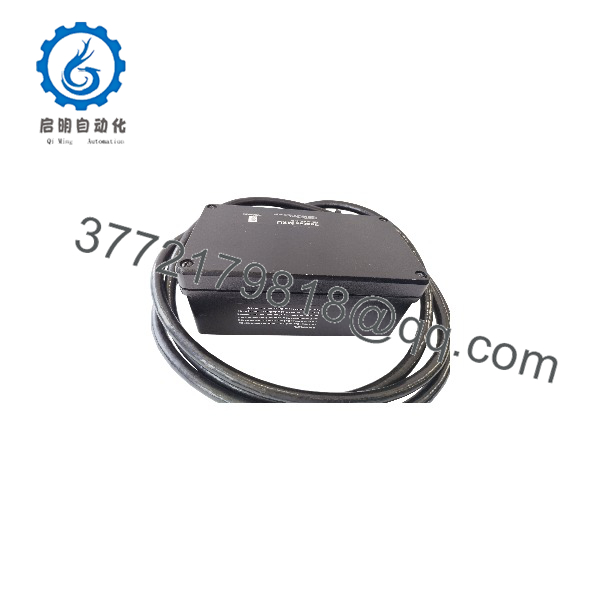
MRU-E-JB3
Installation and Configuration Guide
Stage 1: Confirm System Compatibility
- Verify the full model number, MRU-E-JB3, on the existing unit.
- Identify the connected MRU generation and model.
- Confirm whether the application requires Ethernet, RS-232, RS-422, analog outputs, or a combination of these.
- Verify the available power source and required output power.
- Check the wiring diagrams for the specific MRU, junction box, and processing unit.
Stage 2: Prepare the Installation
- Isolate the relevant power source before opening the enclosure or changing wiring.
- Label existing cables and terminals before disconnecting them.
- Select a mounting location that meets the system’s environmental and access requirements.
- Check the enclosure, cable glands, sealing surfaces, and terminals for damage or corrosion.
Stage 3: Mount and Wire the Junction Box
- Secure the box using the approved mounting arrangement.
- Route the MRU cable and vessel-system cables through the designated cable glands.
- Terminate conductors according to the applicable Kongsberg wiring diagram.
- Connect the chassis and cable shields as specified by the system documentation.
- Seal unused cable entries to preserve the enclosure’s ingress protection.
- Keep power and communication wiring arranged according to the installation instructions.
Kongsberg’s installation documentation provides specific terminal assignments for the connection between the processing unit and the MRU/JB3 junction box. Use those assignments rather than relying on wire colors alone.
Stage 4: Restore Power and Verify Interfaces
- Confirm the input voltage and polarity before energizing the unit.
- Check that the MRU receives power and starts normally.
- Verify Ethernet link status and communication with the intended host system.
- Test the configured serial interfaces and confirm the expected data format.
- If analog outputs are used, verify signal scaling and output values against the application configuration.
- Confirm that the vessel’s navigation, motion-monitoring, or dynamic-positioning system receives valid data.
Stage 5: Troubleshooting and Maintenance
If communication or sensor data are unavailable:
- Check input power, fuses or protective devices, terminal connections, and cable continuity.
- Confirm the correct RS-232/RS-422 interface configuration.
- Check Ethernet cabling and network settings.
- Inspect the shield and chassis-ground connections.
- Verify the MRU generation and cable compatibility.
- Inspect cable glands and enclosure seals if moisture or corrosion is suspected.
Do not change terminal assignments or connect an analog output to an incompatible input without confirming the relevant electrical specifications.
Frequently Asked Questions
Q1: What is the Kongsberg MRU-E-JB3 used for?
It is a junction box for compatible Kongsberg Motion Reference Unit systems. It provides wiring interfaces for power and motion data communication, including serial, Ethernet, and analog connections as supported by the configuration.
Q2: What is the difference between the JB3 and the older JB1?
Kongsberg’s upgrade guide states that a fifth-generation MRU can connect directly to an older JB1, but the COM2 and analog outputs will not be available through the JB1. The JB3 is therefore important when those interfaces are required.
Q3: Does the MRU-E-JB3 support Ethernet?
Yes. The documented fifth-generation MRU arrangement supports Ethernet communication through the junction-box system. Confirm the required cable type and network configuration for the specific installation.
Q4: What is the environmental protection rating?
The published specification lists an IP66 enclosure and an operating temperature range of −25°C to +70°C. Correct installation and cable-gland sealing are necessary to maintain the intended protection.
Q5: Can the MRU-E-JB3 be used with every Kongsberg MRU?
Do not assume universal compatibility. MRU generations have different interfaces and functional capabilities. Check the sensor generation, cable, connector assignments, and required output signals before ordering.
Q6: What should be checked if analog outputs are unavailable?
Confirm that the installation uses the JB3 and that the analog-output channels are supported and configured in the applicable system. The older JB1 does not provide the same analog-output availability for fifth-generation MRUs.
Q7: What should buyers verify before purchasing a replacement?
Confirm the model number, enclosure condition, terminal and connector condition, power-input requirements, required interfaces, and compatibility with the installed MRU generation. Request label photos and available inspection or functional-test records for used or surplus units.