
 WhatsApp: +86 16626708626
 Email:
  Phone: +86 16626708626
Description
Key Technical Specifications
| Parameter | Value |
|---|---|
| Manufacturer | Matrox |
| Model | 979-0101 |
| Revision | Rev C |
| Product Family | Orion PCI |
| Board Type | PCI frame grabber |
| Product Description | Matrox Orion PCI RGB capture card |
| Part Designation | ORI-PCI/RGB/C |
| Primary Function | RGB video/image acquisition |
| Host Interface | PCI |
| Application | Machine vision / industrial image capture |
| Form Factor | PCI plug-in expansion card |
| Configuration | Host-PC installed capture board |
| Lifecycle | Legacy / discontinued |
| Typical Replacement Strategy | Exact-part replacement or validated machine-vision retrofit |
Current secondary-market listings identify the board as “Matrox Orion PCI 979-0101 Rev C ORI-PCI/RGB/C” and describe it as a video capture card/frame grabber.
Important: I would not publish an exact video standard, resolution, pixel clock, connector pinout, or Windows driver version for this part without the applicable Matrox Orion documentation or a clear photograph of the board label. The available sources confirm the identity and function, but they do not provide enough reliable evidence for those parameters.
Product Introduction
The Matrox 979-0101 Rev C is an Orion PCI RGB frame grabber used for RGB video acquisition in PC-based machine-vision and industrial imaging systems. It installs as a PCI expansion card and interfaces the imaging source with the host computer.
This is a legacy component, so the main engineering concern is not simply finding a card with the same connector. The replacement must match the installed Orion hardware revision, PCI environment, camera/video interface, and operating-system driver stack. Secondary-market sources specifically identify Rev C units, making revision verification important.
Installation & Configuration Guide
Stage 1: Pre-Installation Preparation — About 10 minutes
⚠️ Safety First: Shut down the industrial PC completely and isolate its incoming power before opening the chassis. Do not remove or install the PCI card while the computer is energized.
Tools Required:
- ESD wrist strap
- Phillips screwdriver
- Digital multimeter
- Camera or smartphone
- Labels for cable identification
Data Backup:
- Record the existing card’s complete marking: 979-0101, including Rev C.
- Photograph the front and rear of the board.
- Photograph every connected video/camera cable before removal.
- Record the industrial PC motherboard model and available PCI slot.
- Record the operating system and machine-vision application version.
- Back up the current Matrox/Orion driver and application configuration if accessible.
- Record the current acquisition settings, camera format, trigger configuration, and image-processing parameters.
❗ Do not assume that any PCI slot is interchangeable. Legacy industrial PCs can have PCI slots with different electrical or mechanical constraints.
Stage 2: Removing the Old Card — About 5 minutes
- Shut down Windows or the installed industrial-PC operating system normally.
- Switch off the computer and isolate its power.
- Wait for the power supply capacitors to discharge.
- Put on the grounded ESD wrist strap.
- Open the industrial-PC chassis.
- Photograph the installed card and cable orientation.
- Label each connected cable.
- Remove the retaining screw or bracket fastener.
- Disconnect the video/camera cable without pulling on the connector body.
- Pull the PCI card straight upward/outward from the slot.
- Inspect the PCI connector for oxidation, contamination, or damaged contacts.
Keep the old card until the replacement has produced valid images from the actual production camera.
Stage 3: Installing the New Card — About 5 minutes
- Verify the replacement marking is Matrox 979-0101 Rev C.
- Compare the board layout and connector arrangement with the removed card.
- Inspect the PCI edge connector.
- Align the board with the correct PCI slot.
- Press evenly until the card is fully seated.
- Secure the retaining bracket.
- Reconnect the camera/video cable exactly as photographed.
- Close the chassis.
- Restore power.
Self-Checklist:
- Model number matches
- Rev C verified
- PCI slot confirmed
- Board fully seated
- Retaining screw installed
- Camera cable correctly connected
- ESD precautions maintained
Stage 4: Driver, Application & Functional Testing — About 10–20 minutes
- Boot the industrial PC.
- Open the operating system’s hardware/device-management utility.
- Confirm that the PCI device is detected.
- Verify that the installed Matrox/Orion driver recognizes the card.
- Do not immediately overwrite the existing production driver.
- Compare the driver version against the previously documented installation.
- Open the machine-vision application.
- Confirm that the expected acquisition device is selected.
- Verify camera/video format settings.
- Acquire a test frame.
- Check image geometry, color channels, synchronization, and trigger behavior.
- Run several consecutive acquisitions.
- Execute a representative production inspection cycle.
⚠️ If the PC detects the PCI card but the vision application cannot acquire an image, do not immediately condemn the hardware. Driver compatibility, application configuration, camera timing, and legacy operating-system support are common causes.
Technical Pitfall & Survival Guide
❗ 1. PCI Hardware Compatibility
The biggest trap is treating “PCI” as a guarantee of compatibility. A legacy Orion card may depend on a particular PCI implementation, BIOS configuration, and driver environment.
Before ordering, record the exact industrial PC motherboard and operating system.
❗ 2. Revision Mismatch
A listing may simply say “979-0101” while your installed board is marked Rev C. Secondary-market listings explicitly identify Rev C versions.
I’ve seen enough legacy machine-vision systems to know this rule: photograph the old board before removing it. A five-second photograph can prevent hours of troubleshooting.
❗ 3. Driver Availability
The hardware can be electrically perfect and still be unusable if the required legacy driver does not work with the existing operating system.
Back up the working driver before removing the original card.
❗ 4. Cable Compatibility
Do not assume that a physically similar connector means an equivalent camera interface. Match the connector, cable, camera, and acquisition configuration against the original installation.
❗ 5. Do Not Discard the Original Card
Keep the old 979-0101 until the replacement has passed a real acquisition test. If the replacement fails, the original card becomes your fastest diagnostic reference.
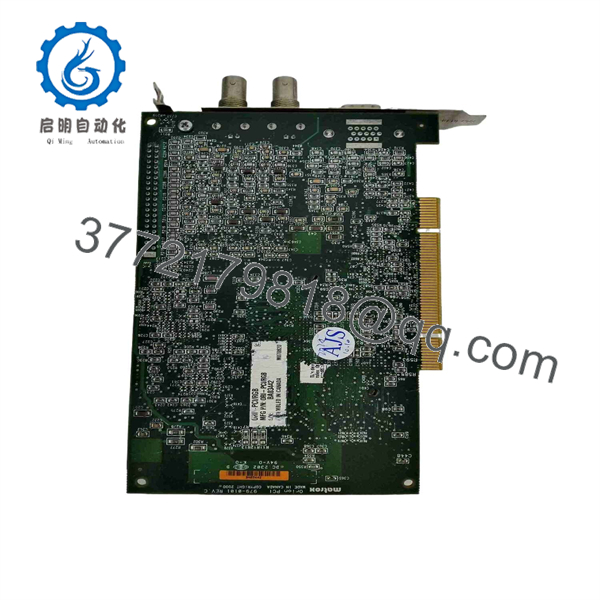
979-0101
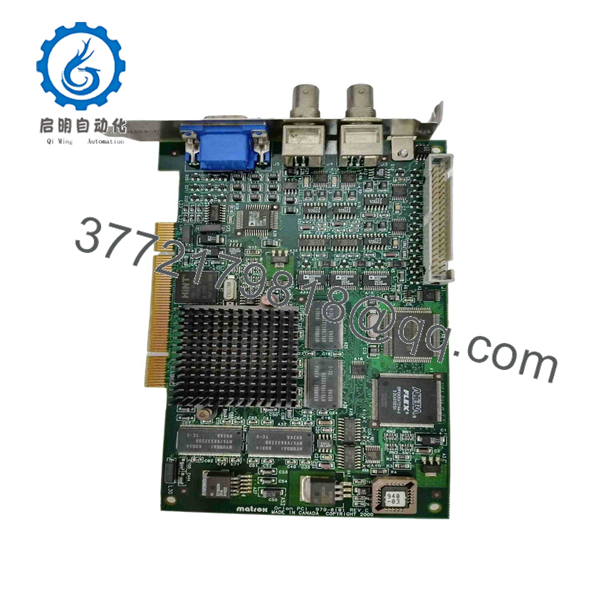
979-0101
Frequently Asked Questions (FAQ)
What is the Matrox 979-0101?
The 979-0101 is a Matrox Orion PCI RGB frame grabber/video capture card. Industrial automation sources identify the Rev C version as ORI-PCI/RGB/C.
Is 979-0101 a PLC or I/O module?
No. It is a PC-based video acquisition card, not a PLC CPU, remote I/O module, or industrial communications adapter. Its job is to acquire RGB image/video data for a host computer application.
Is the 979-0101 obsolete?
It should be treated as a legacy component. Current sources are predominantly secondary-market and repair/replacement suppliers rather than current-production Matrox documentation. Lektronix lists the unit as an Orion Matrox PCI product and provides repair/replacement services, while other suppliers list used or surplus Rev C cards.
Can I replace 979-0101 with any PCI frame grabber?
No. That is a common retrofit mistake. The replacement must be compatible with the camera/video signal, PCI interface, acquisition software, driver, operating system, trigger requirements, and application API. A newer frame grabber may require substantial software changes even if it physically fits the computer.
Does Rev C matter?
Yes. Rev C should be treated as part of the replacement specification. When purchasing a legacy board, request a photograph showing the complete PCB identification rather than relying only on a supplier’s typed model number. Current listings specifically identify 979-0101 Rev C / ORI-PCI/RGB/C units.
Is a used 979-0101 acceptable for a production machine?
It can be, provided it passes functional testing in the actual acquisition environment. A secondary-market listing currently identifies a used Rev C unit as a surplus item, while another supplier lists a unit with a 90-day warranty.
For a production spare, I would require clear PCB photographs, revision confirmation, tested acquisition, and a written warranty before approving the purchase.
What should I verify before ordering?
At minimum, send the supplier:
- 979-0101 full part number
- Rev C marking
- Photograph of the installed card
- Industrial-PC model
- Operating-system version
- Camera/interface type
- Existing driver version
- Required warranty period
That information is far more useful than simply asking for a “replacement 979-0101.”



