
 WhatsApp: +86 16626708626
 Email:
  Phone: +86 16626708626
Description
Key Technical Specifications
| Parameter | Specification |
|---|---|
| Model | D200136L |
| Full Part Number | ADC5483-D200136L |
| Manufacturer | Metso Automation |
| Product Type | Industrial power supply |
| Input Voltage | 115 VAC / 230 VAC |
| Input Frequency | 50/60 Hz |
| Input Current | 4.5 A at 115 VAC / 2.5 A at 230 VAC |
| Output Voltage | 28 VDC |
| Maximum Output Current | 9 A |
| Approximate Output Power | 252 W |
| System Application | Metso legacy DCS / automation systems |
| Manufacturer Status | Discontinued |
| Weight | Approximately 1.54 kg, according to Radwell’s listing |
| Condition Availability | Typically new surplus, unused surplus, refurbished, or used |
The electrical ratings above are consistently reported for ADC5483-D200136L by multiple industrial spare-parts sources. Radwell specifically lists 4.5/2.5 A input, 115/230 VAC, 50/60 Hz, 9 A output, and 28 VDC output, while also identifying the part as discontinued by the manufacturer.
Note: Some secondary listings publish conflicting mechanical dimensions and additional electrical characteristics. Those values should not be treated as OEM-controlled specifications without the original Metso documentation or a verified nameplate. For cabinet replacement, use the installed unit’s physical dimensions, connector arrangement, and mounting interface as the final reference.
Product Introduction
The Metso D200136L (ADC5483-D200136L) is an industrial AC-to-DC power supply used with legacy Metso Automation control-system hardware. It accepts 115/230 VAC input at 50/60 Hz and provides a regulated 28 VDC output rated at up to 9 A for control-system loads.
The unit is particularly relevant for maintenance of older Metso DCS installations where the original power architecture must remain in service. Because the manufacturer has discontinued the part, replacement planning should include exact part-number verification, connector inspection, load assessment, and testing before installation.
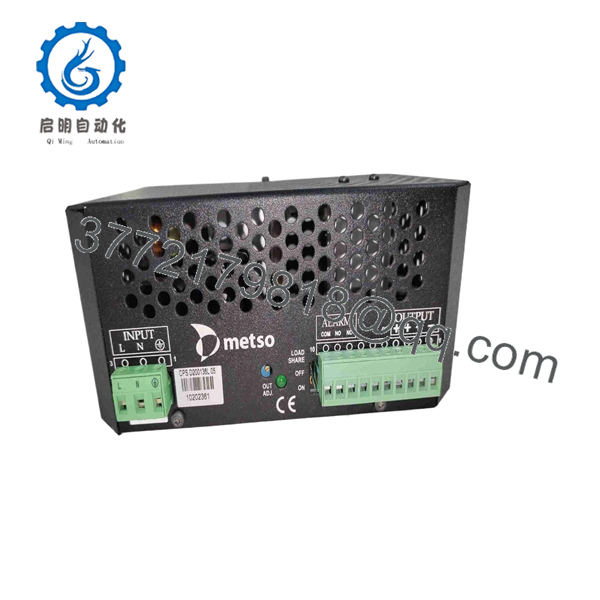
D200136L
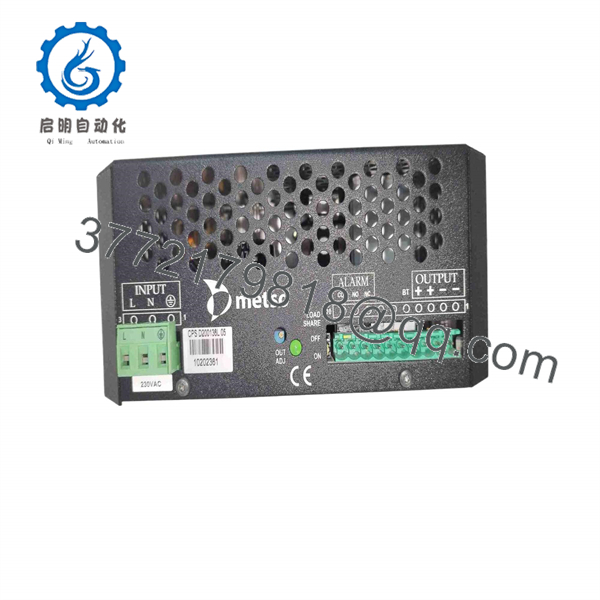
D200136L
Installation & Configuration Guide
Stage 1 — Pre-Installation Preparation
Estimated time: 20–30 minutes
- Apply LOTO (Lockout/Tagout) to the cabinet and verify that the AC supply is isolated.
- Wait at least 5 minutes before accessing the power-supply assembly so internal capacitors can discharge.
- Wear an ESD wrist strap when handling the module or adjacent control electronics.
- Prepare a PH1 screwdriver, insulated tools, calibrated multimeter, wire labels, and a smartphone or camera.
- Photograph the existing D200136L installation before removing anything.
- Record the existing AC wiring, DC wiring, terminal positions, grounding arrangement, and indicator status.
- Back up available DCS configuration data and document the affected rack, controller, and I/O configuration.
- Verify the replacement nameplate shows D200136L / ADC5483-D200136L before installation.
⚠️ Do not rely on the similar D200136 designation alone. The L suffix and complete ADC5483-D200136L identification should be checked against the installed unit.
Stage 2 — Removing the Existing Module
Estimated time: 15–25 minutes
- Confirm the cabinet is electrically isolated with a multimeter.
- Verify zero AC voltage at the input terminals before disconnecting wiring.
- Label every conductor before removal.
- Photograph the terminal arrangement and any rack-position identifiers.
- Disconnect the AC input and 28 VDC output connections according to the cabinet wiring documentation.
- Remove the module’s mechanical retaining hardware.
- Carefully withdraw the power supply without disturbing neighboring DCS modules.
- Inspect the rack/backplane and terminals for discoloration, corrosion, loose contacts, or heat damage.
⚠️ If the old power supply failed because of an external short circuit or excessive load, replacing the module without finding the fault can damage the replacement unit.
Stage 3 — Installing the D200136L
Estimated time: 20–30 minutes
- Compare the replacement module against the removed unit, including part number, connectors, terminal layout, and mounting arrangement.
- Do not install the replacement if the electrical or mechanical interface differs from the existing configuration.
- Inspect the replacement for shipping damage, loose hardware, contamination, or abnormal odor.
- Install the into the designated position.
- Secure the module mechanically before reconnecting electrical wiring.
- Reconnect AC input wiring using the original cabinet documentation as the primary reference.
- Reconnect the 28 VDC output wiring and verify polarity.
- Check protective-earth continuity where applicable.
- Confirm that the connected load does not exceed the documented 9 A maximum output rating.
- Check that ventilation paths are clear before energizing the cabinet.
⚠️ Do not assume D200136 and are interchangeable solely from the model-number similarity. Confirm the complete installed-system configuration and connector/interface details first.
Stage 4 — Power-On & Testing
Estimated time: 30–60 minutes
- Energize the AC input while following the site’s electrical safety procedure.
- Measure the DC output with a calibrated multimeter.
- Verify that the output is approximately 28 VDC under the connected system load.
- Monitor the DCS rack for abnormal alarms, controller faults, or power-related diagnostic messages.
- Check the connected controller and I/O modules for normal startup behavior.
- Verify field I/O operation after the control system completes its startup sequence.
- Monitor the power supply for abnormal temperature rise, noise, smell, or intermittent operation.
- Record input voltage, output voltage, load current, alarm status, and test time in the maintenance record.
- Where practical, perform an extended load test before returning the cabinet to unattended operation.
- Keep the removed unit until the replacement has completed functional verification.
For a critical DCS rack, a replacement should not be accepted solely because the output voltage measures correctly at no load. The downstream rack should also complete its normal startup and communications checks.
Frequently Asked Questions (FAQ)
1. What is the Metso ?
The is a Metso Automation industrial power-supply unit, commonly identified by the full part number ADC5483-D200136L. Its published electrical ratings are 115/230 VAC input and 28 VDC, 9 A output.
2. Is the still manufactured?
Current industrial component databases identify as discontinued by the manufacturer. This means maintenance supply normally comes from existing inventory, new surplus, unused stock, refurbished units, or tested used equipment.
3. Is the same as D200136?
They are closely related part numbers, but a maintenance engineer should not approve a substitution based only on the model-number similarity. Verify the complete part number, rack position, electrical ratings, connector arrangement, and system documentation before replacement.
4. What is the output rating of ?
The commonly documented rating is 28 VDC at up to 9 A, equivalent to approximately 252 W of DC output power. The input is specified as 115/230 VAC, 50/60 Hz, with 4.5 A at 115 VAC and 2.5 A at 230 VAC reported for the input current.
5. Does replacing require DCS programming?
A power-supply replacement normally does not constitute a logic or application-program change. However, the correct procedure depends on the specific Metso/Valmet rack architecture. Verify that the rack powers up normally and that controllers, I/O modules, and communications return to their expected states after replacement.
6. What condition should I specify when purchasing a ?
For an obsolete control-system component, specify the required condition explicitly: New Original, New Surplus, Refurbished, or Used/Tested. Ask for the exact nameplate photograph and complete part number before purchase. Radwell, for example, distinguishes several condition categories for this discontinued part.
7. What should be checked before accepting a replacement?
At minimum, verify the complete part number, physical condition, input/output ratings, terminal configuration, insulation and grounding condition, DC output under load, and behavior of the connected DCS rack. For a critical process installation, retain the test record and perform an extended operational test before closing the maintenance work order.



