
 WhatsApp: +86 16626708626
 Email:
  Phone: +86 16626708626
Description
Key Technical Specifications
- I/O Configuration: 8 digital inputs (8DI), no outputs on this unit
- Input Voltage: 24 VDC per point
- Input Response Time: 10 ms
- Terminal Type: Screw-clamp terminal connections
- Mounting: DIN rail
- Internal Bus Current Draw: 0 mA additional draw from the base unit’s internal 5V bus supply (per Mitsubishi’s system expansion current-budget tables) — confirm your total I/O current budget against your specific base unit when adding this module
- Compatibility: Designed for the FX2N series; also listed as usable for I/O expansion on FX3U-series systems
- Weight: 0.77 lbs (distributor-listed)
- Product Category: MELSEC-F I/O Extension Unit (built-in power supply variant, per Mitsubishi’s own product classification distinguishing “Extension Units” with a built-in supply from “Extension Blocks” without one)
- ⚠️ Two different distributor sources list conflicting physical dimensions for this part (90 x 43 x 87 mm vs. 105 x 75 x 75 mm) — pull the exact CAD/dimension sheet from Mitsubishi’s FA product page before designing panel space around it. One distributor listing also references a 100–240 VAC rating alongside the 24 VDC I/O spec — confirm this against the official Mitsubishi datasheet before assuming AC mains connection is required, since most FX2N I/O extension blocks run purely on the base unit’s 24 VDC bus.
Product Introduction
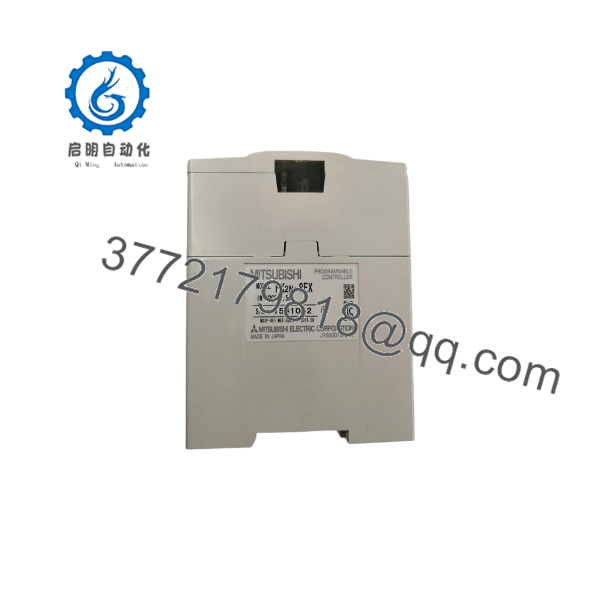
The Mitsubishi FX2N-8EX is a digital input expansion unit for the MELSEC-F FX2N series, adding 8 points of 24 VDC input with a 10 ms response time through screw-clamp terminals on a DIN-rail-mounted housing. It’s a standard building block for scaling I/O count on FX2N-based systems without stepping up to a larger base unit.
This module gets specified into FX2N and FX3U retrofit jobs because it draws zero additional current from the base unit’s internal 5V bus, which keeps expansion current-budget math simple when stacking multiple I/O modules on one base unit. Buyers replacing a failed unit in an existing rack pick this over a generic third-party I/O block because Mitsubishi’s own expansion bus addressing and current-budget tables are built around exact Mitsubishi part numbers.
Troubleshooting Quick Reference
| Symptom | Possible Cause | Relevance to this Part | Quick Check Method | Recommendation |
|---|---|---|---|---|
| No input LEDs light up on any point | Loss of 24 VDC field power or bad wiring at the terminal block | ❌ Low | Measure 24 VDC at the input terminals with a multimeter | Confirm field power before suspecting the module |
| Input LED lights but PLC program doesn’t see the signal | Addressing/configuration mismatch in the PLC program, not a module fault | ❌ Low | Check the input’s assigned device address against the base unit’s expansion order | Verify addressing in the program before replacing hardware |
| Entire expansion bus faults or base unit throws an I/O error after adding this module | Total expansion current draw exceeded the base unit’s budget | ✅ Moderate | Recalculate total residual current across all expansion modules on the base unit | Rebalance module load per Mitsubishi’s current-budget tables rather than assuming this module is defective |
| Single input point stuck on or unresponsive, others on the same module work fine | Localized input circuit failure on the module | ✅ High | Isolate the field wiring from that point and retest with a known-good signal source | If isolated field wiring doesn’t resolve it, this points to the module itself |
If these checks don’t clear it, send us the base unit model, full expansion module lineup, and the PLC’s error code display — that’s enough for us to tell you whether it’s this module or a system-level configuration issue.
FX2N-8EX
Frequently Asked Questions (FAQ)
Can this module be used with FX3U instead of ?
Yes — distributor documentation lists this specific part as compatible for I/O expansion on FX3U-series systems in addition to its native family. Just confirm your base unit’s expansion bus addressing scheme matches, since mixed-generation setups occasionally need extra configuration attention.
Is this hot-swappable if one input fails?
No — treat this like any FX-series expansion module: power down the base unit before adding, removing, or replacing an expansion unit. The expansion bus isn’t designed for live insertion, and doing it powered risks bus errors across the whole rack, not just the module you’re touching.
Why do some listings show this as a “block” and others as a “unit”?
Mitsubishi distinguishes I/O Extension Units (built-in power supply) from I/O Extension Blocks (no built-in supply, powered from the base unit) — this exact part number is documented on Mitsubishi’s own site as the built-in-supply Extension Unit variant. If your project depends on which type you have, confirm the exact suffix on the nameplate.
Do I need to reconfigure my PLC program after swapping this in?
No reprogramming should be needed for a straight like-for-like swap — the input addressing follows physical position in the expansion chain, not anything stored on the module. Just make sure you install the replacement in the same physical position as the original.
Is this new, refurbished, or used?
All three circulate for this part number — it’s a long-running, still-common series component. Distributor pricing typically spans new-boxed, refurbished-tested, and used-as-is grades, so confirm exactly which condition you’re being quoted before ordering.
Why do the physical dimensions I’m finding online not match?
Because two of the sources we checked list different figures for what should be the same physical unit — that’s a data-quality issue on the distributor side, not a sign of multiple hardware revisions we could confirm. Pull the dimension/CAD file directly from Mitsubishi’s FA product page before you finalize any panel layout.



