
 WhatsApp: +86 16626708626
 Email:
  Phone: +86 16626708626
Description
Key Technical Specifications
- Manufacturer: Monico Inc.
- Model Number: CDL-MCLE-FWM
- Product Family: Monico CDL Gateway / Gateway LE platform
- Product Category: Industrial protocol-converter and communications gateway module
- Primary Application: Data acquisition and integration for Caterpillar industrial engines and generator sets
- Engine-Side Network: Caterpillar Data Link (CDL)
- Core Function: Collects engine or genset data and presents it through a configured customer communications interface
- Host-System Use: Connection between Caterpillar engine data and a PLC, SCADA, HMI, historian, remote-monitoring, or third-party control platform
- Data Role: Protocol translation, data concentration, routing, and mapping of configured engine parameters
- Configuration Dependency: Communications behavior depends on the firmware/configuration loaded into the gateway and the suffix-specific interface package
- Replacement Requirement: Match the complete
CDL-MCLE-FWMlabel, existing configuration, port assignment, network wiring, and host-system protocol before purchase - Lifecycle Status: Legacy/discontinued gateway family; source availability from surplus inventory varies by condition and configuration
- Installation Requirement: De-energize equipment as required, apply ESD controls, and retain a complete configuration backup before replacement
Monico identifies its original CDL Gateway as a discontinued legacy product, while continuing support for existing deployments. The platform was designed to communicate directly with Caterpillar industrial engines and generator sets through Cat Data Link, then provide a customer communications interface using configured protocols and data maps.
Product Introduction
Monico CDL-MCLE-FWM is a legacy industrial communications gateway module used to integrate Caterpillar Data Link information from industrial engines and generator sets with external automation, monitoring, or remote-support systems. It belongs to the Monico CDL Gateway family, which collects engine data, maps selected parameters, and translates those values for the configured host interface.
The critical buying factor is configuration compatibility, not just the enclosure label. A replacement must match the CDL network connection, external communications protocol, port wiring, firmware, and installed data map. Monico’s CDL Gateway line is discontinued for new deployments but remains relevant for maintaining installed engine-monitoring systems.
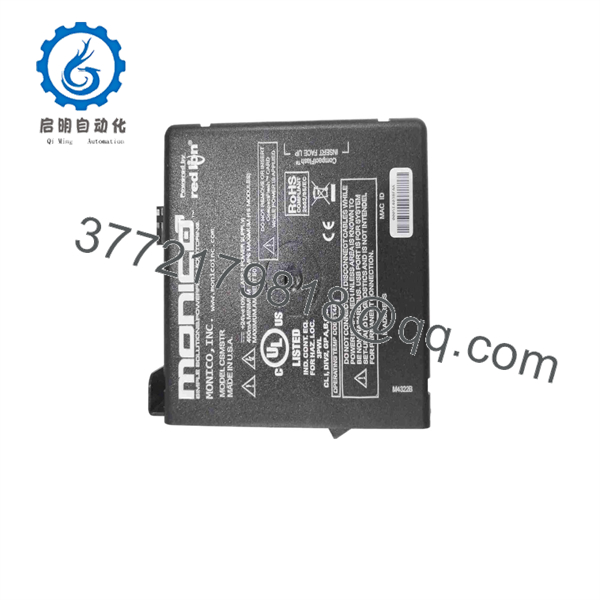
CDL-MCLE-FWM
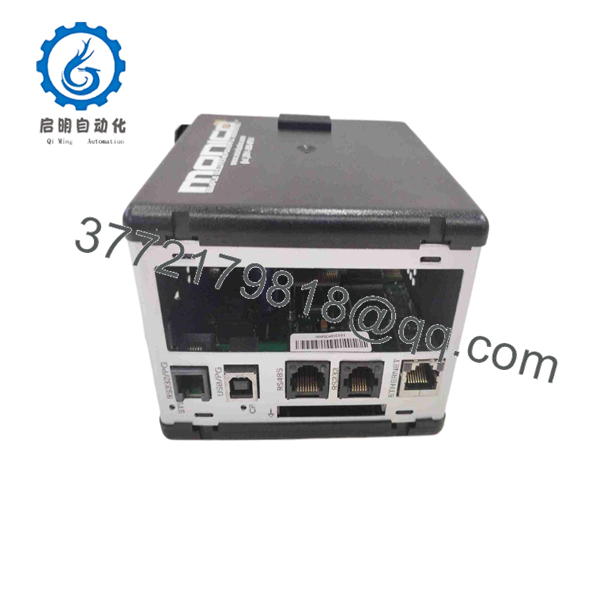
CDL-MCLE-FWM
Troubleshooting Quick Reference
| Symptom | Possible Cause | Relevance to This Part | Quick Check Method | Recommendation |
|---|---|---|---|---|
| Gateway does not power up | Blown fuse, missing supply voltage, reversed polarity, damaged power wiring | ✅ Medium | Measure supply voltage at the gateway input terminals with a calibrated Fluke 115; check upstream fuse, breaker, and ground reference | Verify supply voltage and polarity before replacing the gateway. Do not assume the module failed because its LEDs are dark. |
| Gateway powers up but shows no engine data | CDL wiring open, incorrect CDL polarity, engine ECM offline, wrong engine connector, failed network termination | ✅ High | Check engine ECM status with Caterpillar Electronic Technician where available; inspect CDL conductors end-to-end; compare wiring to the engine and gateway drawings | Diagnose the Caterpillar network first. Replace CDL-MCLE-FWM only after confirming valid engine-side communications at the gateway connection. |
| PLC, SCADA, or HMI cannot read gateway data | Wrong host protocol, IP address conflict, serial-port setting mismatch, bad Ethernet/serial cable, host firewall issue | ✅ High | Ping the configured IP address if Ethernet is used; verify serial baud rate, parity, stop bits, node ID, and cable pinout; compare configuration backup with host settings | Restore the correct communications settings or configuration. A replacement gateway without the proper data map will not automatically communicate. |
| Values display but are incorrect or scaled wrong | Incorrect parameter map, engineering-unit mismatch, stale configuration, wrong ECM personality or engine model mapping | ✅ High | Compare displayed values with Caterpillar ET or another known-good source; review tag mapping, scaling, and data types in the gateway configuration | Restore the verified configuration file. Do not change scaling in the PLC until the raw gateway mapping is proven correct. |
| Data drops out intermittently | Loose connector, shield/grounding issue, vibration, electrical noise, weak power supply, network loading | ✅ Medium | Trend supply voltage during cranking and load changes; inspect connector retention; check shield grounding against the installation drawing | Correct wiring, grounding, and supply problems first. If failure follows the gateway after cable checks, schedule replacement. |
| Replacement unit powers up but host system reports timeout | Missing configuration, incompatible firmware, different port assignment, wrong protocol variant | ✅ High | Save screenshots of the old unit’s configuration and host diagnostics; confirm gateway firmware and configured port roles before installation | Treat the gateway as configuration-dependent. Load the approved configuration before commissioning. |
| Gateway temperature rises or enclosure shows discoloration | Overvoltage, incorrect supply, internal failure, poor ventilation, water ingress | ✅ High | De-energize, inspect for heat damage and contamination, measure supply against the nameplate/drawing, and check cabinet ambient temperature | Replace the unit if damage is present, but identify the source of overvoltage or environmental exposure first. |
❗ Configuration warning: A protocol gateway is not a plug-and-play spare just because the part number matches. The replacement may power up normally yet provide no useful data until it receives the correct configuration file, communications settings, and engine parameter map. Back up the original before removing it.
❗ Firmware mismatch warning: Document the existing firmware version and host-system expectations. I have seen a technician fit a physically identical gateway, then chase a “PLC communication timeout” for two days because the new unit used different default port settings and an incompatible map revision.
❗ Wiring warning: Do not wire Caterpillar Data Link from memory. Confirm connector pinouts, polarity, shield treatment, and termination from the engine and gateway documentation. Reversing or mislanding a data pair may produce a dead network with no obvious physical damage.
❗ Power warning: Check the supply while the engine cranks and while high-current loads operate. A gateway can appear healthy at rest, then reset when the starter, battery charger, solenoid bank, or generator controls pull the DC system down.
❗ ESD warning: Use a grounded wrist strap and avoid handling circuit boards or exposed connector contacts. Legacy communications hardware is not forgiving of static discharge. I once saw a technician replace a working communications card in dry weather without ESD protection; it booted, lost its serial port within minutes, and turned one outage into a second callout.
Keep these checks in mind and you will save yourself 90% of typical rework time. If the fault remains unresolved, send technical support photos of the full module label, power terminals, engine-side CDL connector, host connection, LED status, configuration screens, and communications diagnostics.
Frequently Asked Questions
What is the Monico CDL-MCLE-FWM used for?
Monico CDL-MCLE-FWM is an industrial gateway module used to obtain data from Caterpillar engines or generator sets through Caterpillar Data Link and make configured data available to an external control, monitoring, or remote-support system. The wider Monico CDL Gateway family functions as a protocol converter and data concentrator for Caterpillar industrial-engine and genset applications.
Is CDL-MCLE-FWM a PLC module?
No. It is a communications gateway, not a general-purpose PLC CPU or I/O module. It does not replace a ControlLogix, CompactLogix, Modicon, or Siemens PLC processor. Its job is to collect and translate engine data between the Caterpillar communications network and the external automation or monitoring system.
Can I install a replacement gateway without saving the old configuration?
You can physically install it, but you should not expect the system to resume operation without configuration work. To be honest, this is where legacy gateway replacements become a hassle. The old unit may contain IP settings, serial settings, protocol selections, engine tag mappings, polling behavior, scaling, alarm logic, and port assignments that are not visible from the exterior.
Before removal, save the configuration file if the software is available. At minimum, record firmware version, IP address, subnet mask, gateway address, serial settings, host protocol, engine model, configured data points, wiring photos, and PLC/SCADA tag mapping.
Does this gateway work with every Caterpillar engine?
No. Compatibility depends on the engine ECM, available Caterpillar Data Link connection, engine generation, application wiring, and the gateway’s installed configuration. Confirm the exact engine or genset model, ECM type, communications network, existing gateway data map, and host-system protocol before ordering.
The Monico CDL Gateway platform was designed for Caterpillar industrial engines and generator sets, but the data exposed to the host system is configuration-specific.
Is CDL-MCLE-FWM obsolete?
The Monico CDL Gateway product family is identified by Monico as discontinued for new purchases, although it remains supported for existing deployments. That makes replacement sourcing a maintenance and downtime-management issue: available inventory can be limited, and a like-for-like spare may come from new-surplus or refurbished stock rather than current production.
For a planned shutdown, keep one tested, configuration-ready spare on the shelf. For an unplanned outage, request confirmation of actual inventory, full-label photos, condition, firmware details where available, and dispatch timing before issuing a purchase order.
Can I replace this with a newer Monico gateway?
Possibly, but do not assume it is a direct drop-in replacement. A newer gateway may require a different configuration tool, wiring change, network conversion, license, revised PLC tags, or an updated engine data map. Use a newer product only after confirming electrical interfaces, CDL support, host protocol, data-point coverage, and commissioning requirements.
For a short outage window, a verified like-for-like CDL-MCLE-FWM replacement with the correct configuration is usually the lower-risk path. For a modernization project, evaluate a currently supported monitoring gateway and allow time for site acceptance testing.
Why is a New Surplus CDL-MCLE-FWM cheaper than factory supply?
New Surplus stock usually originates from unused project inventory, warehouse spares, cancelled projects, distributor overstock, or an OEM maintenance inventory release. The lower price often reflects product discontinuation and secondary-market sourcing rather than a defect.
Request evidence instead of accepting generic claims:
- Actual high-resolution label photos showing
CDL-MCLE-FWM - Physical condition photos of ports, connectors, seals, and enclosure
- Confirmation of whether the item is New Original, New Surplus, or Refurbished
- Firmware version and configuration status, if available
- Written warranty duration and return terms
- A documented functional test result using a representative power and communications setup
What testing should a supplier complete before shipping?
A proper supplier inspection should follow a traceable process:
- Inbound inspection and traceability: Verify the full part-number label, source documents, serial or lot information, and factory markings. Inspect for corrosion, cracked housings, rework marks, stripped threads, damaged ports, altered labels, or UV-yellowed plastic.
- Power-up testing: Power the unit from a regulated supply matching the applicable nameplate or installation requirement. Confirm startup behavior, status LEDs, and absence of abnormal heating. Record the supply voltage and current draw.
- Communications test: Connect the unit to an appropriate test system, then confirm it establishes communications on its configured host interface. Where practical, use a representative CDL simulator or known-good Caterpillar engine/ECM interface to confirm data reception and parameter updates.
- Load and thermal observation: Run the unit continuously for at least 24 hours when test capability permits. Monitor for resets, port dropouts, communication errors, and abnormal enclosure temperature.
- Firmware and configuration verification: Record the firmware version; retain or remove the old configuration only with written buyer approval. A supplier must not claim that an unknown configuration matches the buyer’s site.
- Final QC and packaging: Require QC sign-off, ESD-safe handling, protective packaging for ports and connectors, bubble wrap, heavy-duty corrugated boxing, and a dated QC-passed label. Test photos and the test report should be available upon request.



