
 WhatsApp: +86 16626708626
 Email:
  Phone: +86 16626708626
Description
3. Key Technical Specifications
| Parameter | Value |
|---|---|
| Product Model | MVME320B |
| Part Number | 01-W3483B 01C |
| Bus Architecture | VMEbus |
| Product Type | Intelligent Disk Controller |
| Storage Support | Winchester Hard Drives |
| Floppy Support | Floppy Disk Drives |
| Controller Type | Intelligent Peripheral Controller |
| Interface | VMEbus P1/P2 |
| Application | Industrial Computing Systems |
| Form Factor | Double-Height VME Module |
| Typical Deployment | Embedded Control Systems |
| Product Status | Obsolete Legacy Hardware |
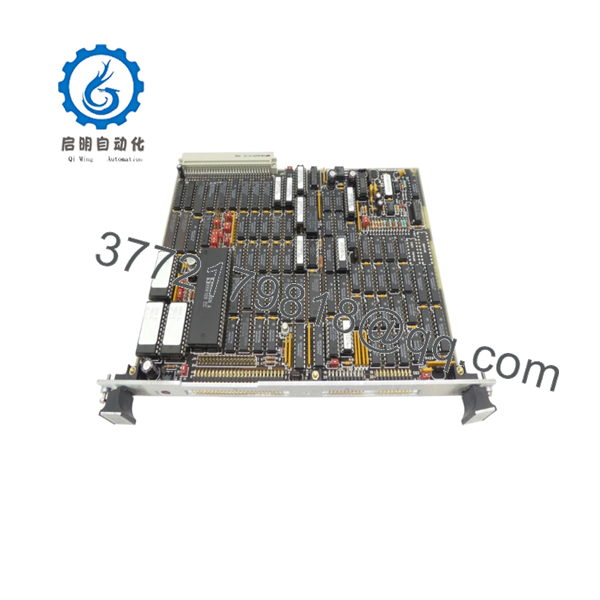
Available documentation and surplus inventory records identify part number 01-W3483B 01C as a Motorola MVME320B VMEbus Intelligent Winchester/Floppy Disk Controller Module.
4. Product Introduction
The Motorola 01-W3483B 01C is a MVME320B intelligent VMEbus storage controller designed to manage Winchester hard drives and floppy disk subsystems in legacy VME-based computing environments. The module offloads disk-management functions from the host processor while providing dedicated storage control within industrial and embedded systems.
The MVME320B was commonly installed in telecommunications, military, semiconductor, and process-control systems where VMEbus architectures dominated the control platform. Although obsolete today, many facilities continue to maintain spare inventory because replacing the entire VME platform often costs substantially more than replacing the controller board.

- 01-W3483B 01C
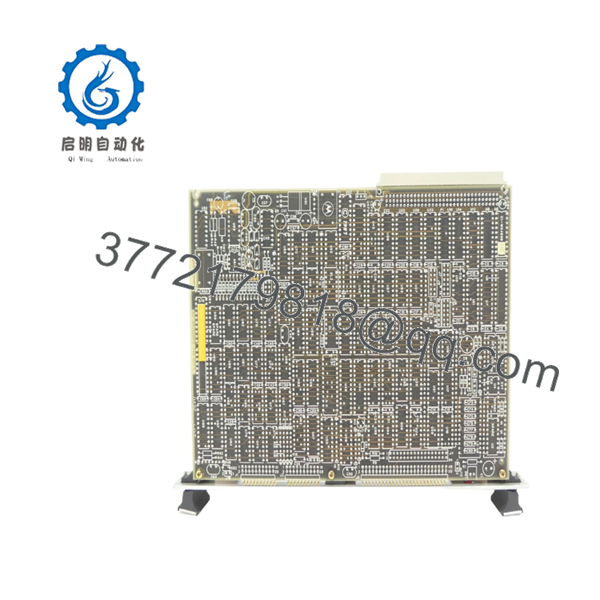
- 01-W3483B 01C
5. Installation & Configuration Guide
Stage 1: Pre-Installation Preparation (10 Minutes)
⚠️ Safety First
- Notify operations personnel of planned maintenance.
- Bring the controlled process to a safe state.
- Apply lockout/tagout procedures.
- Remove chassis power completely.
- Wait at least 5 minutes for power supply discharge.
Tools Required
- ESD wrist strap
- PH1 screwdriver
- Fluke 115 multimeter
- Cable labels
- Smartphone camera
- Flashlight
Data Backup
- Backup all accessible storage media.
- Record VME slot location.
- Photograph disk-controller cabling.
- Document drive addresses and termination settings.
- Record operating system and boot-device configuration.
Stage 2: Removing the Old Module (5 Minutes)
- Remove chassis covers if required.
- Label all storage cables.
- Disconnect ribbon and drive-interface cables carefully.
- Release VME ejector handles.
- Pull the board straight out from the backplane.
⚠️ Note
Do not discard the old controller until the replacement successfully boots the operating system and accesses all storage devices.
Inspection
- Check VME connectors for bent pins.
- Inspect ribbon cable condition.
- Verify drive termination hardware.
- Remove dust from card guides.
Stage 3: Installing the New Module (10 Minutes)
Critical Steps
- Attach ESD strap before handling the board.
- Verify the replacement part number matches 01-W3483B 01C.
- Duplicate all jumper settings exactly.
- Install the board into the card guides.
- Fully seat the board into the VME backplane.
- Lock ejector handles.
- Reconnect storage cables.
Configuration Clone (Crucial)
Storage controllers from this era often depend on jumper-defined drive addressing.
This is the most common rookie mistake, but it happens constantly. Take photographs before removal and duplicate every setting exactly.
Self-Checklist
- Model verified
- Jumpers duplicated
- Ribbon cables connected
- Board fully seated
- Backplane inspected
- ESD procedures followed
Stage 4: Power-On & Testing (10 Minutes)
Pre-Power Check
- Verify chassis supply voltages.
- Check continuity on storage cabling.
- Confirm no shorts exist on the power rails.
Startup Procedure
- Power the VME chassis.
- Observe board initialization LEDs.
- Verify drive detection during boot.
- Confirm controller communication with storage devices.
- Run disk-access diagnostics.
- Verify application startup.
⚠️ Troubleshooting Note
- Failure to detect drives often indicates addressing or termination problems.
- Intermittent disk access frequently traces to aging ribbon cables.
- Boot failures may indicate firmware revision incompatibility between controller and operating system.
6. Frequently Asked Questions (FAQ)
Q1. Can I hot-swap the 01-W3483B 01C?
No.
The MVME320B was designed for traditional VMEbus systems and does not support hot insertion. Power down the chassis before installation or removal.
Q2. Is this model obsolete?
Yes.
The MVME320B platform is legacy hardware and has been out of production for many years. Most available units originate from surplus inventories or decommissioned systems.
Q3. Is this board genuinely new?
It depends on the source.
Current market inventory generally falls into one of four categories:
- New Original
- New Surplus
- Refurbished (tested)
- Used Working Pull
Request actual photographs, serial numbers, and test reports before purchasing.
Q4. What does this controller actually do?
The MVME320B manages storage devices connected to the VME system. It controls Winchester hard drives and floppy drives while reducing storage-management workload on the host CPU.
Q5. What is the safest replacement option?
The safest replacement is another MVME320B carrying the same part number revision.
Many legacy Motorola boards look nearly identical, but firmware, connector assignments, and hardware revisions can differ.
Q6. Will replacing this board affect my operating system?
Potentially.
If the controller stores configuration information or interacts with boot devices, incorrect jumper settings or incompatible firmware may prevent successful startup.
Always perform a complete system backup before replacement.
Q7. Why are prices so different between suppliers?
Availability drives pricing.
Legacy VME hardware is no longer manufactured, so pricing depends on:
- Remaining inventory
- Test status
- Warranty coverage
- Documentation availability
- Traceability records
I’ve seen identical boards listed anywhere from a few hundred dollars to several thousand depending on certification and testing requirements.
Technical Pitfall & Survival Guide
❗ Firmware Revision Mismatch
I’ve seen maintenance teams install a replacement controller that appeared identical to the failed unit.
The system powered up normally but failed to recognize storage devices.
The root cause was a firmware revision difference.
Avoidance: Record firmware revisions before removal and request matching hardware revisions when ordering.
❗ DIP Switch / Jumper Misconfiguration
Storage controllers from this generation rely heavily on hardware configuration.
One incorrect jumper can prevent the entire system from booting.
Avoidance: Photograph every jumper and switch position before removal.
❗ Terminal Block / Cable Compatibility
Legacy storage systems often use custom ribbon-cable arrangements.
Do not assume cable orientation from memory.
Avoidance: Verify pin-1 orientation and connector labeling before power-up.
❗ Power Draw Specifications
Many VME racks operate close to available power capacity after years of upgrades.
Adding replacement hardware without verifying power requirements can introduce intermittent faults.
Avoidance: Calculate total chassis load and maintain at least a 20% power reserve.
❗ Electrostatic Discharge (ESD)
I once watched a contractor replace a VME storage controller without grounding himself during winter maintenance.
The board passed visual inspection, powered on once, and never initialized again.
Avoidance: Use a grounded wrist strap and ESD-safe work surface throughout installation.
Keep these checks in mind and you’ll save yourself 90% of typical rework time.



