
 WhatsApp: +86 16626708626
 Email:
  Phone: +86 16626708626
Description
Key Technical Specifications
- Model: MVME 165-04
- Brand: Motorola
- Product family: MVME 165 VME Single-Board Computer
- Microprocessor: MC68040 at 25 MHz
- CPU architecture: 32-bit Motorola 68000 series
- On-board memory: 4 MB embedded DRAM (configurable up to 16 MB via SIMMs)
- ROM: 128 KB–512 KB (for MVME165bug monitor/boot firmware)
- Bus standard: VMEbus (16-bit or 32-bit backplane support)
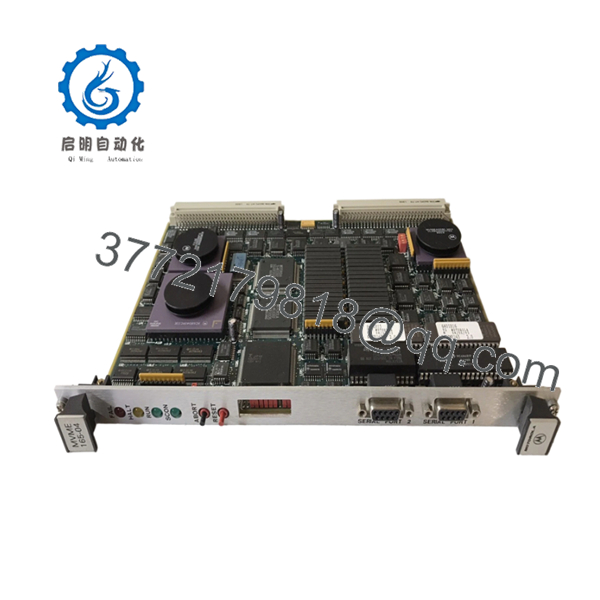
- Serial ports: Dual RS-232 async serial ports
- Ethernet: Optional Ethernet interface (verify on exact unit)
- Form factor: 6U VME board
- Front panel controls: Abort and reset buttons
- Operating temperature: Commercial 0 to 55°C (model-dependent)
- Power consumption: ~20–40 W typical
- Supported OS: VxWorks, OS-9, BSD UNIX, MVME165bug monitor
- Use case: Legacy industrial control, embedded automation, test systems, academic research
Product Introduction
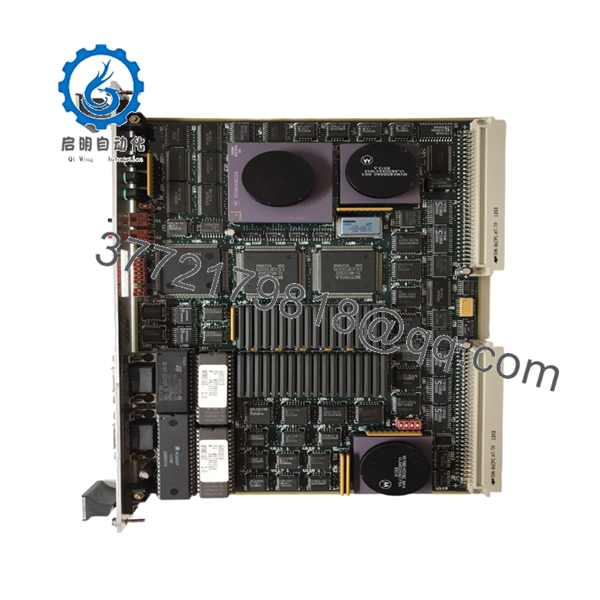
Motorola MVME 165-04 is a 68040-based VME single-board computer running at 25 MHz with 4 MB of embedded DRAM. It serves as the processing core for legacy VME racks in industrial control systems, test equipment, and embedded automation hardware.
This board is chosen as a direct replacement when a plant must keep an existing VME chassis operational. Buyers focus on matching the exact memory size, firmware version (MVME165bug), and dual serial port configuration to avoid boot or driver failures during installation.

- MVME 165-04
- MVME 165-04
Troubleshooting Quick Reference
| Symptom | Possible Cause | Relevance to this Part | Quick Check Method | Recommendation |
|---|---|---|---|---|
| No LEDs on power-up | Power supply failure or blown fuse | ❌ Low | Measure 5 V and 12 V at the VME backplane input terminals | Check PSU and fuses before replacing the board |
| MVME165bug monitor not starting | ROM/firmware corruption or memory fault | ✅ High | Listen for boot beeps and check ROM chip for damage | Reload firmware or replace the board if ROM is faulty |
| Boots but hangs early | Memory mismatch or SIMM installation issue | ✅ High | Verify SIMM seating and compare total RAM to original spec | Reseat or replace SIMMs to match original 4–16 MB config |
| Serial port not responding | Cable, terminal settings, or UART fault | ⚠️ Medium | Check baud rate, parity, cable pinout, and loopback test | Verify wiring and settings before declaring board failure |
| VME crate fails to recognize board | Backplane seating or slot compatibility issue | ✅ High | Reseat the card, inspect edge connector condition | Reinstall carefully and confirm VME slot requirements |
| Random resets during operation | Aging power supply or unstable backplane voltage | ⚠️ Medium | Measure 5 V, 12 V, and -12 V rails under load | Check crate PSU and backplane before replacing the CPU board |
Contact technical support with clear photos, startup symptoms, and any diagnostic logs if the fault is unclear.
Frequently Asked Questions
Q: Is MVME 165-04 the same as MVME 165-01?
A: No. MVME 165-01 typically has 4–16 MB DRAM and similar CPU specs, but the “-04” suffix indicates 4 MB embedded DRAM specifically. Memory size and configuration differ between variants, so match the exact part number before swapping.
Q: Can I hot-swap this MVME165 board?
A: No. MVME165 boards are not hot-swappable. Power down the crate before installing or removing the card to avoid backplane damage.
Q: Will my old firmware (MVME165bug) work with this board?
A: Yes, the MVME165bug monitor is built into the ROM on the board. However, if you’re upgrading to a different OS (e.g., VxWorks), verify the OS version matches the 68040 CPU and memory config.
Q: Why is this board cheaper than a new OEM part?
A: Because it’s obsolete and typically sold as new surplus or used tested stock. New OEM units are no longer in production, so prices drop but availability is limited.
Q: What condition should I expect?
A: Most units are new surplus or used tested. You’ll get a board that’s either unopened (surplus) or functional with prior use. Ask for test photos, ROM version, and status LED behavior before purchase.
Q: Does this board support Ethernet?
A: Ethernet is optional on MVME 165 boards. Verify whether your exact unit has the Ethernet interface installed before ordering.
Q: What warranty do suppliers usually offer?
A: Common warranties range from 90 days. Check the specific supplier’s terms, as obsolete stock often carries shorter coverage than new production.
Q: What should I verify before ordering?
A: Confirm the exact part number, memory size (4 MB vs. expanded), Ethernet interface presence, firmware/OS version, and the VME crate/backplane type. A mismatch here is the fastest way to lose time during installation.



