
 WhatsApp: +86 16626708626
 Email:
  Phone: +86 16626708626
Description
Key Technical Specifications
- Model: MVME 225-1
- Part Number: 01-W35098-01
- Brand: Motorola
- Platform: VMEbus
- Board Type: Expansion / memory module
- Application: Industrial control and embedded VME systems
- Compatibility: Motorola MVME and related VME racks
- Condition: New Surplus or Used Tested, depending on stock
- Availability: Limited, obsolete part class
- Warranty: Supplier-dependent; verify before purchase
Product Introduction
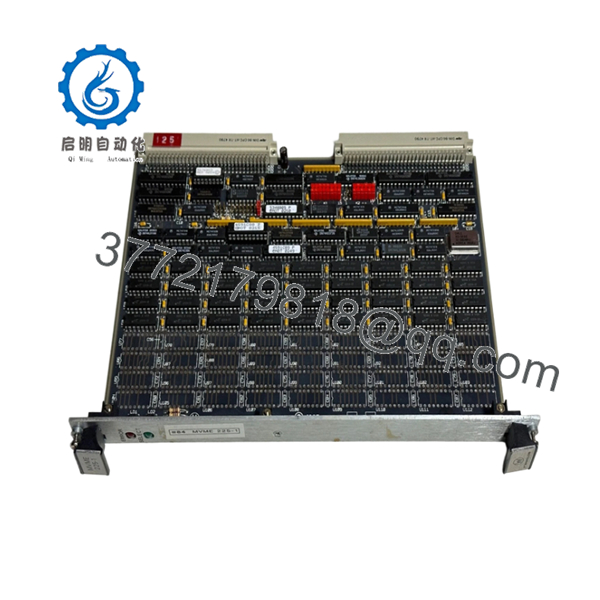
Motorola MVME 225-1 01-W35098-01 is a VMEbus memory expansion module used in industrial embedded control systems. It fits Motorola MVME-based racks and older VME architectures that still appear in plant-floor automation, test systems, and legacy machine controls.
Buyers usually choose this part for exact-form-fit replacement in obsolete systems where a board swap is faster than a platform migration. Verify rack compatibility, backplane layout, and revision match before installation.

- MVME 225-1 01-W35098-01
Troubleshooting Quick Reference
| Symptom | Possible Cause | Relevance to this Part | Quick Check Method | Recommendation |
|---|---|---|---|---|
| System does not boot after install | Incorrect seating, bad backplane slot, or board mismatch | ✅ High | Reseat the board, inspect connector pins, verify slot assignment | Check physical installation before replacing the module |
| Memory errors during startup | Failed RAM devices or address conflict | ✅ High | Run system diagnostics and check boot logs | Replace if errors follow the board across slots |
| No bus activity on VME rack | Backplane power issue or slot-level connectivity fault | ❌ Low | Measure rack supply rails and check adjacent boards | Verify rack power and backplane first |
| Intermittent freezes or resets | Marginal board, heat, or aging electrolytics | ✅ Medium | Monitor temperature and run extended soak test | Replace if failures repeat under load |
| Board passes power-up but fails under load | Timing or compatibility issue with host CPU/backplane | ✅ Medium | Compare revision, firmware, and rack configuration | Confirm exact system match before condemning the card |
| Address decode conflict | Configuration mismatch in legacy system | ✅ High | Check jumpers, switches, and system map | Correct configuration before swapping hardware |
Contact technical support with photos of the board, rack slot, jumper settings, and boot diagnostics if the fault remains unclear.
Frequently Asked Questions
Q: Is this a direct replacement for every MVME system?A: No. It is only a direct fit when the rack, backplane, and system configuration match the original installation. VME hardware is old enough that small revision differences can matter.
Q: Is MVME 225-1 hot-swappable?A: No. Power down the rack before removal or insertion. Live insertion can damage the board, backplane, or neighboring modules.
Q: Will my existing configuration transfer automatically?A: Not always. If the board uses jumpers, DIP switches, or system-specific addressing, you need to mirror the original settings exactly.
Q: Why is this part often sold as surplus?A: Because Motorola MVME hardware is obsolete and no longer common in active production. Most available stock comes from excess inventory, liquidation, or tested pulled parts.
Q: How can I verify compatibility before ordering?A: Match the full part number, inspect the original board label, compare connector and slot format, and confirm the host system’s VME backplane requirements.
Q: Why is this cheaper than a factory-new part?A: Factory-new production is usually unavailable for obsolete MVME hardware. Pricing reflects limited surplus supply, test status, and seller warranty terms.
Q: What should I check before installing a used or surplus board?A: Inspect for bent pins, corrosion, rework marks, battery leakage, and physical damage. Also compare all switches and jumpers against the removed unit.



