
 WhatsApp: +86 16626708626
 Email:
  Phone: +86 16626708626
Description
3. Key Technical Specifications
| Parameter | Value |
| Processor Type | Motorola MC68000 (16-bit) |
| Number of Channels | 6 Independent Serial Ports |
| Interface Standards | RS-232-C, RS-422, RS-423 (Configurable per channel) |
| Bus Architecture | VMEbus (Standard Double-Height Form Factor) |
| Baud Rate Range | 50 bps to 19.2 kbps (Asynchronous) / up to 2 Mbps (Synchronous) |
| On-Board RAM | 128 KB Dual-Ported RAM |
| On-Board ROM | Up to 64 KB (Sockets for EPROM/EEPROM) |
| Power Requirements | +5 VDC (3.5 A typical) |
| Operating Temperature | 0 to +55 °C |
| Storage Temperature | −40 to +85 °C |
| Relative Humidity | 5% to 90% (Non-condensing) |
4. Product Introduction & Supply Chain Strategy
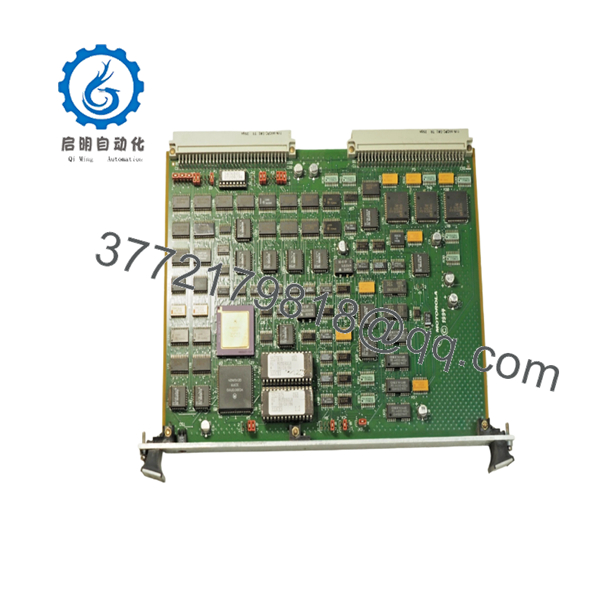
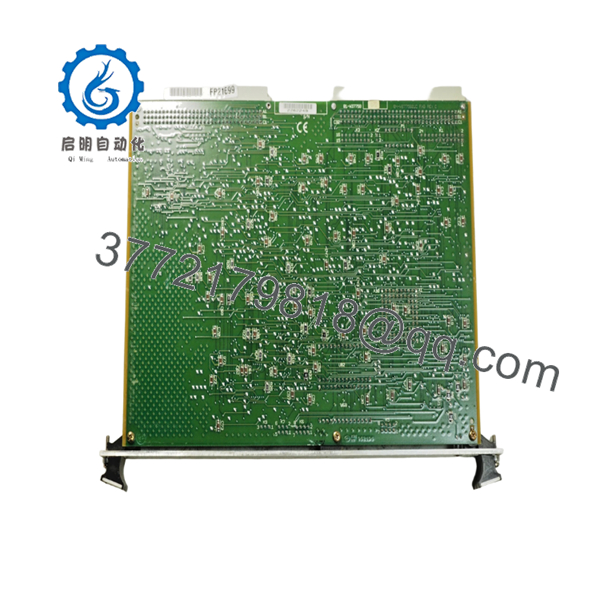
The Motorola MVME 333S-2 01-W3775B07D is a high-performance, VMEbus-compatible serial communications controller designed for industrial automation, aerospace simulation, and legacy process control systems. Utilizing an on-board MC68000 microprocessor, this module offloads heavy serial I/O traffic from the main system controller, managing data routing across six independent multiprotocol channels with minimal backplane latency.
From an inventory management perspective, securing this card as a New Surplus unit is an essential insurance policy for operations reliant on vintage VMEbus infrastructure. Because this hardware is entirely obsolete and no longer supported by the OEM, sourcing authentic New Original stock protects your facility against long-term lead time variability and the compounding failure risks associated with unverified second-hand components. Investing in factory-sealed modules eliminates the high Total Cost of Ownership (TCO) caused by unplanned downtime, keeping your legacy production lines operational without requiring a premature, multimillion-dollar system overhaul.

- MVME 333S-2 01-W3775B07D
- MVME 333S-2 01-W3775B07D
5. Installation & Configuration Guide
Stage 1: Pre-Installation (Prep & Safety)
- Isolate power to the VME chassis using established lock-out/tag-out procedures. Verify that the rack cooling fans have completely spun down.
- Put on a grounded, static-dissipative wrist strap connected to the chassis ground to prevent electrostatic discharge damage.
- Before removing the existing card, use a digital camera to document all external cable connections, terminal wiring, and the exact positions of all onboard configuration jumpers and DIP switches.
Stage 2: Removal
- Unfasten the front panel retaining screws located at the top and bottom of the faulty module.
- Disconnect all serial communication cables from the front panel interfaces.
- Grasp the injector/ejector handles on the front panel and pull them outward simultaneously to unseat the module from the P1 and P2 backplane connectors. Slide the card out of the chassis guides smoothly, avoiding contact with adjacent boards.
Stage 3: Installation (Clone & Seat)
- Place the New Surplus MVME 333S-2 on an ESD-safe mat.
- Configure the hardware jumpers and DIP switches on the new module to mirror the old card exactly, paying specific attention to the VMEbus base address settings, interrupt levels, and port protocol selections (RS-232 vs. RS-422).
- Align the module with the upper and lower chassis card guides. Slide the card into the slot until the connectors touch the backplane. Firmly press the injector/ejector handles inward to seat the backplane pins completely. Fasten the front panel retaining screws.
Stage 4: Power-On & Testing
- Reattach the serial communication cables to their designated ports according to your pre-removal documentation.
- Power up the VME chassis. Monitor the on-board LED indicators immediately.
- Verify that the green status LED illuminates, confirming the module has passed its internal power-on self-test (POST). If the red error LED remains lit, immediately cut power and verify backplane alignment and jumper configurations.
6. Firmware/Software Versions & Upgrade Notes
The MVME 333S-2 relies heavily on firmware stored in on-board EPROM chips to initialize its MC68000 processor and coordinate backplane communication. When replacing an existing module, ensure that the suffix code (01-W3775B07D) and firmware version match your system’s current software revision level.
Upgrading or downgrading firmware versions during a hardware swap presents significant risk; a firmware mismatch can cause severe communication protocol timeouts, address conflicts, or complete failure of the host operating system to recognize the I/O card. If your host system requires a specific legacy driver version, you must physically transfer the original EPROMs from the failed module to the New Surplus card, provided the original chips are undamaged and free of electrical faults.
7. Frequently Asked Questions (FAQ)
- Why is this New Surplus module priced higher than refurbished options on the market?
Our pricing reflects the strict reality of securing genuine, zero-hour New Surplus inventory for an obsolete component. While a refurbished unit may cost less initially, it carries a high risk of hidden component degradation, worn backplane contacts, and dried-out capacitors. One single failure can cause an emergency shutdown costing ten times the price difference. This New Surplus module provides a full 10-15 year operational lifespan, offering true capital efficiency and peace of mind.
- Are these modules actually brand new, and how do you verify them?
Yes. These are genuine, original components sourced from authorized overstock channels. They are not pulled from decommissioned plants. Our standard operating procedure includes rigorous inbound traceability checks, original serial number verification, and physical inspection to ensure zero wear on backplane pins and zero modifications.
- Can I hot-swap the MVME 333S-2 while the VME chassis is powered up?
No. The VMEbus architecture utilized by the MVME 333S-2 does not natively support hot-swapping. Attempting to remove or insert this card while the backplane is energized can cause severe electrical arcing, destroy the transceiver ICs on the module, or generate a voltage spike that crashes the entire rack. Always completely isolate power before replacing hardware.
- Does this card retain its programming or configuration after a total power loss?
The physical configuration of this card (such as port protocols and memory addresses) is completely retained via physical hardware jumpers and DIP switches. Operating firmware is permanently stored in non-volatile EPROM sockets. Temporary application data handled during operation is held in dual-ported RAM and will clear when power is removed, meaning no manual software re-flashing is required after a normal power cycle.
- What warranty terms come with this New Surplus card?
To support your facility’s long-term reliability goals, this module is backed by a comprehensive 1-year warranty covering full functional performance. This stands in stark contrast to the standard 30-day terms typically found with used or refurbished hardware brokers.



