
 WhatsApp: +86 16626708626
 Email:
  Phone: +86 16626708626
Description
Key Technical Specifications
- Processor: MC68020
- Processor Speed: 16.67 MHz
- Coprocessor: MC68881 floating-point coprocessor
- Memory: 1 MB shared local DRAM
- ROM Capacity: Up to 256 KB total via four socket positions
- VME Interface: A24/D32 master, A24/D16 compatible
- Voltage: +5 V, +12 V, -12 V
- Operating Temperature: 0 to 55 C with forced-air cooling
- Bus Features: Interrupt handler/interrupter, bus requester, system controller support
- Form Factor: Double-high, single-wide VME module
Product Introduction
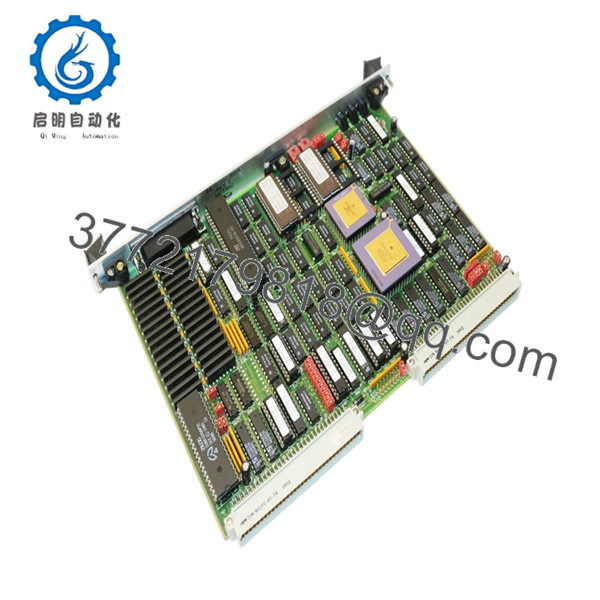
Motorola MVME133-1 is a VMEbus single-board processor module built around the MC68020 at 16.67 MHz with an MC68881 FPU. It is used in legacy industrial control, test stands, and older OEM VME systems where exact board compatibility matters.
This board is chosen when the existing rack needs the same processor family, same bus behavior, and the same legacy software environment. The 1 MB local DRAM, socketed ROM space, and VME system-controller functions make it a practical replacement for older Motorola VME installations.
Troubleshooting Quick Reference
| Symptom | Possible Cause | Relevance to this Part | Quick Check Method | Recommendation |
|---|---|---|---|---|
| No LEDs on power-up | Backplane power issue, not board failure | ❌ Low | Measure +5 V, +12 V, and -12 V at the VME rack with a multimeter | Check PSU, backplane fuse, and slot power before replacing the board |
| FAIL LED stays on | CPU reset fault or bad firmware/ROM | ✅ High | Observe boot sequence and verify ROM contents if possible | High likelihood of board-level fault or corrupted EPROM set |
| Board runs but will not boot application | Missing or mismatched ROM image | ✅ Medium | Confirm ROM/PROM set, revision, and jumpers against the old board | Compare against the original module before swapping hardware |
| Serial console shows garbage | Baud rate or clock source mismatch | ✅ Medium | Check terminal settings and verify the board’s serial clock configuration | Match the original baud settings and header/jumper setup |
| VME interrupts not seen by host | Interrupt level or arbitration issue | ✅ Medium | Check system controller role and interrupt level configuration | Verify bus grants, level jumpers, and rack topology |
| Random crashes after warm-up | Power rail instability or thermal issue | ✅ Medium | Measure rail ripple, check airflow, and monitor board temperature | Inspect cooling and rack loading before condemning the CPU board |
Contact technical support with photos of the board, jumper positions, LED status, and any console logs if the fault is still unclear.

- MVME133-1
Frequently Asked Questions
Q: Is the MVME133-1 the same as the MVME133?
A: Not exactly. The MVME133-1 runs the MC68020 at 16.67 MHz, while the base MVME133 is the slower variant. For a direct replacement, match the exact part number and verify the software and timing expectations of your rack.
Q: Can I hot-swap this module?
A: No. Power the rack down first. Pulling a legacy VME CPU live can stress the backplane, corrupt data, or damage the board.
Q: Will my existing software still run after the swap?
A: Usually yes if the ROM set, memory map, and serial settings match the original board. The catch is that old systems often depend on exact jumper settings and boot images, so document the old card before removing it.
Q: What condition is this part usually sold in?
A: Most units in the surplus market are New Surplus or Refurbished and tested. That is why the price is below factory-new pricing: the board is legacy stock, not current production.
Q: Is it a direct replacement for every MVME133 system?
A: No, not automatically. Some sites used custom ROMs, different serial setups, or specific backplane controller roles. Verify the exact suffix, memory configuration, and system-controller requirements before installation.
Q: Why do these old Motorola boards fail so often?
A: To be honest, many failures come from age, heat, dried capacitors, and bad storage conditions rather than the CPU itself. The common traps are cracked solder joints, marginal ROMs, and corrupted configuration settings.
Q: What warranty should I expect?
A: Surplus sellers often offer a limited warranty, commonly 30 to 365 days depending on condition and test level. Ask for the test report, serial number, and return terms before purchase.



