
 WhatsApp: +86 16626708626
 Email:
  Phone: +86 16626708626
Description
Key Technical Specifications
| Parameter | Value |
| Microprocessor | MC68020 |
| Clock Speed | 20 MHz |
| Floating Point Coprocessor | MC68881 |
| On-board DRAM | 1 MB (Shared) |
| ROM/EPROM Sockets | 4 Sockets (up to 512 KB) |
| Serial Ports | 3 RS-232C Ports |
| Timers | (3) 16-bit programmable timers |
| Bus Interface | VMEbus (A32/D32 Master/Slave) |
| Power Consumption | 3.5 A (typical) @ +5 VDC |
| Operating Temperature | 0 to 55°C |
Product Introduction & Supply Chain Strategy
The Motorola MVME133SA-20 serves as a foundational 32-bit processing element for VMEbus-based industrial control systems. It integrates the MC68020 microprocessor with a dedicated math coprocessor and 1 MB of DRAM, providing the computational overhead required for real-time data acquisition and complex logic execution in legacy manufacturing environments.
From a supply chain perspective, sourcing this module as New Surplus is a critical risk-mitigation strategy. Since these units are no longer in production, relying on refurbished boards introduces significant Total Cost of Ownership (TCO) risks, such as capacitor dry-out or logic timing drifts that cause intermittent system hangs. Acquiring New Surplus units ensures the 10-15 year component lifespan required to keep legacy lines running without the 10x cost penalty of an unplanned emergency shutdown.
Installation & Configuration Guide
Stage 1: Pre-Installation (Prep & Safety)
Ensure the rack is powered down and follows lock-out/tag-out (LOTO) protocols. Wear a grounded ESD wrist strap before handling the card. Before removing the old module, document all jumper settings (J1 through J20) and EPROM labels. Photograph the existing wiring on the front panel serial connectors.
Stage 2: Removal
Loosen the two captive screws located at the top and bottom of the front panel. Use the injector/ejector handles to gently break the seal from the VMEbus backplane. Pull the card straight out of the card guide to avoid bending any of the 96-pin DIN connectors.
Stage 3: Installation (Clone & Seat)
Verify that the jumpers on the new MVME133SA-20 exactly match the original unit to ensure correct base address and interrupt levels. Align the module with the card guides and slide it in until it meets the backplane. Apply firm, even pressure to the handles to fully seat the module.
Stage 4: Power-On & Testing
Secure the front panel screws and re-attach serial cables. Monitor the front panel LEDs during power-up. The “FAIL” LED should illuminate briefly during the Power-On Self-Test (POST) and then extinguish. If the “RUN” LED lights and stays on, the processor has successfully initialized and is executing logic.
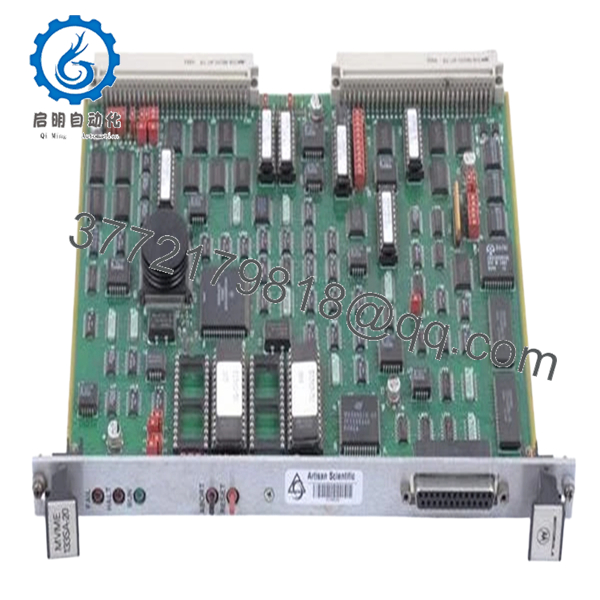
- MVME133SA-20
Firmware/Software Versions & Upgrade Notes
The MVME133SA-20 typically ships with specific 133BUG monitor firmware. It is vital to ensure the EPROMs on the replacement board match the version of your existing system (e.g., V2.4). Mismatched firmware can result in VMEbus arbitration errors or failure to communicate with secondary I/O cards.
Warning: Do not attempt to upgrade firmware unless the application software has been verified for compatibility with the newer instruction set. A hardware swap is the safest time to verify your EPROM checksums against your site backups.
Frequently Asked Questions (FAQ)
Is this really a New Surplus unit, or is it just cleaned up?
This is a genuine New Surplus unit. It has never been installed in a production environment. Unlike refurbished parts that are “cleaned” after years of heat exposure, our stock is verified for zero-hour usage, meaning the electrolytic capacitors and backplane pins are in factory-new condition.
Why is this module more expensive than the “Tested/Used” versions I see online?
You are paying for reliability and a lower TCO. A used module has already endured thousands of thermal cycles, making it a ticking time bomb for your production line. Our New Surplus pricing reflects the scarcity of unused legacy hardware that provides a guaranteed long-term service life.
Can I hot-swap this board while the VME rack is powered?
No. The MVME133SA-20 does not support hot-swapping. Attempting to insert or remove the card while the backplane is energized can cause electrical arcs that may destroy the module’s bus buffers or damage adjacent cards.
How do I handle the EPROMs from my old board?
If your application uses custom software stored in EPROMs, you must carefully migrate those chips to the new board. Ensure the notch on the EPROM matches the orientation of the socket to prevent blowing the chip upon power-up.
What is the warranty on this legacy part?
We provide a comprehensive 1-year warranty on all New Surplus inventory. Because we verify the authenticity and physical integrity of the hardware, we stand behind its performance as an OEM-equivalent replacement.



