WhatsApp: +86 16626708626
 Email:
 Phone: +86 16626708626
Description
3. Key Technical Specifications
- Processor: MC68040, 25 MHz, 32-bit, with integrated MMU, FPU, and 8 KB cache
- DRAM: 4 MB onboard shared DRAM (parity)
- SRAM: 128 KB battery-backed SRAM
- Flash Memory: 1 MB onboard Flash with 162Bug firmware installed
- NVRAM / Clock: 8K × 8 NVRAM with battery-backed TOD clock
- VMEbus Interface: Optional VMEchip2, A16/A24/A32, D8/D16/D32 (D64 on later VMEchip2 revisions), master/slave with system controller function
- Serial Ports: 4 × EIA-232-D via front-panel RJ45 connectors
- Ethernet: Intel 82596CA LAN controller (10BASE-T transceiver option)
- SCSI: NCR 53C710 SCSI controller with local bus DMA (async 5 MB/s, sync 10 MB/s)
- IndustryPack: 2 IP mezzanine slots
- Timers: 6 tick timers with watchdog timer(s)
- Power Requirements: +5 V ±5% at 3.5 A typical / 4.5 A max (no IP modules)
- Format: Single-slot 6U VME Eurocard
4. Product Introduction
The Motorola MVME162-023A is a VMEbus embedded controller built on the 25 MHz MC68040 with 4 MB of onboard DRAM, onboard Flash (162Bug debug monitor preinstalled), four serial ports, and both SCSI and Ethernet interfaces on a single slot. It was a workhorse CPU board in 1990s industrial control systems, test equipment, semiconductor tools, and SCADA front-end processors — which is exactly where most of these boards still live today.
This board is a direct drop-in for the MVME162-023 configuration: same 4 MB DRAM, same SCSI + Ethernet option set. If you’re maintaining a legacy 68K-based system, swapping a failed -023A is far cheaper than porting a proven application to a modern platform. Match your exact suffix (the -023A vs. -022x/-024x variants differ in onboard I/O) and your firmware/EPROM configuration against the installed board before ordering.
5. Troubleshooting Quick Reference
| Symptom | Possible Cause | Relevance to this Part | Quick Check Method | Recommendation |
|---|---|---|---|---|
| FAIL LED (red, DS1) lit at power-up | Local memory test failure or VMEbus configuration conflict | ✅ High | Note the yellow RUN LED pattern; run 162Bug memory test from debug console | Check memory map conflicts with adjacent boards; if the memory test fails repeatedly on our board under test, we replace it |
| No Ethernet link | 10BASE-T transceiver configuration or IP controller address conflict | ⚠️ Medium | Verify 82596CA station address via 162Bug NIOT; check cable and hub |
Board-level Ethernet controller failure is rare; check patch panel and terminations first |
| SCSI devices not detected | SCSI ID conflict, bad terminator, or 53C710 configuration | ⚠️ Medium | Confirm unique SCSI IDs, verify termination at both bus ends | Termination and cabling account for most “dead SCSI” complaints |
| Serial console dead on power-up | RJ45 serial pinout mismatch (this is NOT standard RS-232 pinout) | ⚠️ Medium | Use the Motorola serial breakout cable/adaptor; verify baud in 162Bug NVRAM | Don’t assume the RJ45 follows your chassis standard — this is the most common rookie error with this board |
| System resets intermittently | Marginal +5 V backplane rail under load | ❌ Low | Measure +5 V ±5% with a Fluke 115 at P1 under full chassis load | Verify total chassis draw with a 20% margin; this board draws up to 4.5 A without IP modules |
| RTC / NVRAM loses data on power-down | Dead backup battery | ✅ High (common, minor) | Measure battery voltage (>2.8 V typical); inspect holder for corrosion | Replace the battery before it leaks — leaking cells destroy NVRAM contents and the board |
A note from the bench: the MVME162 is one of the more reliable VME CPU boards Motorola built — most returns test fine, and the real culprit is serial pinout confusion, SCSI termination, or a VMEbus memory map conflict with a newer board in the rack. Before you condemn the board, pull a known-good one into that slot and see if the fault follows the card or the slot. If you’re stuck, email technical support with photos of the front panel LEDs, the 162Bug power-up output, and your chassis configuration — we’ll tell you honestly whether it’s the board or your setup.
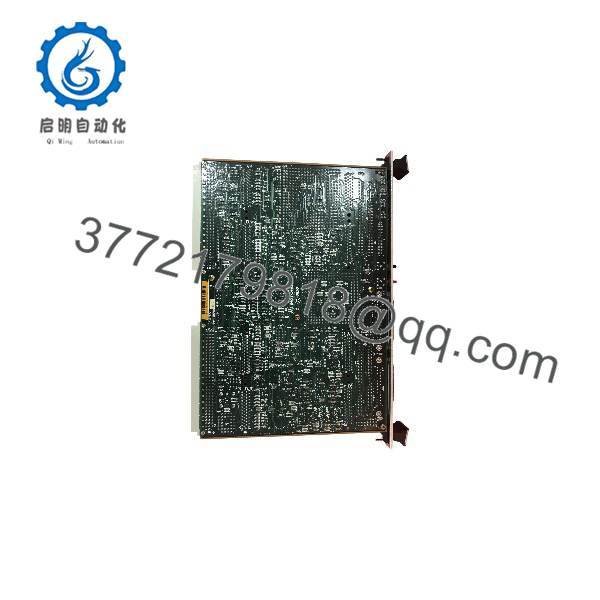
MVME162-023A
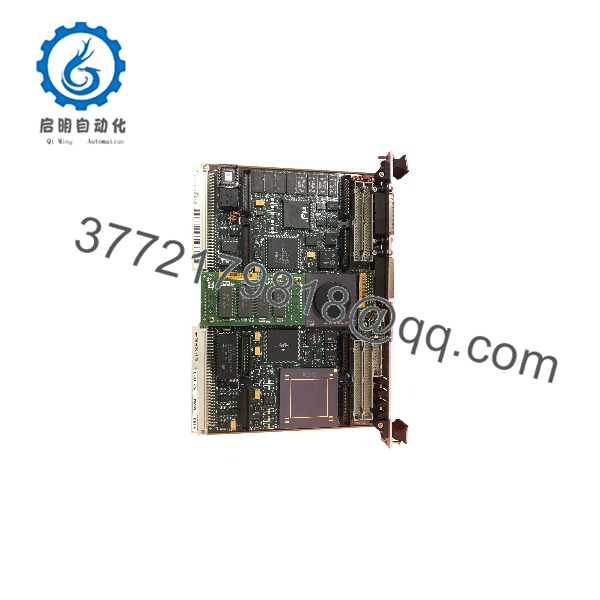
MVME162-023A
6. Frequently Asked Questions
Q1: Is this board new, refurbished, or new surplus?
Both exist in the market. Our stock is a mix of New Surplus (factory-original, never deployed, often sealed in Motorola packaging) and refurbished units pulled from decommissioned systems. Every unit gets the same treatment regardless of condition: inbound traceability and anti-counterfeit checks, power-up on a genuine VME chassis, full 162Bug memory test on all 4 MB of DRAM, serial port loop-back on all four channels, Ethernet and SCSI interface verification, and a 24-hour burn-in run with thermal monitoring. Test reports, photos, and video are available on request. If you specifically need New Surplus, state it at order time — true NOS units of the -023A are getting scarce.
Q2: Why is this board still in use, and can I actually get one?
Motorola Computer Group discontinued the MVME162 line years ago (the family later passed to Force, then arcom/Emerson). There is no factory support and no new production. Everything on the market is surplus or refurbished stock, and that pool shrinks every year. If this board runs a production line, a semiconductor tool, or a test fixture you can’t easily re-platform, my honest advice is to buy a spare now — lead time on a specific -023A when you’re down is measured in weeks, not days.
Q3: Is the -023A a drop-in replacement for other MVME162 variants?
Not automatically. The MVME162 ordering matrix matters here: the -02xx models carry 4 MB DRAM, and the third digit defines the I/O set — -022x is SCSI-only, -023x is SCSI + Ethernet, -024x adds more. A -023A will physically drop into any MVME162 slot, but your application may assume a specific DRAM size, I/O configuration, or VMEbus memory map. Verify the full suffix on your installed board, check for VMEchip2 presence (it affects the VMEbus interface and D64 capability), and confirm the 162Bug/firmware version your application expects before ordering.
Q4: Will my program and configuration survive a board swap?
Your application typically lives in Flash, onboard EPROMs, or off-board storage — not in the CPU board itself, so the swap preserves the program if you move the Flash/EPROM contents or order the board with matching firmware. But two gotchas: the 128 KB battery-backed SRAM and the NVRAM/TOD clock lose volatile-stored data if the battery is dead during the swap, and any process state in DRAM is gone at power-down regardless. Photograph the old board, back up the 162Bug NVRAM configuration (serial port settings, memory map, network address), and document everything before you pull the card.
Q5: Can I hot-swap this board?
No. This generation of the MVME162 has no hot-swap support — that’s a VME64x feature, and this board predates it. Pulling it live risks damage to the backplane drivers, corrupting other boards’ VMEbus cycles, or killing the board itself. Kill chassis power, wait for the backplane to discharge, wear a grounded ESD wrist strap, and handle the board by its edges. I watched a tech in a dry equipment room in January pull a live board without a strap — the static discharge alone took out the Ethernet controller. Use an ESD strap and eliminate the gamble.
Q6: What about the onboard battery?
Check it before you install the board, not after. The MVME162 carries a lithium backup cell for the SRAM, NVRAM, and TOD clock, and a 20-plus-year-old cell is on borrowed time. A leaking battery corrodes the PCB and often destroys the board beyond economical repair — this is the single most common killer of otherwise good MVME162s. Our tested units ship with battery voltage measured and documented, and any board showing corrosion at our inbound inspection is rejected, not resold.
Q7: What warranty, condition guarantee, and lead time do you offer?
Tested units carry a 1-year replacement warranty covering functional failure under normal use — not physical damage, hot-swap damage, or battery leakage after receipt. In-stock boards ship within 1–2 business days via DHL/FedEx worldwide; out-of-stock units typically source in 2–4 weeks depending on condition tier. Confirm stock and lead time before you schedule a maintenance window — I’d rather give you a realistic “3 weeks” today than a promise that leaves your line down.