
 WhatsApp: +86 16626708626
 Email:
  Phone: +86 16626708626
Description
Key Technical Specifications
| Parameter | Value |
| Microprocessor | MC68040 (Integrated FPU/MMU) |
| Clock Speed | 25 MHz |
| On-board DRAM | 4 MB (Parity protected) |
| SRAM | 128 KB (Battery-backed) |
| Flash Memory | 1 MB (4 sockets) |
| I/O Expansion | 4 IndustryPack (IP) interfaces |
| Serial Ports | 4 RS-232/RS-422 configurable ports |
| Ethernet | 82596CA LAN controller (AUI interface) |
| SCSI Interface | 53C710 SCSI I/O processor |
| VMEbus Interface | VME64 (A32/D32) master/slave |
Product Introduction & Supply Chain Strategy
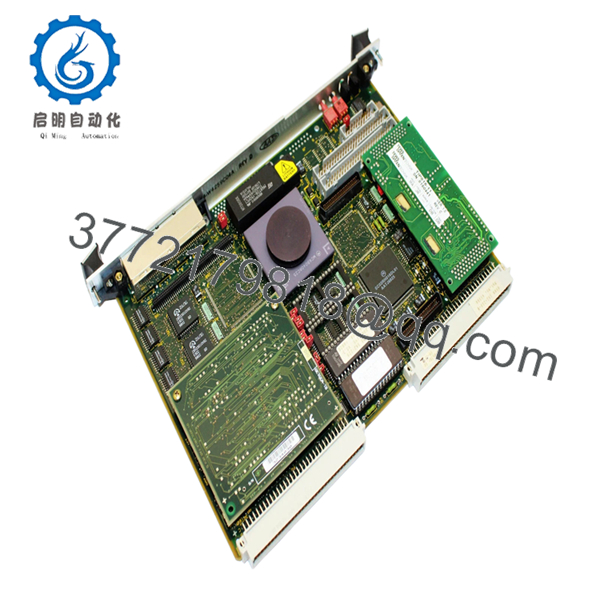
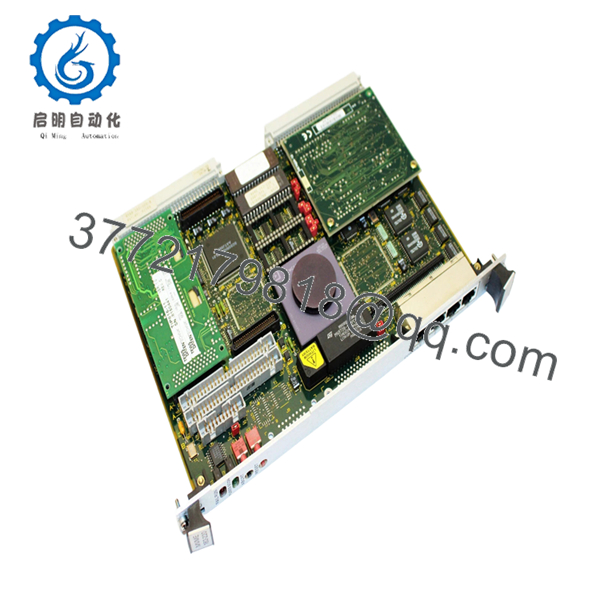
The Motorola MVME162-220-B is a versatile 32-bit processor module engineered for demanding industrial environments. By integrating a 25 MHz MC68040 processor with significant I/O flexibility through IndustryPack slots, this board provides the necessary computational density for SCADA, high-speed motion control, and data multiplexing within legacy VMEbus racks.
Procuring this specific module as “New Surplus” is a strategic necessity for plant managers dealing with End-of-Life (EOL) hardware. Unlike refurbished units, which often suffer from compromised solder joints or electrolyte leakage in aging capacitors, our New Surplus stock offers factory-level reliability. This mitigates the risk of sudden failures that can cause millions in lost production, providing a significantly lower Total Cost of Ownership (TCO) compared to the “cheaper” alternative of used components.
Installation & Configuration Guide
Stage 1: Pre-Installation (Prep & Safety)
Ensure the VME chassis is powered down and the main breaker is locked out. Wear a grounded ESD wrist strap. Use a high-resolution camera to document the jumper configurations (J1-J20) on the original board. Ensure any IP modules installed on the old carrier are carefully moved to the new unit in the same slot positions (A, B, C, or D).
Stage 2: Removal
Unscrew the top and bottom front-panel retaining screws. Use the ejector handles to unseat the 96-pin DIN connectors from the backplane. Pull the card out slowly along the guide rails to prevent physical contact with adjacent modules.
Stage 3: Installation (Clone & Seat)
Mirror all jumper and DIP switch settings from the old board to the new MVME162-220-B. Ensure the IndustryPack modules are securely fastened with their mounting screws to maintain electrical contact during vibration. Slide the module into the slot and push the ejector handles inward to lock the board into the backplane.
Stage 4: Power-On & Testing
After tightening the front panel screws, apply power. The “FAIL” LED should turn off after successful completion of the onboard ROM diagnostics. Check the serial console output (if available) to verify the DRAM and SCSI self-tests passed. If the “RUN” LED is green, the system is executing the application kernel.
Firmware/Software Versions & Upgrade Notes
This module utilizes the 162Bug firmware monitor. It is critical to verify the version of the firmware currently in your system’s ROM sockets (typically V1.x or V2.x). While hardware revision 84-W8913B01A is broadly compatible with most MVME162 installations, specific real-time operating systems like VxWorks or OS-9 may require a specific firmware revision to handle SCSI or Ethernet interrupts correctly.
Warning: Never mix-and-match firmware EPROMs between boards with different DRAM sizes, as this can cause memory mapping errors and system-wide crashes during boot-up.

- MVME162-220-B
- MVME162-220-B
Frequently Asked Questions (FAQ)
What does the “84-W8913B01A” part number signify?
This is the specific Motorola manufacturing assembly number. It identifies the hardware revision and factory configuration of the board, including the memory density and the presence of the SCSI and Ethernet controllers.
Why should I buy New Surplus instead of having my old board repaired?
Board-level repairs often only address the immediate failure point. They do not prevent the next component from failing due to age. Our New Surplus units have zero operational hours, meaning every component on the board has its full service life remaining, effectively resetting the reliability clock for your machine.
Are the IndustryPack modules included?
Standard MVME162-220-B units are sold as the base processor board. IndustryPack (IP) modules (e.g., for analog I/O or digital counters) are usually moved from your old board to the new one during the replacement process.
Is the battery for the SRAM included and functional?
Yes, but for legacy modules, we recommend verifying the battery voltage during installation. The battery-backed SRAM is critical for retaining system parameters during power cycles.
Does this board support VME64?
Yes, the MVME162 series includes the VMEchip2, which provides high-performance VME64 master/slave capabilities, including D32 and block transfer modes for high-speed data throughput.



