
 WhatsApp: +86 16626708626
 Email:
  Phone: +86 16626708626
Description
3. Key Technical Specifications
| Parameter | Specification / Value |
| Manufacturer | Motorola |
| Model Number | MVME335 |
| Part Number | 01-W3530B-04A |
| Bus Interface | VMEbus (Standard Double-Height Form Factor) |
| Controller Type | Zilog Z8530 Serial Communications Controller (SCC) |
| Number of Channels | 2 Independent Serial Ports |
| Physical Interface | RS-232C and RS-422 configurable |
| Baud Rate Range | Up to 1.0 Mbps (Synchronous) |
| On-Board Memory | 128 KB Dynamic RAM / up to 64 KB ROM/EPROM |
| Power Consumption | +5 VDC (±5%), 2.5 A typical |
| Operating Temperature | 0 to +55°C |
4. Product Introduction & Supply Chain Strategy
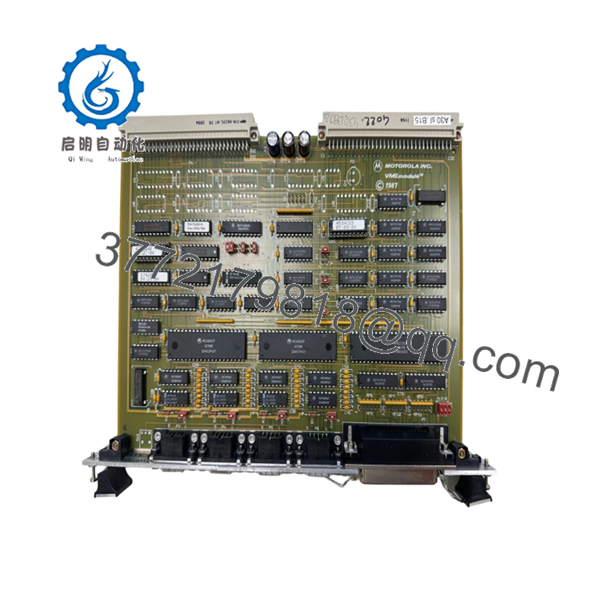
The Motorola MVME335 is an intelligent multiprotocol serial communication controller designed for legacy VMEbus architectures. Operating on a double-height VME board layout, this module utilizes a dedicated Z8530 controller to manage high-speed data transfer across two independent channels, relieving the main system processor of communication overhead. It serves as a vital linking component in maritime simulation, aerospace radar tracking, and older industrial process control setups requiring predictable, deterministic serial communication.
Securing this hardware as New Surplus is a highly critical decision for Total Cost of Ownership (TCO) management. Because the MVME335 is an EOL component, relying on refurbished alternatives introduces severe risk from component aging, specifically dried-out onboard capacitors and fatigued solder joints on the backplane interface. Maintaining a verified new surplus board on-site establishes a dependable insurance policy against catastrophic downtime. This strategic buffer stock ensures immediate recovery during a hardware fault, bypassing long lead times and avoiding the financial penalties of unexpected plant shutdowns.

- MVME335 VME 01-W3530B-04A
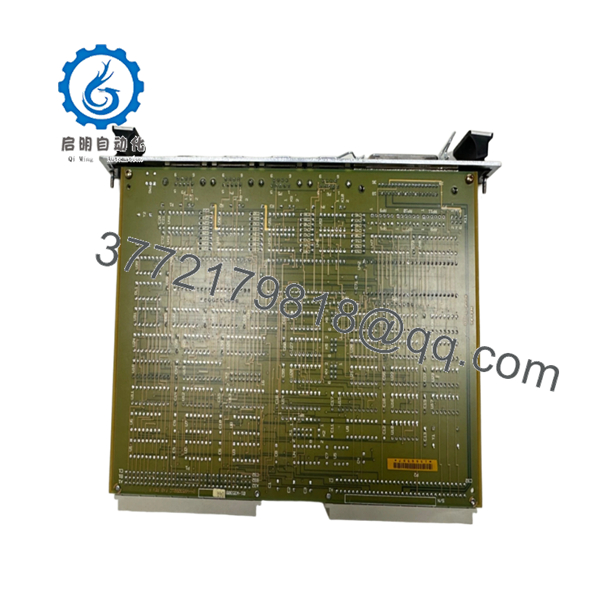
- MVME335 VME 01-W3530B-04A
5. Installation & Configuration Guide
Stage 1: Pre-Installation (Prep & Safety)
- Isolate power to the VME chassis using standard lock-out/tag-out (LOTO) protocols.
- Put on a grounded anti-static wrist strap and connect it to an unpainted metal surface on the chassis enclosure to mitigate ESD hazards.
- Remove the existing module and position it on an ESD-safe mat.
- Document all physical jumper configurations (e.g., J1 through J12) on the original board using a high-resolution camera. These jumpers control base addressing, interrupt levels, and port electrical characteristics (RS-232C vs RS-422).
Stage 2: Removal
- Unthread the upper and lower retaining screws on the front panel of the failed module.
- Unlatch the injector/ejector handles simultaneously to back the card out of the P1 and P2 backplane connectors smoothly.
- Slide the card straight out along the chassis card guides, ensuring components do not rub against adjacent modules.
Stage 3: Installation (Clone & Seat)
- Verify the jumper links on the new surplus MVME335 match the documented settings of the original board exactly.
- Slide the new module into the designated slot guides.
- Push firmly on the front panel until the module sits squarely in the backplane connectors, then close the injector levers to lock it in place.
- Tighten the top and bottom front panel retaining screws.
Stage 4: Power-On & Testing
- Re-energize the VME chassis supply rails and measure the +5 VDC line at the chassis test points to verify it falls within the required ±5% tolerance.
- Check the front panel LEDs. The red FAIL light must extinguish immediately after the power-on self-test completes.
- Initialize the system software layer and monitor the host controller’s diagnostic logs to confirm successful VMEbus handshaking and driver attachment.
6. Firmware/Software Versions & Upgrade Notes
The MVME335 relies heavily on a matched boot ROM configuration for proper address decoding and communication with older operating system kernels like VxWorks or VMEexec. The 01-W3530B-04A revision typically ships with standard production firmware version 2.x stored in UV-EPROM chips.
When replacing an active module, you must check the version number printed on the EOL ROM labels of your original board. Using a mismatching firmware revision can cause immediate address space mapping collisions or timing timeouts on the VMEbus. If your system runs a customized software build, you must physically transfer the original EPROMs onto the new surplus board to retain specialized operational configurations and driver compliance.
7. Frequently Asked Questions (FAQ)
Q: Why is this New Surplus MVME335 unit priced higher than the refurbished options online?
A: Refurbished cards are typically harvested from decommissioned machinery or salvaged scrap. They contain aged electronic components that have been subjected to thousands of operational thermal cycles, drastically shortening their remaining service life. Our pricing reflects the high cost of souring and maintaining genuine, zero-hour New Surplus stock. This purchase acts as a reliable insurance policy, protecting your process from the multi-thousand-dollar costs associated with secondary failures common to used hardware.
Q: Are these boards actually new, and how do you verify authenticity?
A: Yes, these are genuine original components. Every board passes through a strict inbound quality control audit. We verify the factory serial numbers, confirm the physical condition of the backplane P1/P2 pins, and ensure the board has original solder traces with zero aftermarket modifications. Full traceability documents and quality control compliance tags are provided with each unit.
Q: Is the MVME335 module hot-swappable?
A: No. The VMEbus architecture used by this module does not support live insertions. Pulling or inserting a card while the chassis backplane power is active can cause high-voltage transients. This can damage the onboard Z8530 controller and corrupt data on other operational modules sharing the bus. Always shut down power completely before handling.
Q: Do I need to reprogram the module before it goes into service?
A: The card functions based on hardware jumper configurations and its onboard boot ROMs. It does not contain an independent flash memory layer for user application code. As long as you match the jumper configurations of your old board and verify firmware compatibility, it will operate immediately upon insertion.
Q: What kind of warranty coverage comes with this New Surplus board?
A: Unlike refurbished items that typically offer short 30-day coverage, we back this New Surplus MVME335 with a comprehensive 1-year warranty. Because these components have spent zero hours in active production, they deliver the exact same lifecycle expectancy and operational reliability as an original factory-direct part.



