
 WhatsApp: +86 16626708626
 Email:
  Phone: +86 16626708626
Description
Key Technical Specifications
| Parameter | Specification |
|---|---|
| Manufacturer | Motorola (Motorola Computer Group → Emerson Network Power) |
| Model Number | MVME5100 (01-W3620F 66A) |
| Processor | MPC750 class (MPC7410, MPC750, or MPC755) |
| Clock Frequency | 450 MHz (baseline), up to 500 MHz on some variants |
| L1 Cache | 32 KB instruction / 32 KB data (64 KB total) |
| L2 Cache | Up to 2 MB secondary backside cache |
| Frontside Bus | 100 MHz |
| On-Board Memory | Up to 512 MB ECC SDRAM (expandable to 1.5 GB with RAM500 modules) |
| Flash Memory | 17 MB on-board flash |
| Bus Standard | VMEbus (6U form factor) |
| PCI Interface | 64-bit PCI, up to 264 MB/s throughput (PowerPlus II Architecture) |
| PMC Slots | Dual IEEE P1386.1 compatible 32/64-bit PMC expansion slots |
| PCI Expansion | 64-bit PCI mezzanine connector (up to 4 more PMCs) |
| Serial Ports | Dual 16550-compatible async serial ports |
| Ethernet | Dual 10BaseT/100BaseTX |
| NVRAM | 32 KB NVRAM + time-of-day clock with battery backup |
| Timers | Four 32-bit timers + one watchdog timer |
| Temperature Range | Commercial: 0 to 55°C; Extended: –20 to 71°C |
| Front Panel Options | VME Scanbe (-xxx1) or IEEE 1101 compatible (-xxx3) |
| Architecture | PowerPlus II (integrated PCI bridge-memory controller ASIC) |
Product Introduction
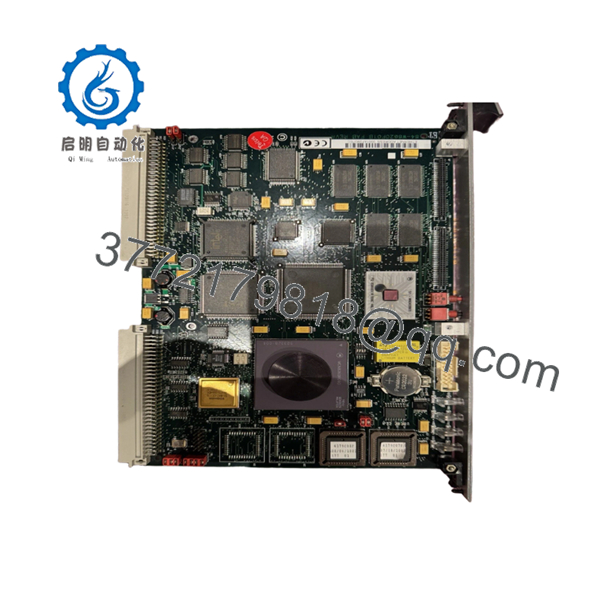
Motorola MVME5100 (01-W3620F 66A) is a high-performance VMEbus single board computer featuring a PowerPC MPC750 class processor running at 450 MHz with 512MB ECC SDRAM and 64-bit PCI support. It is part of the MVME5100 Series, the flagship of Motorola’s VME processor modules, delivering supercomputing-level performance in a scalable single-board format.elma.
The MVME5100 uses PowerPlus II Architecture for full PCI throughput of 264 MB/s without starving the processor from memory. It supports dual PMC slots, dual Ethernet, and extended temperature operation (–20 to 71°C) for rugged industrial applications. Motorola Computer Group was sold to Emerson Network Power, so current EOL support comes through Emerson.

- MVME5100 01-W3620F 66A
Troubleshooting Quick Reference
| Symptom | Possible Cause | Relevance to this Part | Quick Check Method | Recommendation |
|---|---|---|---|---|
| System will not boot | SBC fault or poor VME backplane seating | ✅ High | Power down, reseat board, inspect VME connector pins for damage | Replace if boot failure follows the board |
| No POST or console output | CPU fault, memory failure, or flash corruption | ✅ High | Check front-panel LEDs, measure 5V/±12V rails, read diagnostic buffer | Replace if CPU does not initialize |
| Random crashes or lockups | Memory error, overheating CPU, or cache fault | ✅ High | Monitor CPU temperature, run memory test if software available | Improve cooling or replace if errors persist |
| PCI/PMC slot not detected | PMC module fault or PCI bridge failure | ✅ Medium | Reseat PMC modules, test with known-good PMC card | Replace if PCI bridge fails with good PMCs |
| Ethernet not working | Network interface fault or cable issue | ✅ Medium | Test with known-good cable, check link LEDs, verify IP config | Replace if both ports fail with good cables |
| Serial communication errors | Serial port driver fault or baud rate mismatch | ✅ Medium | Check DIP switch/config settings, test with loopback connector | Replace if both serial ports fail loopback test |
| Board overheats | Failed thermal path or CPU overload | ✅ High | Thermal check after power-up; verify heatsink contact and airflow | Replace if overheating continues with proper cooling |
If you are stuck, contact technical support with photos of the board, front-panel LEDs, VME connector, PMC modules, and system diagnostic logs.
Frequently Asked Questions
Q: Is MVME5100 01-W3620F 66A a direct replacement for my existing board?
A: Only if your system uses the exact same model (MVME5100) and Motorola part number (01-W3620F 66A). The processor speed (450 MHz vs 500 MHz), memory size (512 MB), L2 cache (1 MB vs 2 MB), and front panel type (Scanbe vs IEEE) must also match. Firmware/OS compatibility is critical.
Q: Is this part new or used?
A: This model is obsolete and typically sold as new surplus or refurbished (tested). Motorola Computer Group was sold to Emerson Network Power, so no new factory stock exists. All available units are surplus or refurbished.
Q: What warranty do I get?
A: Warranty varies by vendor: typically 90 days to 1 year for refurbished/surplus units. Confirm before ordering. Refurbished units have been tested; surplus may be untested.
Q: Can I hot-swap this board?
A: No. VMEbus SBCs are not hot-swappable. Power down the entire rack before removing or installing. Backplane damage is a real risk if you try.
Q: Will this fix a system that will not boot?
A: Maybe. A bad backplane, power supply, or other VME card can cause similar symptoms. Check supply rails (5V, ±12V), reseat the board, and confirm the fault follows the SBC before replacing it.
Q: Do I need to reprogram the board after replacement?
A: Yes, likely. The MVME5100 has 32 KB NVRAM with configuration settings and time-of-day clock. Back up the existing configuration (firmware version, network settings, PMC settings) before removal and restore it on the new board. Document DIP switches/jumpers with photos
Q: Why is this more expensive than older MVME models?
A: The MVME5100 is a high-performance PowerPC SBC with 450 MHz CPU, 512MB RAM, and 64-bit PCI. Older 68040 models (like MVME167) are much slower and cheaper. The MVME5100 is flagged for supercomputing-level performance in VME systems.
Q: What should I verify before ordering?
A: Match the model (MVME5100), Motorola part number (01-W3620F 66A), processor speed (450 MHz), memory size (512 MB), L2 cache size, front panel type (Scanbe vs IEEE), and PMC configuration. Confirm firmware/OS compatibility with your application. Always back up configuration before swapping.



