
 WhatsApp: +86 16626708626
 Email:
  Phone: +86 16626708626
Description
3. Key Technical Specifications
| Parameter | Value |
|---|---|
| Processor | Motorola MC68040 (25–33 MHz, with FPU) |
| Memory | 16 MB DRAM (configurable variants) |
| SRAM | 512 KB battery-backed |
| Flash Memory | 1 MB onboard |
| Form Factor | 6U VMEbus (double-height board) |
| Bus Interface | VMEbus A16/A24/A32, D8/D16/D32 |
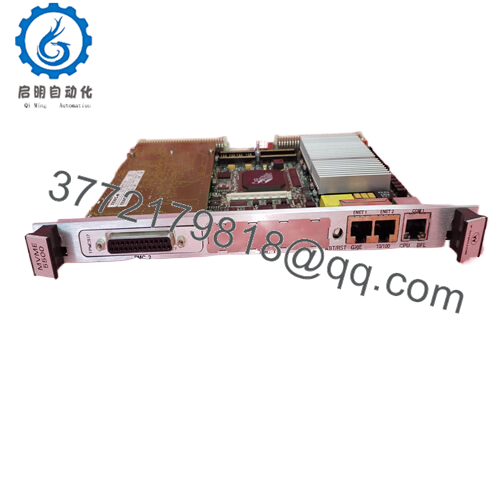
| Communication Ports | Ethernet |
| Expansion | 4 × IndustryPack (IP) slots |
| Timers | 6 programmable timers + watchdog |
| Power Consumption | ~20 W typical |
| Operating Temperature | −40 to +85°C |
| Lifecycle Status | End-of-Life (OEM discontinued) |
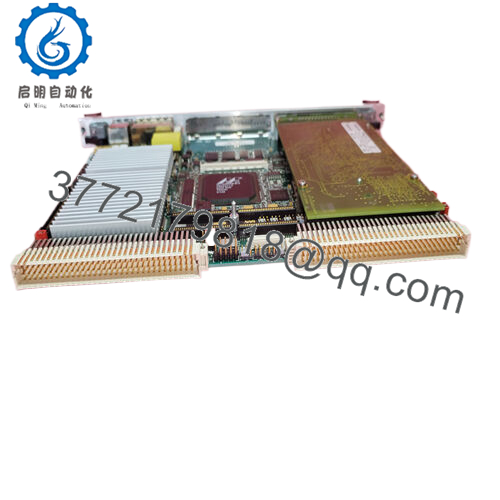
The module integrates CPU, memory, and multi-protocol communication interfaces on a single VME board, supporting embedded control and real-time processing environments.
4. Product Introduction & Supply Chain Strategy
The Motorola VME162PA-344SE is a VMEbus-based single board computer that serves as the central processing unit for legacy industrial control, aerospace systems, and embedded automation platforms. It executes real-time control logic while managing communication across Ethernet, SCSI, and serial interfaces.
From a supply-chain standpoint, this is a high-criticality CPU module—failure results in total system downtime. With OEM production long discontinued, securing New Surplus units is essential. A structured last-time-buy strategy combined with defined buffer stock protects against lead time variability and avoids the high failure risk associated with refurbished boards, directly reducing Total Cost of Ownership (TCO).
5. Installation & Configuration Guide
Stage 1: Pre-Installation (Prep & Safety)
- Execute full lock-out/tag-out (LOTO) on the VME chassis.
- Wear ESD protection (grounded wrist strap mandatory).
- Document slot position, cabling, and IP module configuration.
- Record boot parameters and system firmware settings.
Stage 2: Removal
- Power down the VME rack completely.
- Loosen front-panel screws and ejector handles.
- Remove evenly to avoid PCB flex or connector damage.
Stage 3: Installation (Clone & Seat)
- Match all configuration jumpers and IP module placements.
- Align with card guides and insert using ejector handles.
- Ensure full seating into the VME backplane.
Stage 4: Power-On & Testing
- Restore power and monitor boot sequence.
- Verify CPU initialization and memory check.
- Confirm communication (Ethernet/SCSI/serial).
- Validate application loading (e.g., VxWorks OS).

- VME162PA-344SE 01-W3528F60A
6. Firmware/Software Versions & Upgrade Notes
- Typically runs real-time OS such as VxWorks—version compatibility is critical.
- Boot ROM and firmware revisions must match the existing system environment.
- Upgrading firmware during replacement can introduce boot failures or driver incompatibility.
- Always back up boot parameters and maintain identical firmware where possible.
- Risk note: Newer firmware may not support legacy IndustryPack modules or drivers.
7. Frequently Asked Questions (FAQ)
Q1: Is this unit truly new or previously used?
This product is a Brand New Surplus unit. It is not used, not pulled from a decommissioned plant, and not refurbished. All boards show zero connector wear and original OEM build integrity.
Q2: Why is this more expensive than refurbished boards?
Refurbished CPU boards often fail due to aged capacitors or memory degradation. A CPU failure halts the entire system. The cost of downtime can exceed $50,000—far outweighing any upfront savings.
Q3: Is the VME162PA-344SE obsolete?
Yes. It is an End-of-Life VME CPU module with no active OEM production. Availability is limited to surplus inventory channels.
Q4: What stocking strategy do you recommend?
- Minimum: 1–2 units per critical system (insurance buffer stock)
- Multi-site plants: Implement cross-site sharing
- Reorder Point: Based on lead time variability (typically 6–12 months due to scarcity)
Q5: Can this board be hot-swapped?
No. VME CPU boards require full system shutdown before replacement to avoid bus faults and hardware damage.
Q6: What is the biggest integration risk?
Firmware mismatch and incorrect IP module configuration. Always replicate the original setup exactly to avoid boot or communication failures.
Q7: What warranty is included?
12 months warranty with full QC validation, including functional testing, memory checks, communication verification, and serial traceability.



