
 WhatsApp: +86 16626708626
 Email:
  Phone: +86 16626708626
Description
Key Technical Specifications
- Model: MTL 8220-DI-IS
- Product family: PAC8000 Process I/O / MTL 8000
- Product type: Intrinsically safe discrete input module
- Primary field devices: Dry contacts, NAMUR proximity sensors, and compatible switch/proximity detectors
- Input capacity: 16 digital input channels in standard switch/proximity service
- Intrinsically safe capacity: Eight IS channels, application and terminal configuration dependent
- Field circuit type: Intrinsically safe switch/proximity detector circuits
- Signal-processing function: Discrete state detection with input filtering and diagnostics
- Typical applications: Limit switches, level switches, pressure switches, valve feedback, position switches, and NAMUR sensors
- Hazardous-area use: Intended for PAC8000 hazardous-area I/O architectures
- I/O platform connection: PAC8000 Railbus through the installed carrier and Bus Interface Module
- PAC8000 station capacity: One Bus Interface Module can control up to 32 I/O modules
- Input wiring requirement: Use the approved intrinsically safe terminal assembly and associated entity documentation
- Replacement requirement: Match full part number, terminal type, carrier arrangement, and hazardous-area approval basis
- Product status: Legacy process I/O equipment; verify stock, documentation revision, and certification applicability before release
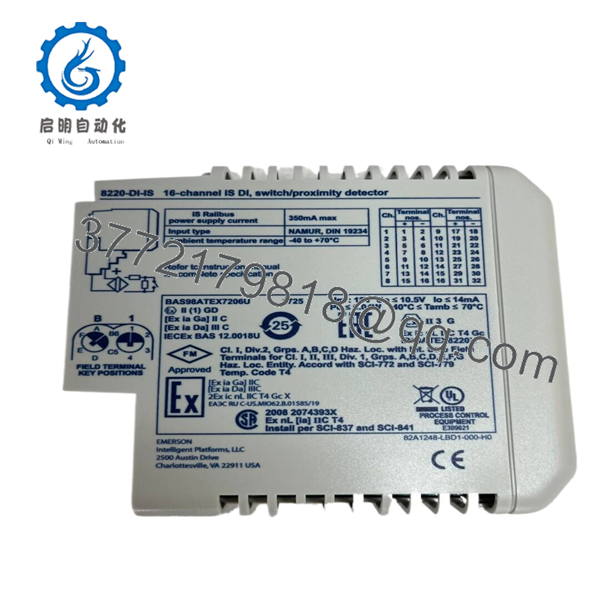
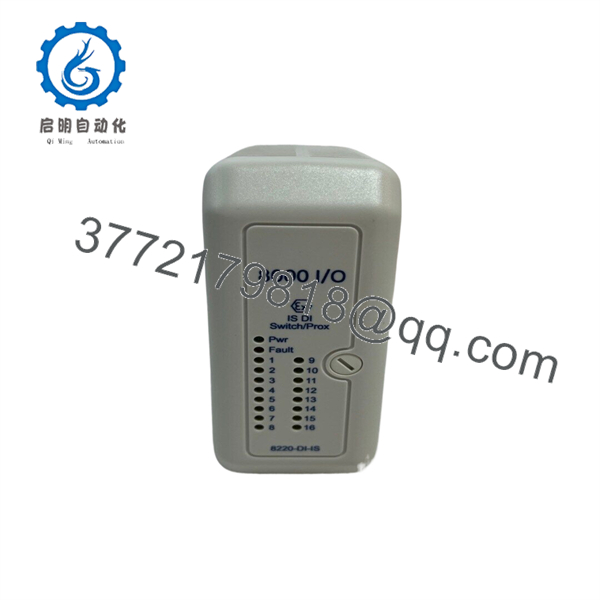
The 8220-DI-IS is identified by MTL and Emerson product sources as a PAC8000 intrinsically safe discrete-input module for switch and proximity-detector service. Available catalog references describe it as a “16 (8) channel” module: 16-channel switch/proximity input capacity with an eight-channel intrinsically safe implementation. Confirm the exact terminal assembly, field-device type, wiring method, and certified loop parameters before installation.
Product Introduction
The MTL 8220-DI-IS is a PAC8000 intrinsically safe discrete-input module for monitoring switch contacts and proximity detectors in hazardous process areas. It brings field status from devices such as valve limit switches, pressure switches, level switches, emergency pull-wire contacts, and NAMUR proximity sensors into a remote I/O station.
The “16 (8) channel” designation matters. This module supports 16 switch/proximity input points, while the intrinsically safe implementation is identified as eight channels. Do not treat it as a generic 16-point 24 VDC PLC input card. Confirm the installed terminal base, input circuit arrangement, field-device approval, and hazardous-area loop documentation before a replacement.
8220-DI-IS
8220-DI-IS
Troubleshooting Quick Reference
| Symptom | Possible Cause | Relevance to this Part | Quick Check Method | Recommendation |
|---|---|---|---|---|
| All input points show OFF or bad quality | Railbus issue, Bus Interface Module fault, carrier power fault, incorrect configuration | ⚠️ Medium | Check station diagnostics, Railbus status, Bus Interface Module indicators, and status of adjacent I/O modules. Confirm the 8220-DI-IS is present and enabled in the released control configuration. | Start at the I/O station. A complete module outage usually points to carrier, Railbus, controller, or configuration causes before a failed input module. |
| One switch input remains OFF when the field switch closes | Open cable, bad switch contact, wrong terminal, failed proximity sensor, input channel fault | ⚠️ Medium | Confirm field-device action locally. Under the approved hazardous-area procedure, measure continuity or use an approved IS test device at the terminal. Compare with a known-good channel using the same field-device type. | Check the switch, sensor, cable, and terminal first. Replace the module only if a verified field circuit produces no state change on that channel. |
| One input remains ON with field device open | Shorted cable, water ingress, welded contact, incorrect wiring, wrong sensor output type | ⚠️ Medium | Isolate the field loop under an approved permit, inspect cable and junction boxes, and verify contact state at the device. Check for a short between conductors. | Do not bypass the circuit. Find the short or incorrect field-device wiring before replacing the module. |
| NAMUR proximity sensor never changes state | Wrong sensor type, reversed polarity, inadequate field supply, excessive cable capacitance, sensor failure | ⚠️ Medium | Verify the sensor is NAMUR-compatible and compare wiring polarity with the device datasheet. Check the installed cable length and approved entity parameters. | Use only the field-device type and cable parameters allowed by the hazardous-area design. A standard three-wire PNP sensor is not a direct substitute for a NAMUR sensor. |
| Input changes intermittently during motor or VFD operation | Cable damage, shield/ground issue, EMI pickup, loose terminal, moisture in junction box | ⚠️ Medium | Trend the raw input and compare events with nearby motor starts. Inspect terminal torque, cable routing, junction-box seals, and shield treatment per the approved drawing. | Correct field wiring and separation before replacing the module. Intermittent state changes commonly originate in the field cable or sensor. |
| Multiple nearby channels change together | Common return issue, terminal disturbance, shared junction-box fault, wiring cross-connection | ⚠️ Medium | Identify whether the affected points share a terminal assembly, cable tray, junction box, or recent maintenance activity. Compare field wiring to the loop drawings. | Investigate the common field wiring first. A multi-channel pattern is less likely to be isolated card failure. |
| Module is not recognized after replacement | Incorrect keying, wrong carrier/terminal assembly, bent connector pin, system configuration not updated | ⚠️ Medium | Verify the exact model, module keying, carrier part number, and approved terminal hardware. Inspect backplane and terminal contacts for damage before inserting the module. | Never force the unit into the carrier. Reconcile physical hardware with the released I/O list before energizing. |
| Input quality is bad after hot replacement | Module configuration not restored, terminal not fully seated, field circuit disturbed, controller scan issue | ⚠️ Medium | Check the module latch, terminal seating, I/O diagnostics, and online configuration status. Confirm that the field contacts were not disturbed during replacement. | Follow the site hot-maintenance procedure. In a hazardous-area loop, a quick module swap still requires process and safety review. |
| Plant trip or permissive loss occurs after input work | Wrong input wiring, normally open/normally closed logic mismatch, bypass removed incorrectly, configuration change | ✅ High | Compare the field contact type and controller logic against the approved cause-and-effect chart. Review bypass status, sequence-of-events records, and the I/O forcing report. | Stop and involve the responsible operations and safety engineer. Do not “toggle wires until it works” on trip, ESD, or permissive circuits. |
| One channel appears permanently failed | Field fault has been excluded, known-good test circuit does not change state, module diagnostic follows channel | ✅ High | Use only an approved intrinsically safe test arrangement. Move the verified field circuit to a spare channel if the engineering procedure allows, then compare diagnostics. | Replace the module if the fault follows the physical channel after field wiring, terminal hardware, and configuration have been proven correct. |
❗ Intrinsic-safety warning: This is not a standard 24 VDC digital-input module. Do not apply an ordinary bench supply, jumper wire, or non-approved signal generator to an IS terminal. Use the site’s approved hazardous-area work procedure, correct terminal assembly, and documented entity parameters.
❗ 16-channel versus eight-channel warning: The catalog description identifies the 8220-DI-IS as a “16 (8) channel” switch/proximity module. Do not make assumptions from the channel count alone. Confirm how the specific station is configured and which channels are certified for the installed IS application before reconnecting field circuits.
❗ Contact-logic warning: Photograph the old terminal wiring and record normally open versus normally closed field logic before removal. A correct electrical signal wired with reversed process logic can block a permissive or create a false trip. It is the sort of mistake that turns a 15-minute spare swap into a long startup investigation.
❗ ESD warning: Wear a grounded wrist strap and handle the card by its edges. Do not touch Railbus or field-terminal contacts. Static damage can create a marginal input channel that only fails after the panel has been returned to service.
Keep these checks in mind and you will save yourself 90% of typical rework time. If the issue remains unresolved, provide technical support with the exact module label, terminal part number, I/O diagnostic screen, field-device model, loop drawing, hazardous-area classification, and photos of the installed field wiring.
Frequently Asked Questions (FAQ)
Q: What does the MTL 8220-DI-IS do?
A: The MTL 8220-DI-IS monitors discrete field states from switches and proximity detectors in a I/O system. It is intended for hazardous-area applications that require intrinsically safe field circuits, such as valve-position feedback, level switches, limit switches, pressure switches, and proximity sensing.
Q: Is the 8220-DI-IS a 16-channel or eight-channel module?
A: The available MTL catalog description calls it a “16 (8) channel” switch/proximity detector module. That means the product must be validated against the exact installation architecture rather than marketed as a generic 16-point input card. Confirm the installed terminal assembly, channel allocation, certification drawing, and field wiring before replacement.
Q: Can I connect a standard 24 VDC PNP proximity sensor directly to the 8220-DI-IS?
A: Do not assume so. This module is intended for intrinsically safe switch and proximity detector service, which may require NAMUR-compatible sensors and certified field-loop parameters. A standard three-wire PNP sensor has different electrical behavior and may not meet the intrinsic-safety design. Check the field-device datasheet and the approved loop drawing before connection.
Q: Can I hot-swap the 8220-DI-IS?
A: systems can support online I/O replacement, but that does not eliminate field and process risk. Before pulling the module, assess what each point controls, apply approved bypasses where required, verify alarm response, and follow the hazardous-area maintenance procedure. A valve limit input can look minor until it blocks an ESD reset or a startup permissive.
Q: Can I replace the 8220-DI-IS with a standard digital input module?
A: Not if the circuit needs intrinsic safety. A standard digital input module does not provide the same field-circuit energy limitation or hazardous-area approval basis. Replace like for like unless the entire loop is redesigned, documented, reviewed, and approved by the responsible functional-safety and hazardous-area authorities.
Q: How do I prove the 8220-DI-IS is actually faulty?
A: First rule out the field device, cable, junction box, terminal assembly, carrier connection, controller configuration, and common I/O station power. Then use an approved IS test method to apply a known-valid input condition. If the diagnostic and fault remain tied to the same physical channel after those checks, the module is a valid replacement candidate.
Q: Is the MTL 8220-DI-IS obsolete?
A: It belongs to the /MTL 8000 modular process-I/O product family, which has been widely deployed in legacy and hazardous-area automation systems. Procurement status can vary by Emerson support region, distributor inventory, and local certification needs. Confirm present manufacturer status, valid certificates, stock condition, and lead time before committing to a shutdown window.
Q: Why can New Surplus stock cost less than current factory inventory?
A: New Surplus generally means unused original equipment released from a plant spare shelf, canceled project, distributor excess, or liquidation inventory. It can be less expensive because it may not include current factory channel support, updated certification paperwork, or factory packaging. Before purchase, request photos of the exact label, terminal compatibility confirmation, packaging condition, incoming inspection record, functional-test method, warranty terms, and actual shipping lead time.



