
 WhatsApp: +86 16626708626
 Email:
  Phone: +86 16626708626
Description
Key Technical Specifications
| Parameter | Value |
|---|---|
| Manufacturer | NEC Corporation |
| Model | FC-9801F |
| Common configuration | Model 2 factory computer configuration |
| Product family | NEC FC-9800 Factory Computer Series |
| Product type | Industrial personal computer / factory computer |
| System architecture | Legacy NEC PC-9800-compatible industrial computer platform |
| Processor class | 32-bit CPU system; exact CPU board depends on installed configuration |
| Main application | Legacy machine control, factory automation, supervisory control, data collection, and industrial workstation applications |
| Chassis format | Industrial computer chassis with internal expansion and storage bays |
| Expansion-slot capacity | Model 2 supports six expansion slots |
| SCSI/file-device slot | One dedicated file slot for SCSI-interface devices or related storage hardware |
| Floppy-drive slots | Two FDD slots |
| Installed boards | Configuration-dependent; used systems may include CPU, network, display, storage, or proprietary I/O boards |
| Example installed PC-NET board | PC-NET (RS) 277-053119-001 Rev A2A appears in one documented Model 2 used-system inventory; not standard across all units |
| Storage | Configuration-dependent; verify HDD, SCSI disk, floppy drive, controller board, cables, and boot media individually |
| Operating system | Configuration-dependent; do not assume Windows, MS-DOS, PC-98 DOS, or application software is included |
| Communication interfaces | Configuration-dependent; may be supplied by installed serial, PC-NET, industrial network, or proprietary expansion cards |
| Replacement requirement | Match chassis version, installed backplane, power supply, CPU board, expansion boards, software image, storage interface, and cabinet installation constraints |
| Lifecycle status | Obsolete legacy computer platform; sourcing requires actual-unit verification |
NEC’s original FC-9801F material identifies the system as a factory computer platform. The Model 2 configuration includes six expansion slots, one file slot intended for SCSI-interface equipment or similar storage hardware, and two floppy-drive slots. A reseller inventory of an FC-9801F Model 2 shows that installed internal boards vary by unit, including NEC CPU boards, PC-NET hardware, and a CommandPost board.
Product Introduction
The NEC FC-9801F is a legacy industrial factory computer from the NEC FC-9800 platform, used to run PC-9800-based machine-control, supervisory, data-acquisition, and proprietary manufacturing applications. It is a complete industrial computer system, not a plug-in PLC card or generic I/O module.
The FC-9801F Model 2 is commonly sourced when an operating legacy installation must remain unchanged because it depends on specific ISA-style expansion cards, SCSI devices, PC-NET communication hardware, custom software, or an exact PC-9800 boot environment. The included boards, drives, operating system, and application image must be verified unit by unit.
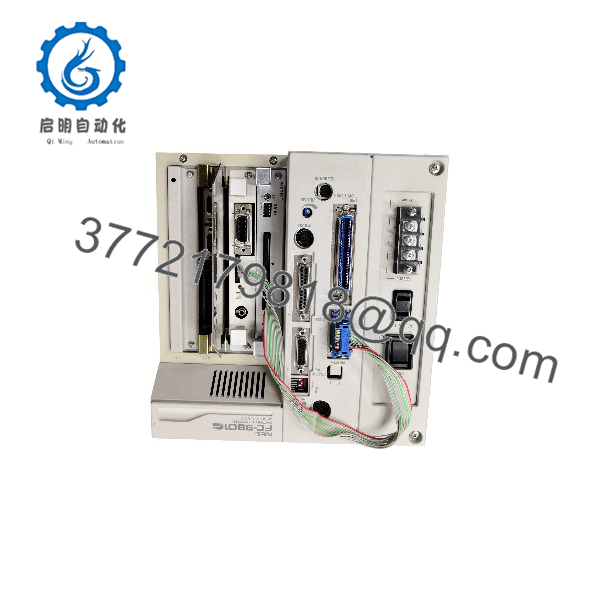
FC-9801F
Troubleshooting Quick Reference
| Symptom | Possible Cause | Relevance to This Part | Quick Check Method | Recommendation |
|---|---|---|---|---|
| No power, no fans, and no front-panel activity | Failed AC input, blown fuse, failed power supply, loose power harness, power switch fault | ✅ High | Verify incoming AC voltage at the cabinet feed and FC-9801F power input. Check external breaker and fuse. With power isolated, inspect the PSU harness, switch wiring, and fuse condition. | Repair incoming power and PSU faults before replacing the computer. Do not assume a dead chassis means a failed CPU board. |
| Fans run but no display or boot indication | Loose display adapter, monitor/cable issue, CPU board fault, memory fault, corrupted BIOS or boot device | ⚠️ Medium | Test with a known-good compatible display path. Reseat internal boards only with power removed and ESD protection in place. Observe any beep codes, LEDs, or POST behavior. | Determine whether the system reaches POST before replacing boards. A display problem is not automatically a CPU failure. |
| System starts but cannot boot application | Failed SCSI/HDD/floppy storage, corrupted boot media, BIOS settings lost, missing application disk, loose storage cable | ✅ High | Record current boot sequence and BIOS settings. Check storage-controller LEDs and cables. Create a verified image of readable disks before repeated restart attempts. | Preserve the existing storage image first. Replace or clone storage only after confirming the correct legacy interface and boot requirements. |
| Application boots but machine communication is lost | Failed serial/PC-NET card, cable fault, incorrect baud or node setting, network hardware fault, application configuration corruption | ⚠️ Medium | Identify the installed communication board and cable type. Check board LEDs, connector retention, port settings, and remote-device power. Compare settings to documented machine configuration. | Troubleshoot the communication card and field network before replacing the FC-9801F chassis. |
| System freezes intermittently | Aging power supply, failing capacitors, heat buildup, marginal RAM, loose backplane connector, failing hard drive | ⚠️ Medium | Check cabinet temperature, fan operation, supply rails, event timing, and disk error logs if available. Reseat boards and connectors only after making a full software and disk backup. | Address cooling and power stability first. Replace storage or individual boards based on evidence rather than replacing the complete system blindly. |
| System loses date, BIOS settings, or boot configuration | Exhausted CMOS/RTC battery, battery leakage, BIOS memory failure | ⚠️ Medium | Record current BIOS settings and system date. Inspect the battery area for corrosion or leakage before fitting a replacement. | Replace the battery using the correct type and safely clean any leakage. Re-enter and document settings before returning to service. |
| Expansion card is not detected after replacement | Wrong slot, loose seating, incompatible card revision, backplane fault, driver missing, resource conflict | ⚠️ Medium | Compare old card location and orientation. Check slot contacts and mechanical retention. Restore original driver/configuration files and verify interrupt/address settings if applicable. | Use the original slot and configuration whenever possible. Do not assume a similar-looking board is compatible with the PC-9800 bus environment. |
| Replacement FC-9801F powers up but does not run the machine | Missing proprietary I/O boards, wrong CPU/card configuration, incorrect operating system, no application image, changed serial/network parameters | ✅ High | Compare every internal board, storage device, cable, DIP switch, BIOS setting, and application file with the original unit. Make an image of the original storage if it remains readable. | Treat a replacement as a system migration, not a chassis swap. Transfer or clone the complete compatible hardware/software environment before commissioning. |
Field note: The FC-9801F is often replaced because the computer is old, but the real failure is frequently a dead SCSI disk, a weak power supply, or a lost BIOS setting after the backup battery expires. Before you power-cycle it repeatedly, image the drive. A clean disk image is often worth more than the replacement computer.
If you need technical support, provide front, rear, and internal photos; chassis label; CPU-board labels; all installed expansion-card part numbers; power-supply labels; drive and controller labels; BIOS screen photos; boot error text; and a copy of the current disk image if available.
Frequently Asked Questions
What is the NEC FC-9801F?
The NEC FC-9801F is a factory computer in NEC’s FC-9800 industrial computer family. It is a legacy PC-9800-compatible industrial system used to run machine-control, industrial communication, data-acquisition, and supervisory applications. It is not a PLC I/O module.
What is different about FC-9801F Model 2?
The FC-9801F Model 2 is an expansion-capable chassis configuration. NEC documentation identifies six expansion slots, one file slot for SCSI-interface equipment or related file devices, and two floppy-drive slots. The actual CPU, storage, network, display, and proprietary I/O cards installed in a used Model 2 system vary by machine.
Is FC-9801F a direct replacement for any NEC PC-9800 computer?
No. The chassis name alone does not prove compatibility. A direct replacement must match the original machine’s backplane, CPU board, installed expansion cards, card-slot layout, storage controller, operating system, application files, communication parameters, and physical cabinet constraints.
To be honest, this design is a bit of a hassle to replace. A replacement computer may boot successfully and still fail to control the machine because one proprietary ISA-style interface card, serial setting, or PC-9800 software component is missing.
Does an FC-9801F include the operating system and application software?
Do not assume so. A used or surplus FC-9801F may be supplied as chassis only, chassis with boards, or a partial system. The original operating system, application software, licenses, machine recipes, parameters, and communication settings may remain on the original storage device and might not be transferable without a compatible disk image.
Before ordering, request a complete inventory of included internal boards, drive types, boot media, installed software status, and photographs of the BIOS or boot screen if the unit is tested.
Can I move my existing hard drive into a replacement FC-9801F?
Possibly, but confirm the storage interface first. The Model 2 chassis can support SCSI-interface file devices, and legacy systems may use proprietary controllers, older HDDs, removable drives, or floppy-based boot media. Record cable position, controller model, termination settings, BIOS configuration, and drive geometry before moving anything.
Create a verified image of the old disk before testing it in another system. Repeated boot attempts on an aging disk can turn a recoverable machine into a data-recovery job.
Can I hot-swap boards or drives in an FC-9801F?
No. Treat all internal boards, drives, and cables as non-hot-swappable. Shut the system down, isolate AC power, allow stored energy to discharge, use a grounded ESD wrist strap, and document the existing hardware layout before removal.
Take photos of every connector, DIP switch, jumper, and expansion slot. Seriously. A single reversed SCSI cable or moved board can add days to a legacy-system recovery.
Why does a replacement FC-9801F not start my machine application?
The most common causes are:
- Missing proprietary machine I/O, PC-NET, or serial-interface board
- Incorrect CPU board or incompatible PC-9800 system configuration
- Missing, corrupted, or incompatible HDD/SCSI/floppy boot media
- BIOS or RTC settings lost after battery replacement
- Different communication card address, baud rate, node ID, or cable type
- Missing driver, library, license, or machine application file
- Incorrect expansion-card slot position or resource setting
Compare the old and new systems board-by-board, slot-by-slot, cable-by-cable, and setting-by-setting. The computer is only one component of the machine-control environment.
Is FC-9801F still supported by NEC?
The FC-9801F is a legacy platform, and current OEM support, spare availability, software media, and repair options should not be assumed. Its practical support path is usually documented site backups, careful cloning, qualified legacy-hardware repair, tested surplus units, and a planned modernization project. NEC’s original documentation is archived, while available market listings primarily describe used or surplus units.
Is this FC-9801F New Surplus or Refurbished?
The supplier must state the condition explicitly. New Original / New Surplus means unused stored equipment, but it still requires inspection because age affects batteries, capacitors, fans, connectors, and storage media. Refurbished (tested) means the actual chassis has been inspected and functionally checked.
For a refurbished FC-9801F, request actual-unit photos, complete installed-board inventory, power-on and POST result, display output verification, storage-interface identification, drive-read test, fan and PSU check, communication-port test, battery condition, and written test report. Test videos and photos should be available upon request.
What should I verify before ordering an FC-9801F?
- Exact chassis label: FC-9801F and Model 2 marking
- CPU board part number and revision
- Every installed expansion-card label, slot position, jumper, and DIP-switch setting
- Storage devices, SCSI/controller model, cabling, termination, and boot media
- Power supply input, output ratings, connectors, and cabinet fit
- Display adapter, monitor connection, and display-mode requirements
- Serial, PC-NET, or proprietary communication cards and settings
- Operating system, application disk image, licenses, recipes, and parameter backups
- BIOS/RTC configuration and battery condition
- Required condition: New Original/New Surplus or Refurbished (tested)
Keep these checks in mind and you will avoid most FC-9801F replacement rework.



