
 WhatsApp: +86 16626708626
 Email:
  Phone: +86 16626708626
Description
Key Technical Specifications
| Parameter | Value |
|---|---|
| Manufacturer | National Instruments (NI) |
| Model | cDAQ-9174 |
| Part Number | 781157-01 |
| Product Series | CompactDAQ |
| Chassis Type | 4-Slot USB Chassis |
| C Series Slots | 4 |
| Host Interface | USB 2.0 Hi-Speed |
| Counter/Timers | 4 × 32-bit general-purpose |
| Power Input | 9–30 VDC |
| Maximum Input Power | 15 W |
| USB Power Consumption | 500 μA maximum |
| Dimensions | 159.5 × 88.1 × 58.9 mm |
| Weight | Approximately 574 g |
| Operating Temperature | −20 to +55 °C |
| Storage Temperature | −40 to +85 °C |
| Operating Humidity | 10–90% RH, noncondensing |
| Ingress Protection | IP30 |
| Maximum Altitude | 5,000 m |
| Input FIFO | 127 samples per slot |
| Timing Accuracy | 50 ppm of sample rate |
| Timing Resolution | 12.5 ns |
| Data Stream Types | Analog I/O, digital I/O, counter/timer I/O, NI-XNET |
| Power Supply Included | 12 V, 2 A desktop supply |
The chassis itself does not determine the measurement channel count or maximum sample rate; those specifications depend on the installed C Series modules. NI specifies the cDAQ-9174’s USB interface as USB 2.0 Hi-Speed and its operating temperature as −20 to +55 °C.
The physical dimensions are approximately 159.5 × 88.1 × 58.9 mm, with an unloaded weight of about 574 g. The chassis accepts 9–30 VDC and has a maximum required input power of 15 W.
Product Introduction
The National Instruments cDAQ-9174 is a four-slot CompactDAQ USB chassis designed to connect C Series I/O modules to an external host computer. It handles module timing, synchronization, and data transfer while supporting analog I/O, digital I/O, and counter/timer measurements.
The chassis includes four 32-bit general-purpose counters/timers and multiple timing engines, allowing several hardware-timed operations to run simultaneously. The actual measurement performance remains dependent on the C Series modules installed in the four slots.
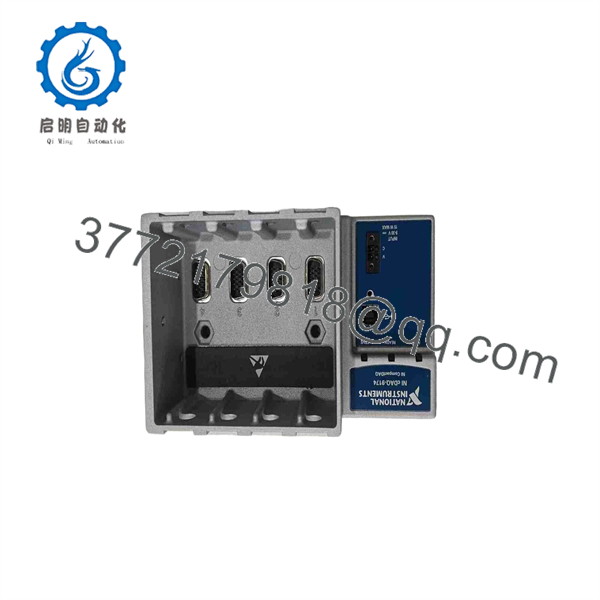
cDAQ-9174
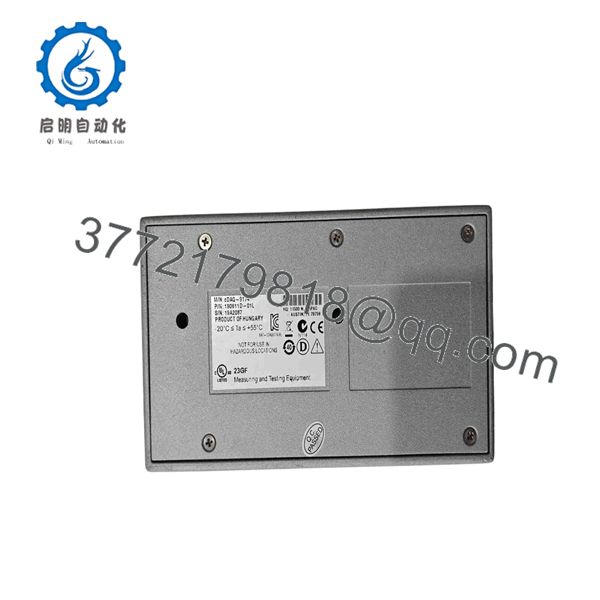
cDAQ-9174
Installation & Configuration Guide
Stage 1: Pre-Installation Preparation — Approximately 5–10 Minutes
⚠️ Safety First: Disconnect the external 9–30 VDC supply before removing or installing C Series modules. Follow the site’s electrical safety and lockout/tagout procedure where applicable.
Tools Required:
- ESD wrist strap
- #1 Phillips screwdriver
- Digital multimeter
- USB-A to USB-B locking cable
- 9–30 VDC power source or supplied 12 V, 2 A adapter
- Smartphone for configuration photographs
- NI software/driver installation media
Data Backup
- Record the existing cDAQ-9174 serial number and part number.
- Photograph the chassis and all four module positions.
- Record the exact C Series module installed in each slot.
- Back up the NI application and hardware configuration.
- Record the existing DAQ task names, channel assignments, sampling rates, and trigger settings.
- Record the installed NI-DAQmx software version.
- Photograph USB and power connections before disassembly.
NI specifies that the cDAQ-9174 requires an NEC Class 2 power source and that the chassis itself accepts 9–30 VDC.
Stage 2: Removing the Old Chassis — Approximately 5 Minutes
- Stop active acquisition tasks in the host application.
- Close NI MAX and other applications communicating with the chassis.
- Disconnect the USB cable from the host.
- Disconnect the 9–30 VDC power connection.
- Remove any panel or DIN mounting hardware if installed.
- Remove the chassis from its mounting position.
- If transferring C Series modules, identify every module and its original slot.
- Inspect module connectors for contamination, bent contacts, or mechanical damage.
⚠️ Do not pull a C Series module by its terminal block. Release the module according to the applicable C Series module documentation.
Stage 3: Installing the New cDAQ-9174 — Approximately 5–10 Minutes
- Confirm the replacement is cDAQ-9174.
- Verify the part number and chassis label.
- Install the chassis using the appropriate mounting method.
- Transfer each C Series module into its documented slot.
- Check that every module is fully seated.
- Connect the approved 9–30 VDC power source.
- Connect the locking USB-A-to-USB-B cable.
- Secure the USB cable to reduce connector movement.
- Confirm that the host PC recognizes the USB device.
NI’s current product information lists a 2 m locking USB-A-to-USB-B cable and a 12 V, 2 A desktop power supply among the included items for the 781157-01 configuration.
Self-Checklist:
- Correct cDAQ-9174 model
- Correct part number verified
- Four C Series slots populated as documented
- Modules installed in correct slots
- Power polarity verified
- USB cable secured
- Chassis mechanically secured
- Original configuration backed up
Stage 4: Power-On & Testing — Approximately 10–15 Minutes
- Apply power to the chassis.
- Check the chassis POWER, READY, and ACTIVE status indicators.
- Connect the USB cable to the host computer.
- Open NI Measurement & Automation Explorer (NI MAX).
- Confirm that the cDAQ-9174 appears under connected hardware.
- Confirm that all installed C Series modules are detected in the correct slots.
- Run the applicable self-test in NI MAX.
- Verify the DAQmx device name and channel assignments.
- Run a low-risk test acquisition.
- Confirm sample rate, timing, triggering, scaling, and signal values.
- Test representative analog, digital, or counter channels.
- Restore the production acquisition task only after the hardware passes testing.
⚠️ Troubleshooting Note: If the chassis appears in Windows but the C Series modules are missing, check the module seating and NI-DAQmx installation before replacing hardware. If acquisition timing is incorrect, check the task configuration and the timing capabilities of the installed C Series module rather than assuming the chassis timing engine is defective.
NI states that the cDAQ-9174 provides multiple timing engines and can run four hardware-timed operations simultaneously, with three independent rates available for analog input.
Frequently Asked Questions (FAQ)
Q1. What is the NI cDAQ-9174 used for?
The cDAQ-9174 is a four-slot USB CompactDAQ chassis. It provides the host interface, timing, synchronization, and data transfer required to operate compatible C Series I/O modules. Typical applications include sensor measurement, automated test systems, laboratory instrumentation, and portable data acquisition.
Q2. Does the cDAQ-9174 include C Series I/O modules?
No. The chassis provides four module slots, but the measurement channels come from separately selected C Series modules. The maximum sample rate and channel count therefore depend on the modules installed.
Q3. Can I use USB 3.0 with the cDAQ-9174?
The chassis interface is specified as USB 2.0 Hi-Speed. A USB 3.x host can generally provide backward-compatible connectivity, but the cDAQ-9174 itself remains a USB 2.0 device. NI’s current product specification identifies the bus connection as USB 2.0.
Q4. What power supply does the cDAQ-9174 require?
The chassis accepts 9–30 VDC and has a maximum required input power of 15 W. NI specifies use of an NEC Class 2 power source. The current NI product listing includes a 12 V, 2 A desktop power supply.
Q5. Can I hot-swap C Series modules while the cDAQ-9174 is running?
Do not assume that you can. The safe procedure depends on the specific C Series module and application. For a controlled replacement, stop acquisition, disconnect power as required by the module documentation, and use ESD protection before removing the module.
Q6. Is the cDAQ-9174 obsolete?
NI’s current product page lists cDAQ-9174 as an active product and identifies 781157-01 as its part number. The current NI page also provides drivers, manuals, calibration procedures, and other support resources.
Q7. Why does my replacement cDAQ-9174 not behave exactly like the old unit?
Start with the software and configuration rather than immediately replacing hardware. Check the NI-DAQmx version, device name, C Series module slot assignment, DAQ task configuration, sampling rate, trigger configuration, and application software version. The chassis supplies the acquisition infrastructure, while many actual channel and timing limits originate from the installed C Series modules.



