
 WhatsApp: +86 16626708626
 Email:
  Phone: +86 16626708626
Description
Key Technical Specifications
| Parameter | Value |
|---|---|
| Manufacturer | National Instruments |
| Model Number | cFP-1804 |
| Common Part Number | 779490-01 |
| Product Series | Compact FieldPoint |
| Product Type | Ethernet/Serial backplane |
| I/O Capacity | Four Compact FieldPoint I/O-module slots |
| Ethernet Interface | 10BASE-T and 100BASE-TX |
| Ethernet Standard | IEEE 802.3 |
| Ethernet Speed | 10 Mbps or 100 Mbps, auto-negotiated |
| Serial Interface | RS-232 |
| Serial Connector | 9-pin D-sub serial connection |
| Ethernet Cable Distance | Up to 100 m per network segment |
| Maximum I/O Module Power | 9 W |
| Safety Isolation | 250 V RMS continuous, Measurement Category II |
| Isolation Withstand | 2,300 V RMS for 5 seconds maximum |
| Software Configuration | NI Measurement & Automation Explorer (MAX) |
| Supported Software Environment | NI FieldPoint software; LabVIEW, LabWindows/CVI, Measurement Studio, VI Logger, and applicable NI real-time environments |
| Mounting | Panel mounting or 19-inch rack installation |
| Approximate Weight | 2 lb, 1 oz. |
| Required Field Wiring Accessories | One cFP-CB-x connector block or compatible connectivity accessory per installed I/O module |
| Replacement Requirement | Confirm part number, firmware, IP settings, installed I/O modules, power supply, connector blocks, and FieldPoint software support |
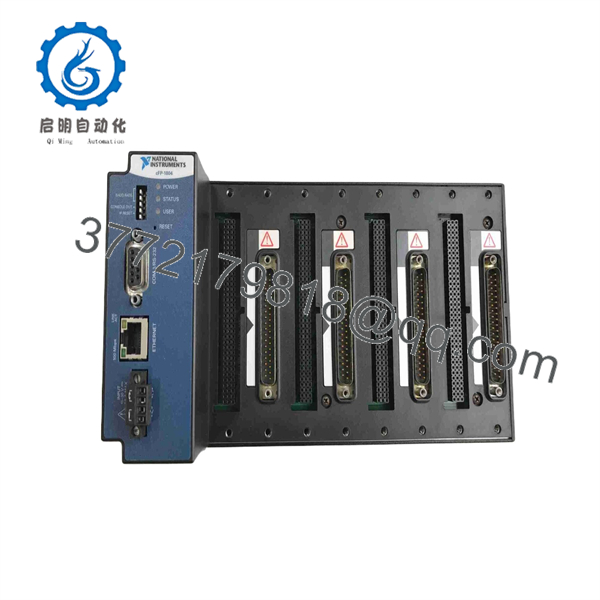
The NI cFP-1804 is a four-slot Compact FieldPoint Ethernet/Serial backplane that connects Compact FieldPoint I/O modules to Ethernet, RS-232, or both. It supports 10/100 Mbps Ethernet auto-negotiation, uses IEEE 802.3 Ethernet, and requires configuration through NI Measurement & Automation Explorer.
Product Introduction
National Instruments cFP-1804, part number 779490-01, is a four-slot Compact FieldPoint Ethernet/Serial backplane for distributed industrial I/O systems. It accepts up to four Compact FieldPoint I/O modules and connects the station to a 10BASE-T or 100BASE-TX Ethernet network, an RS-232 serial connection, or both.
The cFP-1804 is a communications backplane, not a programmable controller or field I/O module. It is chosen for maintaining legacy Compact FieldPoint stations where existing I/O modules, connector blocks, FieldPoint drivers, and application software must remain compatible. Confirm the installed module set and saved network configuration before replacement.
cFP-1804
cFP-1804
Troubleshooting Quick Reference
| Symptom | Possible Cause | Relevance to This Part | Quick Check Method | Recommendation |
|---|---|---|---|---|
| No power or status LEDs | Missing DC supply, blown fuse, reversed polarity, failed external power supply, damaged backplane | ✅ Medium | Measure supply voltage at the cFP-1804 power terminals using a calibrated Fluke 115; check upstream fuse and supply output under load | Verify power polarity and supply capacity before replacing the cFP-1804. |
| Ethernet link LED is off | Bad patch cable, wrong switch port, damaged RJ45 port, disabled switch port, failed Ethernet interface | ✅ High | Use a known-good Cat5e/Cat6 patch cable and switch port; observe link/activity LEDs; connect a laptop directly only under approved network procedures | Replace cables and test the network path first. Suspect the backplane only if a known-good cable and port still show no link. |
| Ethernet link is present but MAX cannot detect cFP-1804 | Incorrect IP address, subnet mismatch, firewall, missing NI FieldPoint driver, duplicate IP address | ✅ High | Check the assigned IP address and subnet; ping the device; scan with NI MAX; verify the PC has the appropriate FieldPoint driver installed | Correct the network configuration before replacing hardware. NI notes that MAX cannot detect the cFP-1804 without the FieldPoint driver. |
| Backplane communicates intermittently | Loose power wiring, network noise, damaged cable, duplicate IP, switch issue, overheated cabinet | ✅ Medium | Review switch-port errors; trend device ping loss; inspect power terminals; monitor enclosure temperature; test with a short known-good cable | Correct power and network problems first. Replace the backplane if failures remain with known-good infrastructure. |
| One I/O module is not detected | Module not seated, incompatible module, failed I/O module, damaged slot contacts, connector block issue | ✅ Medium | Power down; reseat the I/O module; test it in another slot if approved; inspect slot contacts and connector block engagement | Do not replace the entire cFP-1804 until the module is tested in a known-good slot. |
| All installed I/O modules disappear | Backplane fault, lost power, FieldPoint service/driver problem, Ethernet/serial communications failure | ✅ High | Verify LEDs, power, and network link; inspect device status in NI MAX; test with the saved configuration and a known-good host PC | Back up configuration first. Replace cFP-1804 if the station remains inaccessible after power, cabling, and software checks. |
| Serial connection does not communicate | Wrong COM settings, null-modem versus straight-through cable mismatch, damaged DB9 cable, wrong port selection | ✅ High | Verify baud rate, parity, data bits, stop bits, and flow control; compare the cable wiring with the device manual; test with a known-good serial cable | Correct serial settings and cable type before replacing the backplane. |
| New replacement powers up but system will not connect | IP address changed, firmware difference, missing FieldPoint driver, configuration not restored, host firewall restriction | ✅ High | Use NI MAX to assign or confirm network settings; compare old configuration records; verify host firewall and driver versions | Restore the approved IP configuration and test in a maintenance window before returning the system to service. |
❗ IP-address warning: Before removing the existing cFP-1804, record its IP address, subnet mask, default gateway, hostname, MAC address, switch port, and NI MAX configuration. Two devices with the same IP address can create intermittent communication failures that look like a defective backplane.
❗ Driver warning: A healthy cFP-1804 can appear invisible if the host PC does not have the correct NI FieldPoint software and driver components. NI community guidance specifically notes that MAX cannot detect the device without the FieldPoint driver. Check the software stack before ordering hardware.
❗ Power-budget warning: The cFP-1804 supplies up to 9 W to installed I/O modules. Add the power requirements of every installed Compact FieldPoint I/O module and leave at least a 20% margin. A station can boot normally with a light load, then reset or lose modules when additional field I/O becomes active.
❗ Connector-block warning: Do not install or remove a cFP-CB-x connector block or other I/O connectivity accessory while power is applied. Shut down the station according to the maintenance procedure first. Incorrect live handling can damage field wiring, I/O modules, or the backplane.
❗ ESD warning: Use a grounded wrist strap when handling Compact FieldPoint I/O modules or the backplane. I have seen a technician replace a communication chassis on a dry day, leave a module on an unprotected cardboard box, and create a second failure. Use ESD protection from removal through reinstallation.
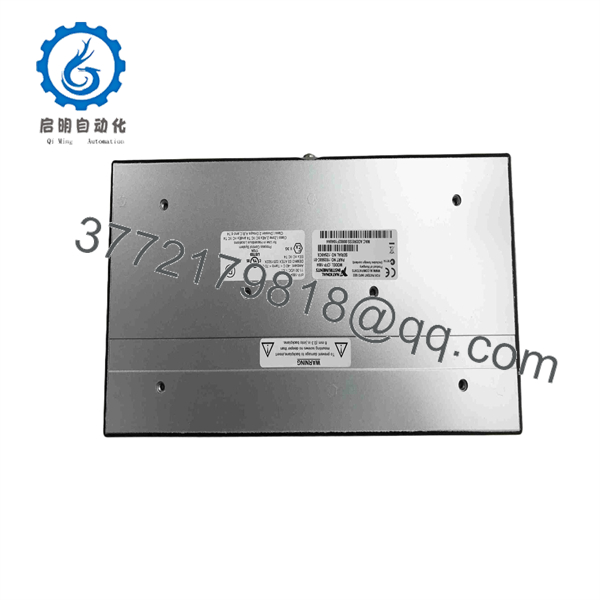
Keep these checks in mind and you will save yourself 90% of typical rework time. If you need help confirming a replacement, provide technical support with the cFP-1804 rear label, serial number, installed I/O module part numbers, connector-block part numbers, NI MAX screenshots, firmware information, IP settings, and switch-port diagnostics.
Frequently Asked Questions
What is the NI cFP-1804?
The National Instruments cFP-1804 is a four-slot Compact FieldPoint Ethernet/Serial backplane. It holds up to four Compact FieldPoint I/O modules and connects the I/O station to a host system using Ethernet, RS-232, or both. The commonly associated NI part number is 779490-01.
Is the cFP-1804 a PLC or a standalone controller?
No. The cFP-1804 is a communications backplane for Compact FieldPoint I/O modules. It provides the physical slots, I/O-station communications, and network interfaces. It does not replace a CompactRIO controller, a FieldPoint controller, a PLC CPU, or an individual analog/digital I/O module.
The host PC, NI real-time system, PLC, or other control application performs the higher-level control function. The cFP-1804 makes the installed Compact FieldPoint I/O accessible over Ethernet or RS-232.
How many I/O modules fit in a cFP-1804?
The cFP-1804 has four slots for Compact FieldPoint I/O modules. Each installed module also requires a compatible cFP-CB-x connector block or other supported connectivity accessory for field wiring.
Before ordering, document every installed module and connector block. A backplane can be correct while the connected I/O module or terminal accessory is not compatible with the intended application.
Does the cFP-1804 support Ethernet and serial communications?
Yes. The cFP-1804 supports 10BASE-T and 100BASE-TX Ethernet with auto-negotiated 10 Mbps or 100 Mbps operation, plus an RS-232 serial interface. The Ethernet interface follows IEEE 802.3, and the serial connection uses a 9-pin D-sub interface.
It can connect to an Ethernet network, an RS-232 network, or both. Confirm the host application, network addressing, serial configuration, and cable type before commissioning.
Can I hot-swap Compact FieldPoint I/O modules or connector blocks?
Do not remove or install connector blocks, connectivity accessories, or I/O modules under power unless the exact NI product documentation and your approved maintenance procedure explicitly permit it. NI-related product guidance warns against installing or removing connector blocks or connectivity accessories while powered.
To be honest, the few minutes saved by live swapping are not worth a damaged module, a shorted field circuit, or an unplanned process trip. Isolate field circuits, remove power under the site procedure, verify absence of voltage, and label all wiring before work begins.
What software do I need to configure a cFP-1804?
Use National Instruments Measurement & Automation Explorer, commonly called NI MAX, with the appropriate FieldPoint software and driver support. The device can work with NI software environments including LabVIEW, LabWindows/CVI, Measurement Studio, VI Logger, and applicable NI real-time systems.
If NI MAX cannot find the backplane, check the FieldPoint driver before suspecting hardware. NI community guidance states that MAX cannot detect a cFP-1804 without that driver.
Is cFP-1804 obsolete, and can I still buy one?
Compact FieldPoint is legacy equipment, so cFP-1804 availability normally comes from New Surplus, refurbished, or used tested inventory rather than current production. It remains practical for keeping an installed station running, but it is not the right choice for a new control-system design.
For critical plants, keep a tested spare with a documented IP configuration and confirmed installed firmware. For modernization work, plan a migration to a currently supported distributed I/O platform rather than waiting for an emergency failure.
Why is a New Surplus cFP-1804 cheaper than factory supply?
New Surplus equipment usually comes from cancelled projects, unused OEM spares, distributor overstock, warehouse inventory, or decommissioned system stock. The price can be lower because Compact FieldPoint is a legacy platform and the source is secondary-market inventory.
Before issuing a purchase order, request:
- Actual photos of the rear label showing
cFP-1804and779490-01 - Serial number and hardware revision where visible
- Photos of all I/O slots, Ethernet port, DB9 serial connector, power terminals, and mounting hardware
- Confirmation of Factory Sealed, New Original / New Surplus, or Refurbished (tested) condition
- Firmware information, if available
- Warranty terms, return conditions, confirmed stock quantity, and dispatch lead time
What testing should a supplier complete before shipment?
A supplier should use a traceable test process:
- Inbound inspection and traceability: Verify the NI part label, serial number, source records, factory markings, and condition of the enclosure. Inspect for corrosion, altered labels, scratches, cracked housings, bent slot contacts, rework marks, heat discoloration, or UV yellowing.
- Power-on test: Apply the correct regulated DC supply in a protected test setup. Verify startup LEDs, stable operation, normal current draw, and no abnormal heating.
- Ethernet test: Connect to a managed or known-good Ethernet switch, confirm 10/100 Mbps auto-negotiation, verify link/activity LEDs, assign or discover network settings through NI MAX, and confirm stable device communication.
- Serial test: Use a known-good RS-232 connection and configured test host. Verify transmit and receive operation at representative serial settings. Confirm cable type and pinout rather than assuming a null-modem or straight-through cable.
- I/O-slot test: Install known-good Compact FieldPoint I/O modules in all four slots. Confirm module detection, stable communications, and representative input/output function using the correct connector blocks.
- Load and thermal test: Operate the backplane with a representative I/O load for more than 24 hours where equipment permits. Monitor for resets, lost-module events, Ethernet dropouts, abnormal current draw, and temperature rise.
- Final QC and packaging: Obtain inspector sign-off, protect ports and terminals, place the unit in ESD-safe packaging, use bubble wrap and heavy-duty corrugated boxing, and apply a dated QC-passed label. Test photos, NI MAX screenshots, and a test report should be available upon request.



