
 WhatsApp: +86 16626708626
 Email:
  Phone: +86 16626708626
Description
Key Technical Specifications
| Parameter | Value |
|---|---|
| Manufacturer | Pilz |
| Order Number | 773602 |
| Product Name | PNOZ ml2p safe link PDP |
| Product Family | PNOZmulti Classic |
| Product Type | Safe Link / Connection Module |
| Supply Voltage | 24 V DC |
| Communication | CAN-based |
| Decentralized Devices | Up to 4 PDP67 devices |
| Connection Type | Series connection |
| Supply Capacity | 4 A |
| Width | 22.5 mm |
| Height | 94 mm |
| Depth | 121 mm |
| Net Weight | 133 g |
| Ambient Temperature | 0 to 60 °C |
| Safety Classification | Category 4, PL e, SIL CL 3 |
| Certifications Listed | CE, cULus, BG, TÜV, CCC, KCC |
Pilz’s published technical data lists 24 V supply, 22.5 mm × 94 mm × 121 mm dimensions, 133 g net weight, and a 0 to 60 °C ambient temperature range.
The PNOZ ml2p provides the interface between a PNOZmulti Classic safety controller and decentralized PDP67 devices. Earlier Pilz-related documentation identifies 773602 specifically as the safe-link module for PDP67 F 8DI ION devices.
Product Introduction
The Pilz 773602 PNOZ ml2p is a safe-link connection module for PNOZmulti Classic safety-control systems. It provides a CAN-based connection to decentralized PDP67 devices, allowing safety inputs to be distributed closer to machine components instead of routing every safety circuit back to the central controller.
The module is particularly relevant to machines using decentralized safety I/O. Its documented architecture supports connection of up to four PDP67 devices, with a 4 A supply capability for the connected decentralized structure.
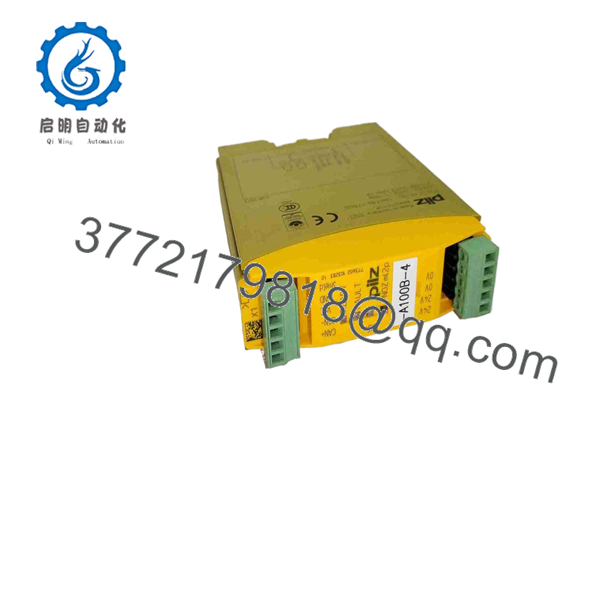
773602
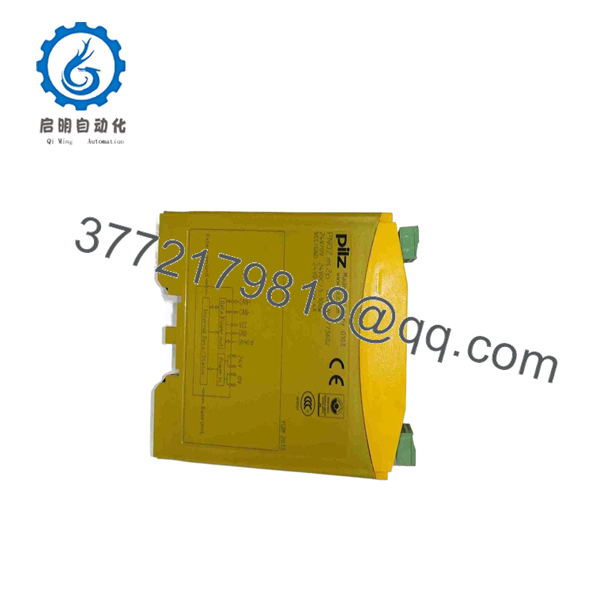
773602
Installation & Configuration Guide
Stage 1: Pre-Installation Preparation — Approx. 5–10 Minutes
⚠️ Safety First
- Notify machine operations and obtain the approved maintenance window.
- Place the machine in its defined safe state.
- Apply lockout/tagout (LOTO) to the applicable safety-control power circuits.
- Verify that the 24 V DC supply is de-energized.
- Confirm that all connected machine hazards have been controlled before working on the safety system.
- Verify the replacement marking is Pilz 773602.
Tools Required
- ESD wrist strap
- Appropriate screwdriver
- Calibrated multimeter
- Wire labels
- Smartphone or camera
- Pilz PNOZmulti configuration documentation
Data Backup
Before removing the existing module:
- Back up the PNOZmulti project.
- Record the PNOZmulti base unit type and firmware.
- Photograph the 773602 wiring.
- Record the connected PDP67 device types.
- Photograph bus connections and terminal assignments.
- Record the existing module position and configuration.
⚠️ Do not treat the 773602 as a generic 24 V communication module. It is part of a safety-control architecture, so the project configuration and connected topology must be verified before commissioning.
Stage 2: Removing the Old Module — Approx. 5 Minutes
- Verify zero voltage before touching the wiring.
- Label each conductor and communication connection.
- Photograph the complete installation.
- Disconnect the 24 V DC supply.
- Disconnect the CAN/PDP connections.
- Release the DIN-rail mounting mechanism.
- Remove the module without pulling on the wiring.
- Inspect the wiring and terminal condition.
- Check the DIN rail for mechanical damage.
⚠️ Keep the original module until the replacement has completed commissioning. Its terminal arrangement and labeling are useful references if the installation documentation is incomplete.
Stage 3: Installing the 773602 — Approx. 5–10 Minutes
- Verify the replacement part number: 773602.
- Confirm that the module is the PNOZ ml2p safe link PDP.
- Check the housing for shipping damage.
- Install the module on the DIN rail.
- Confirm that the locking mechanism is fully engaged.
- Reconnect the 24 V DC supply.
- Reconnect the CAN-based communication wiring.
- Reconnect the decentralized network.
- Verify polarity and terminal assignments against the applicable Pilz documentation.
- Confirm that connected devices match the project configuration.
Self-Checklist
- Part number 773602 verified
- PNOZmulti Classic compatibility confirmed
- 24 V DC polarity checked
- CAN/PDP wiring checked
- topology matches the project
- DIN-rail locking mechanism engaged
- All terminals secured
- Original module retained for comparison
Stage 4: Power-On & Testing — Approx. 10–15 Minutes
- Complete a wiring inspection before applying power.
- Verify the 24 V DC supply voltage.
- Energize the safety-control system.
- Observe the module status indicators.
- Check whether the PNOZmulti controller recognizes the decentralized structure.
- Verify communication with each connected device.
- Check the PNOZmulti diagnostic information for configuration or communication faults.
- Perform the machine’s approved safety-function test.
- Test each relevant emergency-stop, guard, light-grid, or other safety input according to the machine safety validation procedure.
- Document the final module and network configuration.
⚠️ Do not bypass a safety function to force the system into RUN. If the 773602 reports a communication or configuration fault, correct the underlying topology, wiring, addressing, or project configuration first.
Frequently Asked Questions (FAQ)
Q1. What is Pilz 773602?
773602 is the Pilz PNOZ ml2p safe-link PDP connection module. It belongs to the PNOZmulti Classic family and provides a CAN-based connection between the safety controller architecture and decentralized devices.
Q2. How many devices can one 773602 connect?
The available technical documentation specifies connection of up to four decentralized devices. This is one of the main reasons the module is used in distributed machine-safety architectures.
Q3. What supply voltage does 773602 require?
The specified supply voltage is 24 V DC. The documentation also identifies a 4 A supply capability for the decentralized structure. Do not confuse this with the actual current consumption of the module itself.
Q4. What safety level is associated with the PNOZ ml2p?
Available Pilz-related technical documentation lists Category 4, PL e, and SIL CL 3 for the applicable PNOZ ml2p architecture. The actual safety rating of a complete machine function depends on the complete validated safety circuit, configuration, connected devices, and application.
Q5. Can I replace 773602 while the machine is powered?
Do not assume that it can be hot-swapped. Treat the replacement as a de-energized safety-system maintenance operation unless the specific Pilz documentation and machine safety procedure explicitly authorize otherwise. Remove power, verify the safe state, and follow the site’s LOTO procedure.
Q6. Is 773602 compatible with the newer PNOZmulti 2 platform?
Do not assume compatibility simply because both products carry the PNOZ name. 773602 belongs to the PNOZmulti Classic ecosystem. Confirm the exact controller, project, devices, and communication architecture before attempting a cross-generation substitution.
Q7. What condition should I specify when purchasing 773602?
Specify the physical condition explicitly: Factory Sealed, New Original/New Surplus, or Refurbished (tested). Current market listings show both new factory-sealed and refurbished 773602 units, so “available” alone does not establish condition.



