
 WhatsApp: +86 16626708626
 Email:
  Phone: +86 16626708626
Description
Key Technical Specifications
- Manufacturer: Praxis Automation Technology B.V.
- Part Number: 93.6.021.009
- Product Type: Operator trackball keyboard / HMI input device
- Primary Function: Provides manual keyboard and pointing-device input to a compatible Praxis operator interface or marine automation system
- Reported Application: Marine engine-room monitoring, alarm, and operator-control systems
- Operator Interface: Integrated trackball and keyboard controls; confirm actual key layout from the physical unit
- Equipment Family: Likely associated with legacy Praxis marine automation/operator-interface installations; verify the exact host system and software
- System Connection: Verify connector type, cable pinout, interface protocol, and supply voltage from the installed unit
- Mechanical Installation: Verify panel cutout, front-bezel size, mounting studs, sealing gasket, and rear clearance before purchase
- Environmental Suitability: Treat as a marine-control-room component; confirm IP rating, EMC requirement, and environmental classification from OEM documentation
- Firmware / Driver Requirement: May require host-specific keyboard/trackball driver mapping; verify with the system integrator or service documentation
- Lifecycle Status: Legacy / availability depends on New Surplus, used, refurbished, or repair-channel inventory
The available public listings conflict on the exact product classification: several identify 93.6.021.009 with Praxis Automation as a trackball keyboard/operator-interface device, while other listings label it as a Terasaki circuit-breaker board, power connector, or generic control module. The Praxis attribution is supported by a Praxis product-list source and multiple trackball/keyboard listings; however, no manufacturer datasheet with electrical and mechanical specifications was available. Verify the physical label and host-system documentation before ordering.
Product Introduction
The Praxis Automation 93.6.021.009 is associated with a marine operator-input assembly that combines a keyboard and trackball for navigation, alarm handling, screen selection, and command entry. It is typically used in legacy vessel automation or engine-room monitoring installations where an operator station requires a dedicated, panel-mounted input device.
This part should not be purchased as a generic USB keyboard or trackball. Match the original unit’s rear label, host system, key layout, mounting dimensions, connector type, power requirements, cable pinout, and interface behavior. A standard computer input device may physically resemble the unit but will not necessarily communicate with the Praxis system.
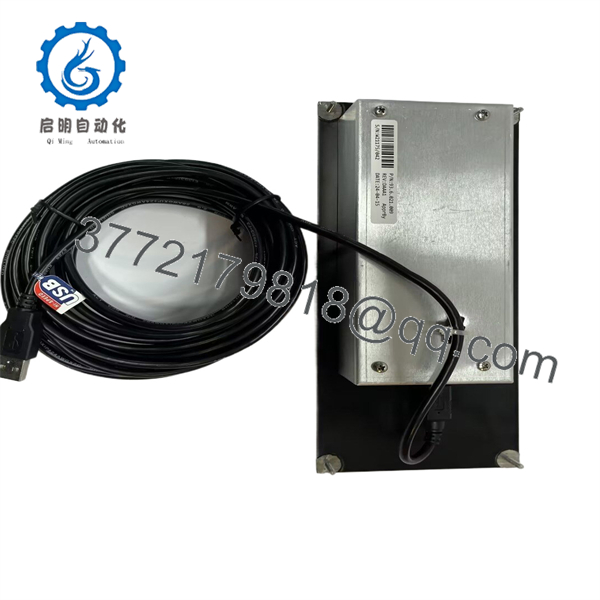
93.6.021.009
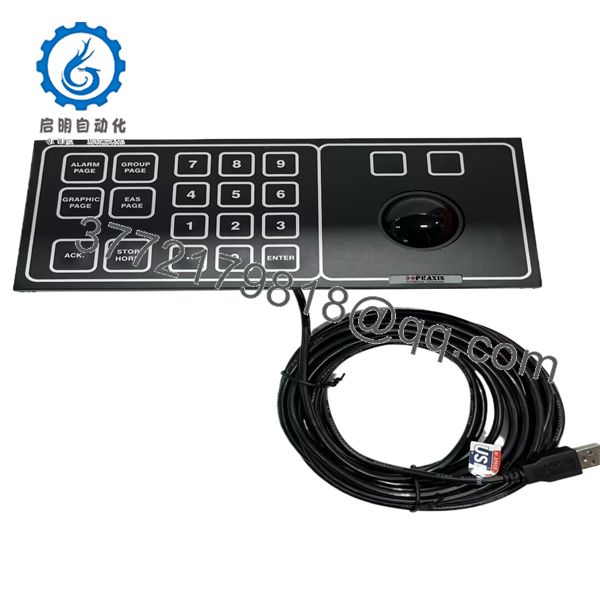
93.6.021.009
Troubleshooting Quick Reference
| Symptom | Possible Cause | Relevance to This Part | Quick Check Method | Recommendation |
|---|---|---|---|---|
| Trackball pointer does not move | Failed trackball sensor, contaminated ball/rollers, broken cable, host HMI fault, missing device power | ✅ High | Shut down the station safely, remove the trackball retainer only if approved, inspect for debris, and check cable/connector seating | Clean using approved electronics methods and test the cable before replacing the unit |
| Keys do not respond | Damaged keyboard membrane, connector fault, failed interface board, host software lockup, input device disabled | ✅ High | Test multiple keys across the panel; power-cycle only under approved system procedure; inspect cable and connector pins | If groups of keys fail, suspect membrane or internal matrix failure; verify host input settings first |
| Only some keys work | Contaminated membrane, worn contacts, damaged key matrix, liquid ingress, broken flex cable | ✅ High | Compare failed keys by row/column pattern and inspect for signs of water or oil ingress | Do not spray cleaner into the panel. Replace or repair the keyboard assembly if a matrix pattern is confirmed |
| Operator station has no input from keyboard or trackball | Host computer fault, interface power missing, cable disconnected, software/driver problem, failed device | ⚠️ Medium | Check HMI display and system boot status; verify power at the input-device connector against the schematic | Diagnose host power and software before replacing the input panel |
| Trackball is erratic or jumps | Dirt on rollers, worn bearings, static discharge, poor grounding, cable shielding damage | ✅ High | Inspect and clean the ball and roller surfaces; check ground/shield continuity and note whether faults occur during nearby radio or motor operation | Correct contamination and grounding first. Replace if motion remains erratic with a known-good cable |
| Panel works intermittently during vibration | Loose rear connector, broken conductor, cracked solder joint, damaged mounting hardware | ⚠️ Medium | Inspect connector retention and cable strain relief; gently test cable movement only with the system in a safe maintenance state | Repair cable or connector strain relief before replacing the full assembly |
| Replacement panel powers up but input mapping is wrong | Different key layout, interface protocol mismatch, driver mapping mismatch, wrong revision | ✅ High | Compare all key labels, connector pins, part number, revision, and host configuration with the removed unit | Do not commission a near-match without a controlled compatibility test |
| New panel does not fit the console opening | Different bezel dimensions, mounting pattern, rear-depth conflict, wrong gasket | ✅ High | Measure panel cutout, mounting-hole centers, bezel size, and rear clearance before purchase | Request front and rear dimensional photographs from the supplier before shipment |
| Input failure follows the host connection, not the panel | Damaged cable, host interface fault, power problem, software issue | ❌ Low | Substitute a known-good compatible panel only if procedure permits; inspect host-side connector and power supply | Repair the host interface or cable rather than replacing additional input devices |
| Water, salt residue, or corrosion is present | Failed sealing gasket, marine moisture exposure, condensation, improper cleaning | ✅ High | Power down, inspect bezel seal, rear enclosure, connectors, and PCB for corrosion | Remove from service for evaluation. Do not energize a visibly corroded input panel |
❗ Do not assume this is a standard PC USB device. Legacy marine operator panels may use proprietary keyboard matrices, serial interfaces, PS/2-style interfaces, or custom controller wiring. Do not plug it into a random computer or apply an assumed supply voltage. Confirm the pinout and host interface from the vessel documentation first.
Before removal, take photographs of the front keyboard layout, rear label, every connector, cable colors, cable markings, panel cutout, mounting hardware, and the active operator screens. Record whether the trackball and keys are both failing or only one function has failed. That distinction helps separate an input-device fault from a host-interface fault.
If you need technical support, provide photos of both sides of the unit, the full label and revision, vessel or system name, host-controller model, connector close-ups, measured supply voltage, and a video showing the failed input behavior.
Frequently Asked Questions
What is the Praxis 93.6.021.009?
Available industrial listings associate the Praxis Automation 93.6.021.009 with a keyboard and trackball operator-input device used in marine control or monitoring installations. It is likely a panel-mounted HMI input assembly rather than a PLC module, power connector, or circuit-breaker trip board.
Is 93.6.021.009 made by Praxis or Terasaki?
The available listings are inconsistent. Praxis Automation sources and trackball listings associate 93.6.021.009 with a keyboard/trackball device, while other sellers label the same number as Terasaki hardware. Do not place an order based on a text-only listing. Confirm the physical manufacturer logo, full rear label, revision label, photographs, host-system bill of materials, and connector layout.
Can I replace it with a generic USB keyboard and trackball?
Usually not as a direct replacement. A generic USB device may not fit the console, survive the marine environment, match the original key functions, or communicate with proprietary host electronics. It may be acceptable only as a temporary troubleshooting tool if the host system specifically supports USB HID input and the vessel’s operating procedure permits it.
Can I clean a faulty trackball myself?
You can often remove dust and debris from the ball and rollers, but only with the system safely shut down and according to the equipment maintenance procedure. Use a lint-free swab and approved electronics-safe cleaning method. Do not use oil, abrasive cleaners, compressed-air blasts that drive contamination deeper into the assembly, or moisture-heavy solvents. If the trackball has corrosion or damaged bearings, service or replacement is safer.
Can I hot-swap the 93.6.021.009?
Do not assume it supports hot-swapping. Place the operator station and affected machinery in a safe state before disconnecting the panel. In a marine control or alarm system, disconnecting an input device can interrupt operator acknowledgment, navigation, alarm handling, or maintenance access. Follow vessel procedures and any applicable lockout requirements.
Why do the keys and trackball both stop working at the same time?
When both functions fail together, start with common causes: power at the input device, the shared cable, the host-interface connector, host software, and any common internal controller board. If only the trackball fails while keys work, the problem is more likely mechanical contamination or a trackball sensor fault. If only certain keys fail, suspect the keyboard matrix or membrane.
Is the 93.6.021.009 obsolete, and should I stock a spare?
Treat it as a legacy marine automation spare with limited availability. For a vessel or plant with a production-critical or safety-relevant operator station, keep a verified spare, photographs of the original panel and wiring, the host-system documentation, a tested interface cable if separate, and a documented replacement procedure. Confirm actual physical inventory, condition, lead time, and warranty before issuing a purchase order.
What testing should a supplier perform before shipment?
For New Original / New Surplus stock, request exact label and revision verification, high-resolution front and rear photographs, key-layout confirmation, connector and cable photographs, inspection for corrosion, damaged bezel seals, scratched trackball surfaces, broken mounting hardware, and safe moisture- and impact-protected packaging.
For Refurbished stock, request functional testing with a compatible Praxis host interface whenever possible. The report should document keyboard response across all keys, trackball movement in both axes, button operation if included, cable continuity, connector condition, stable operation during a controlled run, and final QC sign-off. Ask for test video, actual-unit photos, a written condition statement, and warranty terms before shipment.



