
 WhatsApp: +86 16626708626
 Email:
  Phone: +86 16626708626
Description
Key Technical Specifications
| Parameter | Value |
|---|---|
| Manufacturer | Pro-face / Digital Electronics Corporation |
| Model | GP2500-TC41-24V |
| UL Registration Model | 2880045-01 |
| Series | GP2000 |
| Product Type | Graphic Operator Interface / HMI |
| Display Size | 10.4 inches |
| Display Type | TFT Color LCD |
| Resolution | 640 × 480 pixels |
| Display Colors | 256 colors / 64 colors with 3-speed blink |
| Effective Display Area | 211.2 × 158.4 mm |
| Backlight | CCFL |
| Backlight Life | More than 50,000 hours at 25°C under continuous operation |
| Touch Panel | Analog resistive |
| Rated Voltage | 24 VDC |
| Allowable Voltage | 19.2–28.8 VDC |
| Power Consumption | 50 W or less |
| COM1 | RS-232C / RS-422 configurable |
| COM2 | RS-232C |
| Ethernet | IEEE 802.3, 10BASE-T |
| Tool Port | 8-pin mini-DIN |
| CF Card | 1 slot |
| Expansion Interface | Optional communication module |
| Operating Temperature | 0–50°C |
| Storage Temperature | −20–60°C |
| Operating Humidity | 10–90% RH, non-condensing |
| Front Protection | Equivalent to IP65f / NEMA Type 4X/12 |
| Dimensions | 317 × 243 × 58 mm |
| Weight | Approximately 3.5 kg or less |
| Cooling | Natural air circulation |
The specifications above are supported by Pro-face’s GP2500T documentation. The manufacturer’s data sheet specifies the 640 × 480 display, 24 VDC input, Ethernet interface, serial interfaces, CF slot, and 317 × 243 × 58 mm external dimensions.
Certification and Installation
The GP2500-TC41-24V / 2880045-01 is documented as UL/c-UL listed under UL file E182139, including UL508 and UL1604 requirements. The installation guide also specifies that the unit is intended to be installed as a built-in component in the front of a metal panel.
Product Introduction
The Pro-face GP2500-TC41-24V is a 10.4-inch GP2000 Series programmable HMI with a 640 × 480 TFT color LCD, analog resistive touch panel, Ethernet, and 24 VDC power input. Its UL registration model is 2880045-01. It was designed for machine operation, PLC communication, alarm display, and industrial data entry.
This is a legacy HMI. Pro-face records the model’s end of sales as December 28, 2012 and end of repair as March 29, 2019. For an installed machine, an original tested unit can preserve the existing panel opening and legacy application while avoiding an immediate redesign.
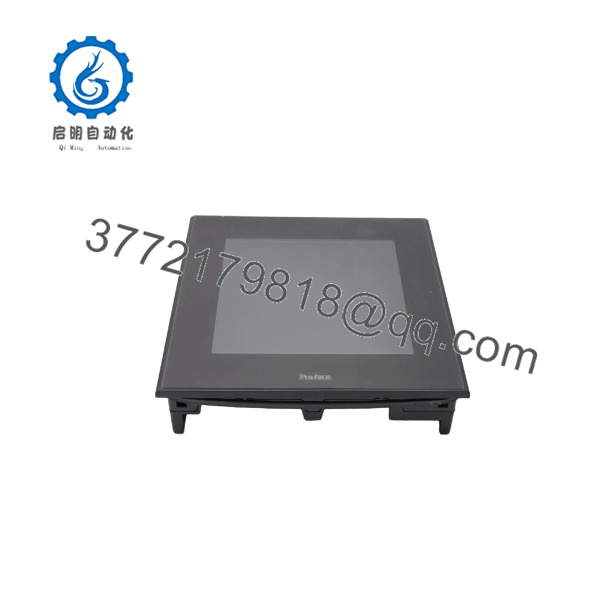
GP2500-TC41-24V
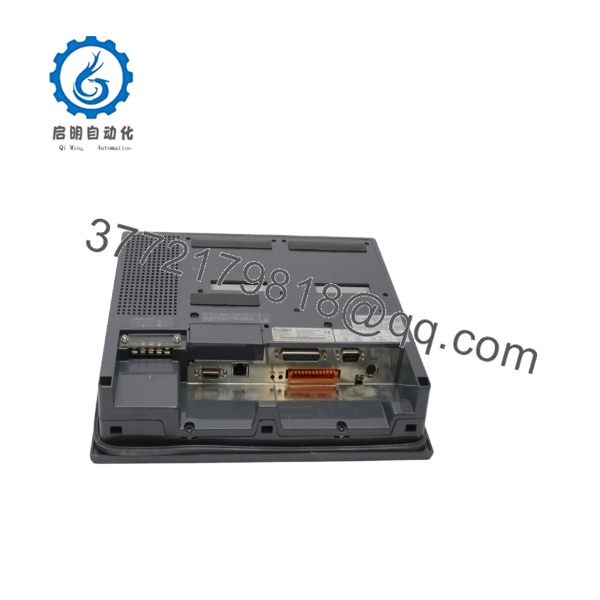
GP2500-TC41-24V
Installation & Configuration Guide
Stage 1: Pre-Installation Preparation — 5–10 Minutes
⚠️ Safety First: The GP2500-TC41-24V operates from 24 VDC, but the connected control cabinet can contain hazardous voltages. Isolate the relevant cabinet power sources and follow the site’s lockout/tagout procedure before removing the HMI.
Tools Required
- ESD wrist strap
- Phillips screwdriver
- Multimeter
- Cable labels
- Smartphone or camera
- Appropriate panel-mounting tools
Before Removal
- Notify operations and place the machine in a safe state.
- Isolate power to the HMI and associated control equipment.
- Verify the 24 VDC supply is actually de-energized.
- Photograph the complete HMI installation.
- Record the model and UL registration markings.
- Photograph all communication cables and terminal wiring.
- Back up the HMI project if the original engineering environment is available.
- Record PLC communication parameters before disconnecting the unit.
Stage 2: Removing the Existing GP2500-TC41-24V — Approximately 10 Minutes
- Remove the required rear access hardware.
- Label every cable before disconnecting it.
- Disconnect COM1, COM2, Ethernet, tool-port, and other connections as applicable.
- Disconnect the 24 VDC power wiring.
- Release the panel mounting hardware.
- Support the HMI while removing the final fasteners.
- Carefully remove the unit from the panel.
- Inspect the panel cutout and gasket area.
The published dimensions for the main unit are 317 × 243 × 58 mm. Verify the actual installed panel opening rather than relying solely on cabinet drawings.
⚠️ Keep the original HMI until the replacement has completed communication and application testing.
Stage 3: Installing the Replacement — Approximately 10 Minutes
- Verify the replacement model: GP2500-TC41-24V.
- Confirm the 2880045-01 identification where applicable.
- Inspect the LCD, touch surface, connectors, and mounting hardware.
- Position the HMI in the existing panel opening.
- Install the mounting hardware evenly.
- Reconnect the 24 VDC power wiring with correct polarity.
- Reconnect the PLC communication cable.
- Reconnect Ethernet and other interfaces.
- Verify that every connector is fully seated.
- Check that cables are not pinched behind the HMI.
⚠️ Do not confuse the AC-powered GP2500-TC11 with this model. requires 19.2–28.8 VDC and is not an AC-input replacement.
Stage 4: Power-On & Testing — 5–15 Minutes
- Perform a final wiring inspection.
- Verify 24 VDC polarity and voltage with a multimeter.
- Restore power.
- Observe the startup sequence.
- Confirm the TFT display initializes correctly.
- Test touch response across multiple screen areas.
- Verify Ethernet communication if used.
- Verify COM1/COM2 communication.
- Start the HMI application.
- Test representative PLC data.
- Verify alarms and operator controls.
- Test any CF-card or auxiliary functions required by the application.
Commissioning Check
- verified
- 2880045-01 verified
- 24 VDC polarity checked
- Display operating normally
- Touch panel operating normally
- Ethernet communication verified
- Serial communication verified
- HMI project loaded
- PLC communication verified
- Alarm screens tested
- Operator commands tested
Frequently Asked Questions (FAQ)
Q1. What is Pro-face ?
It is a 10.4-inch GP2000 Series programmable HMI with a TFT color display, analog resistive touch panel, Ethernet, serial interfaces, and 24 VDC power input. Its UL registration model is 2880045-01.
Q2. Is 2880045-01 the same product as ?
Yes. Pro-face’s installation guide explicitly identifies:
→ UL Registration Model: 2880045-01.
This makes a useful combined search and procurement identifier.
Q3. What power supply does this HMI require?
It requires 24 VDC, with an allowable input range of 19.2–28.8 VDC. Maximum specified power consumption is 50 W.
Do not substitute an AC-powered GP2500-TC11 without redesigning the power arrangement.
Q4. What is the display resolution?
The uses a 10.4-inch TFT color LCD with 640 × 480 pixels. The effective display area is 211.2 × 158.4 mm.
Q5. Does have Ethernet?
Yes. It provides an IEEE 802.3 10BASE-T Ethernet interface. It also has configurable RS-232C/RS-422 COM1 and an RS-232C COM2 interface.
Q6. Is obsolete?
Yes. Pro-face lists December 28, 2012 as the end-of-sales date and March 29, 2019 as the end-of-repair date.
For a production-critical legacy system, procurement should therefore distinguish clearly between factory-sealed surplus, new old stock, tested used units, and refurbished units. Do not treat those conditions as equivalent.
Q7. What are the recommended replacements?
Pro-face lists several replacement paths. The current official product page identifies PFXGP4501TAD, PFXGP4501TMD, PFXGP4501TADW, PFXSP5600TPD + PFXSP5B10, and PFXSP5500TPD + PFXSP5B10 among the replacement options. Some have different panel cutouts, while the PFXGP4501TADW and PFXSP5600TPD + PFXSP5B10 are documented as having compatible panel-cut dimensions.



