
 WhatsApp: +86 16626708626
 Email:
  Phone: +86 16626708626
Description
Key Technical Specifications
| Parameter | Specification Value |
| Display Type | TFT Color LCD |
| Display Size | 10.4 Inches (211.2 mm W × 158.4 mm H) |
| Resolution | 640 × 480 pixels (VGA) |
| Display Colors | 64 Colors (RGB 4 levels) |
| Input Voltage | 85 to 132 V AC (50/60 Hz) |
| Power Consumption | 50 VA or less |
| Application Memory | 2 MB FLASH EPROM |
| SRAM Backup Memory | 96 KB (Lithium Battery Backed) |
| Serial Interface (COM1) | D-Sub 25-pin female (RS-232C / RS-422 configurable) |
| Tool Interface | Serial TTL level (for data transfer via software) |
| Printer Interface | Centronics-compliant parallel interface |
| Enclosure Rating | IP65f / NEMA 4x (Front panel when mounted) |
| External Dimensions | 317 mm W × 243 mm H × 85 mm D |
| Cutout Dimensions | 302 mm W × 228 mm H |
Product Introduction & Supply Chain Strategy
The Pro-face GP577R-TC11 is a 10.4-inch VGA TFT color touch panel designed for machine control, system visualization, and real-time PLC diagnostics. Equipped with a 100 MHz RISC processor and a matrix resistive touchscreen, it delivers immediate visual feedback for complex industrial machinery running on AC power systems.
Securing this panel as New Surplus protects facility uptime and drives down Total Cost of Ownership (TCO). Because the GP77R series is discontinued by the OEM, buying factory-fresh surplus units avoids the severe risks of degraded backlights or failing digitizers common in used equipment. It allows maintenance teams to execute direct drop-in swaps without spending thousands of dollars re-engineering panel cutouts or rewriting legacy PLC communications.
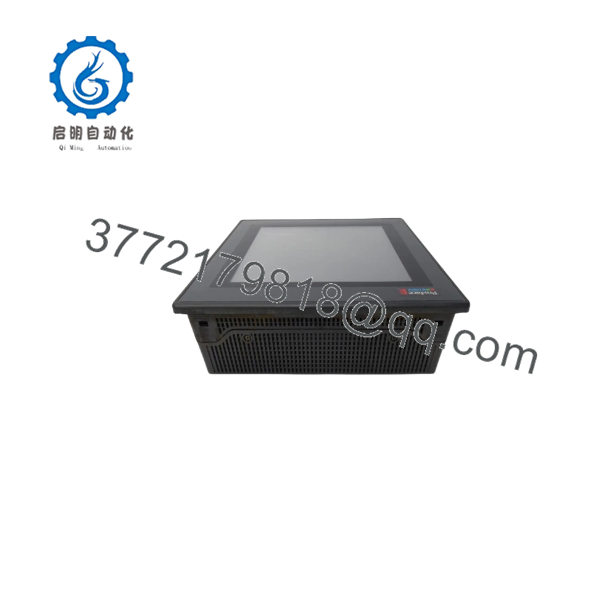
GP577R-TC11
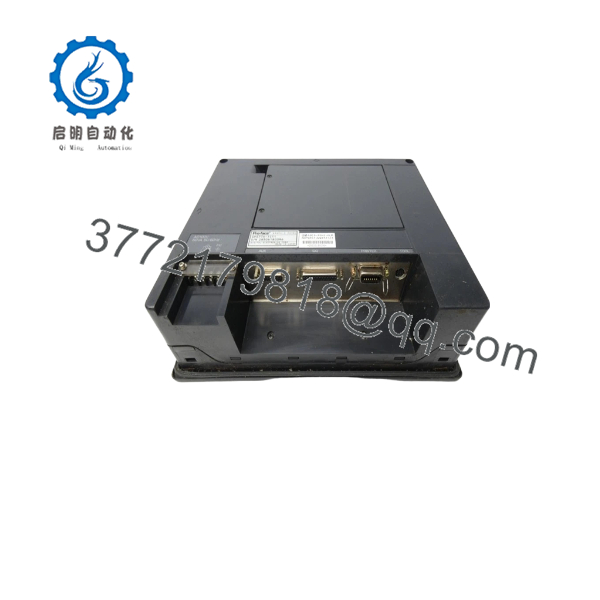
GP577R-TC11
Installation & Configuration Guide
Stage 1: Pre-Installation (Prep & Safety)
- Perform Lock-Out/Tag-Out (LOTO) on the main AC power distribution block feeding the enclosure.
- Put on an ESD-grounded wrist strap connected to cabinet earth ground before handling the replacement unit.
- Open the rear enclosure door and photograph all physical switch settings, wire labels, and port connections on the old unit.
Stage 2: Removal
- Unplug the 120V AC screw-terminal block and the ground wire from the rear panel.
- Disconnect the 25-pin D-sub serial cable (COM1) and any AUX/Printer interface connectors.
- Loosen the panel-mounting screw clamps securing the display frame to the enclosure cutout.
- Carefully push the old unit forward through the cutout, making sure not to damage the cutout gasket or backplane pins.
Stage 3: Installation (Clone & Seat)
- Verify the front panel gasket on the new GP577R-TC11 is seated evenly to maintain IP65f sealing.
- Replicate any hardware jumper settings from the old panel onto the new unit.
- Slide the new panel into the existing 302 mm × 228 mm panel cutout from the front.
- Attach the mounting clamps from behind the cabinet door and torque them evenly to prevent frame warping.
Stage 4: Power-On & Testing
- Measure the incoming AC line voltage to confirm it falls strictly within the 85–132 V AC operating window.
- Reattach the 120V AC terminal plug, protective earth, and the 25-pin serial communication cable.
- Apply power. Verify the power LED turns solid and the TFT display initializes without screen flicker.
- Transfer the system project file (
.prw) using GP-PRO/PBIII software via the dedicated tool cable, then test touch response and PLC data handshaking.
Firmware/Software Versions & Upgrade Notes
- Programming Software: The GP577R-TC11 requires GP-PRO/PBIII for Windows (Version 4.0 or higher recommended) for runtime project downloads and firmware management.
- System Program Versioning: Ensure the runtime system program (OS) installed on the panel matches the compiler version used in GP-PRO/PBIII. Mismatched system files can cause protocol timeouts or corrupted display objects.
- Protocol Compatibility: COM1 supports both RS-232C and RS-422 point-to-point or multi-drop layouts. Changing protocol settings inside GP-PRO/PBIII reconfigures pin assignments electronically; no internal hardware boards need to be swapped.
- Firmware Flashing Risks: Do not interrupt AC power during runtime transfer or OS flashing. Interrupted downloads corrupt the 2 MB onboard Flash EPROM, rendering the unit unbootable.
Frequently Asked Questions (FAQ)
Why is New Surplus pricing higher than refurbished units, but lower than original OEM list prices?
New Surplus units sit in the sweet spot of capital efficiency. Original OEM list prices for active models include distributor markup and full engineering support. Refurbished parts are cheap because they use aged components nearing end-of-life. Our New Surplus inventory consists of genuine, unused OEM stock purchased from plant cancellations and excess spares. You get factory-grade reliability at a lower price than active OEM models, while eliminating the downtime risks of used hardware.
Are these Pro-face GP577R-TC11 panels truly brand new and unused?
Yes. Every unit in this lot is Original New Surplus. They originate from unfulfilled integration projects or climate-controlled surplus inventory reserve. They have zero operational run hours, zero pin wear, and clean mounting surfaces. We open anti-static packaging strictly under ESD-controlled conditions for incoming quality inspection.
Since the GP577R series is obsolete, how can I ensure long-term site reliability?
Holding 1–2 New Surplus units on-site acts as an immediate insurance policy against extended downtime. Because Pro-face discontinued the GP77R series, finding clean replacements on short notice is difficult. Keeping a pre-tested surplus unit in your facility warehouse allows your maintenance team to perform an immediate 15-minute physical swap without mechanical or software modifications.
Can I hot-swap the GP577R-TC11 while the control cabinet is energized?
No. You must never hot-swap an AC-powered HMI panel. Removing or plugging the 120V AC power connection or the 25-pin serial cable while live can cause electrical arcing, blown fuses, or severe static damage to the communication transceivers on both the HMI and the connected PLC. Always isolate AC power before disconnecting cables.
Will the HMI retain its project memory and recipe data if main AC power is removed?
Yes. Screen graphic layouts and application logic are stored in non-volatile 2 MB Flash EPROM, which retains memory indefinitely without external power. Alarm logs, trend history, and SRAM recipe data are maintained by an internal lithium backup battery. If storing surplus panels long-term, inspect and test SRAM battery voltages before putting the panel into production service.



