
 WhatsApp: +86 16626708626
 Email:
  Phone: +86 16626708626
Description
Key Technical Specifications
| Parameter | Value |
|---|---|
| Product Family | PL5700 Series industrial panel computer |
| Model | PL-5700S1 |
| Display Type | TFT color LCD |
| Display Size | 10.4 in |
| Display Resolution | 640 × 480 pixels, VGA |
| Display Area | 211.2 mm W × 158.4 mm H |
| Touch Technology | Analog resistive film |
| Touch Resolution | 1,024 × 1,024 |
| CPU | AMD Am5x86, 133 MHz |
| Main Memory | Two DIMM sockets; maximum 32 MB DRAM |
| Expansion Slots | Three ISA-bus slots |
| Slot Configuration | Two half-size slots and one three-quarter-size slot |
| Rated Input | AC 85–132 V, 50/60 Hz |
| Maximum Power Consumption | 150 VA |
| Serial Interface | RS-232C, including COM1 |
| Auxiliary Interface | Parallel interface and keyboard/mouse interfaces, depending on installed configuration |
| Operating Temperature | 0 to 40°C |
| Storage Temperature | −10 to 60°C |
| Operating Humidity | 30–85% RH, non-condensing |
| External Dimensions | 321 mm W × 272 mm H × 129.3 mm D |
| Weight | Approximately 5.5 kg |
| Front Protection | Equivalent to IP65F when correctly panel-mounted |
| Cooling | Internal fan-assisted cooling |
| Grounding | Protective grounding required |
| Expansion Power Capacity | 5 V at 1.0 A and 12 V at 0.5 A for the documented slot power budget |
| Platform Status | Obsolete legacy industrial PC |
The PL-5700S1 manual identifies the model as a TFT color LCD panel computer with an AMD Am5x86 133 MHz processor, three ISA-bus expansion slots, 32 MB maximum DRAM, AC 85–132 V input, and 5.5 kg weight.
Product Introduction
The PRO-FACE PL-5700S1 is a 10.4-inch PL5700 Series industrial panel computer for legacy machine-control, operator-interface, data-collection, and embedded Windows or DOS applications. It combines a 640 × 480 TFT display, analog resistive touchscreen, AMD Am5x86 133 MHz processor, and three ISA-bus expansion slots.
This model is useful when an installed machine depends on legacy ISA cards or an archived application image. It is obsolete hardware, so verify the operating system, storage device, ISA cards, touchscreen condition, and power supply before purchase.
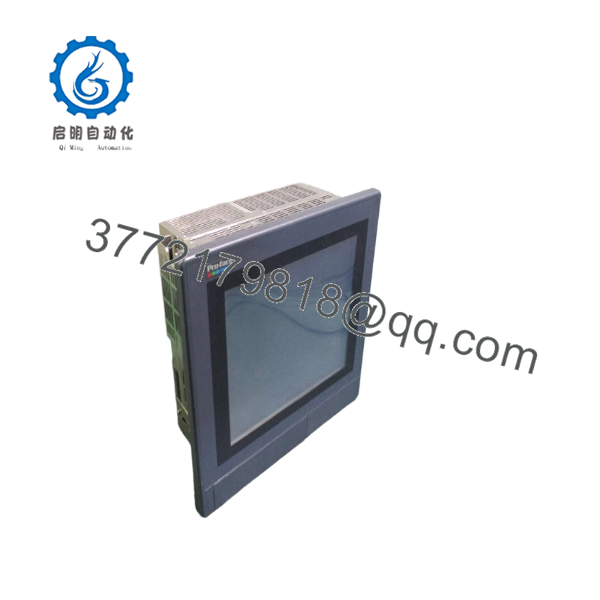
PL-5700S1
Troubleshooting Quick Reference
| Symptom | Possible Cause | Relevance to This Part | Quick Check Method | Recommendation |
|---|---|---|---|---|
| No power LED or no boot activity | Missing AC input, blown fuse, power-supply failure, or loose internal connector | ✅ High | Measure AC voltage at the PL-5700S1 input terminals. Confirm AC 85–132 V at 50/60 Hz. | Check the branch circuit, fuse, terminal block, and protective ground before replacing the computer. |
| Power is present but the screen remains black | Display circuit, backlight, video path, or motherboard failure | ✅ High | Check the power indicator, listen for POST activity, and inspect the display under an external light for a faint image. | Separate display failure from computer failure before replacing the complete panel PC. |
| Unit powers on but does not complete POST | RAM, CPU, ISA card, or motherboard fault | ✅ High | Remove nonessential ISA cards, reseat the DRAM, and observe the POST or diagnostic-beep behavior. | Test the base unit with the minimum hardware configuration. Add ISA cards one at a time. |
| System loses settings after power removal | Failed CMOS battery or damaged nonvolatile memory | ✅ High | Enter BIOS and check whether date, time, and hardware settings reset after power is removed. | Replace the battery only with the specified type and document BIOS settings first. |
| DOS or Windows does not load | Hard-drive failure, corrupted boot sector, or incorrect drive geometry | ✅ High | Enter BIOS, confirm that the IDE drive is detected, and test the storage device with a known-good boot disk or image. | Preserve the original drive before testing. Legacy disk images may be difficult to recreate. |
| Touchscreen does not respond | Damaged resistive touch layer, disconnected cable, or driver problem | ✅ High | Enter the touch diagnostic or operating-system calibration utility. Test the center and four corners. | Replace the touch panel or cable if diagnostics fail across multiple areas. |
| Touch coordinates are inaccurate | Calibration loss, worn resistive layer, or incorrect driver | ✅ Medium | Run touch calibration and compare the detected location with the physical press location. | Recalibrate first. Replace the touch layer if accuracy varies across the panel. |
| ISA expansion card is not detected | Incorrect ISA address, IRQ conflict, DMA conflict, or poor card seating | ✅ High | Record the card’s jumpers and DIP switches, then verify I/O address, IRQ, and DMA settings against the legacy application configuration. | Mirror the original card settings exactly. Do not rely on plug-and-play behavior. |
| Machine-control card causes system lockup | ISA bus timing, power draw, card fault, or address conflict | ✅ High | Boot the PL-5700S1 without the card, then reinstall it with the original jumper settings. Check the slot power budget. | Test each card separately and verify that total current remains within the documented slot limits. |
| Display shows corrupted characters or colors | Video memory fault, display timing issue, or loose internal cable | ✅ Medium | Enter BIOS or a basic DOS screen. Check whether corruption appears before the application starts. | If corruption exists in BIOS, suspect the computer or display hardware rather than the application. |
| HMI freezes after extended operation | Fan failure, dust buildup, heat, RAM fault, or aging storage | ✅ High | Inspect the fan, clean dust from air paths, and monitor internal temperature. Run a memory test and storage check. | Replace failed fans and aging storage. Maintain clear airflow around the rear enclosure. |
| Unit resets when an ISA card starts | Power-supply overload or shorted expansion card | ✅ High | Remove all ISA cards and measure the system supply during boot. Reinstall cards individually. | Replace the defective card or repair the power supply before returning the system to service. |
| Serial device does not communicate | Wrong COM port, cable pinout, baud rate, parity, or legacy driver | ✅ High | Use a serial loopback test and compare the application’s COM settings with the original configuration. | Verify RS-232C pinout and software settings before replacing the motherboard. |
| Panel does not fit the existing cutout | Confusion with PL-5701S1 or another PL5700 model | ✅ High | Measure the panel opening and compare the complete model number. Confirm the rear depth of approximately 129.3 mm. | Do not substitute a thinner PL-5701 model without checking ISA-slot requirements and enclosure clearance. |
If the fault remains unclear, provide technical support with the nameplate photograph, BIOS screen, power measurements, ISA-card photographs, storage-drive label, operating-system version, touchscreen test results, and application error logs.
Frequently Asked Questions (FAQ)
What is the PRO-FACE PL-5700S1?
The PL-5700S1 is a legacy Pro-face PL5700 Series panel-mount industrial computer. It combines a 10.4-inch TFT color display, analog resistive touchscreen, AMD Am5x86 133 MHz processor, onboard memory, and ISA-bus expansion slots for machine-control hardware.
How many ISA expansion slots does the PL-5700S1 have?
The PL-5700S1 provides three ISA-bus expansion slots. This is a critical difference from the PL-5701S1, which provides one slot. Count the required ISA cards and verify their physical size and power demand before selecting a replacement.
Is the PL-5700S1 still manufactured?
No. The PL5700 Series is obsolete legacy hardware. Original systems are generally sourced as surplus, used, or refurbished units. Stock condition varies considerably, so request photographs of the display, touchscreen, rear connectors, ISA slots, storage device, and power-up test.
What power does the PL-5700S1 require?
The documented PL-5700S1 input is AC 85–132 V at 50/60 Hz, with maximum power consumption of 150 VA. Confirm the nameplate before installation because related PL5700 models and later variants may use different power arrangements.
Can I install a modern PCI or PCIe card in this computer?
No. The PL-5700S1 is documented with ISA-bus expansion slots. A PCI or PCIe card is not a direct electrical or mechanical replacement. If the machine depends on an ISA motion, fieldbus, I/O, or data-acquisition card, preserve the original card and its jumper configuration.
Will replacing the panel computer preserve the machine application?
Only if the storage device or a verified disk image is transferred correctly. The application may depend on DOS or an older Windows version, ISA-card drivers, fixed COM assignments, BIOS settings, and specific I/O addresses. Back up the original drive before powering the unit repeatedly or attempting repairs.
Why is this unit cheaper than a current industrial PC?
The PL-5700S1 uses obsolete processor, display, storage, and ISA-bus technology. Lower pricing usually reflects surplus sourcing, used condition, or refurbishment rather than current factory supply. Confirm whether the unit is New Original, New Surplus, or Refurbished, and ask whether testing covered the display, touch panel, storage, ISA slots, serial ports, and continuous operation.



