
 WhatsApp: +86 16626708626
 Email:
  Phone: +86 16626708626
Description
Key Technical Specifications
| Parameter | Value |
|---|---|
| Manufacturer | Pro-face |
| Series | PL5910 Series |
| Model | PL5910-T11 |
| Product Type | Industrial Panel Computer |
| Display Size | 10.4 inches |
| Display Type | TFT Color LCD |
| Resolution | VGA, 640 × 480 pixels |
| Display Colors | 262,144 |
| Touch Panel | Analog resistive film |
| Touch Resolution | 1,024 × 1,024 |
| CPU | ULV Celeron 650 MHz |
| Main Memory | SDRAM, 256 MB or 512 MB |
| Power Input | AC100V |
| Allowable Voltage | AC85–132V |
| Frequency | 50/60 Hz |
| Power Consumption | 150 VA or less |
| LAN | IEEE 802.3 10BASE-T / 100BASE-TX × 1 |
| USB | USB 1.1 × 2 |
| Serial Interfaces | COM1, COM2, COM3, RS-232C |
| Keyboard | PS/2 mini-DIN 6-pin |
| Mouse | PS/2 mini-DIN 6-pin |
| Printer | Centronics-compatible, D-sub 25-pin |
| Storage Interface | E-IDE, 2.5-inch HDD × 2 |
| Expansion | PCI/ISA × 2, ISA × 1 |
| Operating System | MS-DOS / Windows 2000 |
| Cooling | Natural air ventilation |
| Operating Temperature | 0 to 45°C; 5 to 45°C with HDD |
| Storage Temperature | −10 to +60°C |
| Operating Humidity | 10–85% RH, non-condensing |
| Front Protection | Equivalent to IP65f when installed in a solid panel |
| Dimensions | W311 × H271 × D130 mm |
| Weight | 6.0 kg or less |
These specifications come directly from Pro-face’s PL-5910 documentation.
Product Introduction
The Pro-face PL5910-T11 is a 10.4-inch industrial panel computer in the PL5910 Series. It uses a ULV Celeron 650 MHz processor, VGA 640 × 480 TFT display, analog resistive touch panel, AC100V input, and a three-slot expansion architecture. The platform was designed for industrial operator interfaces and legacy control-system computing applications.
This is now a legacy product. Pro-face records the PL5910-T11 as discontinued on November 30, 2010, with repair service ending March 31, 2017. For an existing machine, an original replacement can therefore be useful for maintaining the installed architecture without immediately redesigning the application.
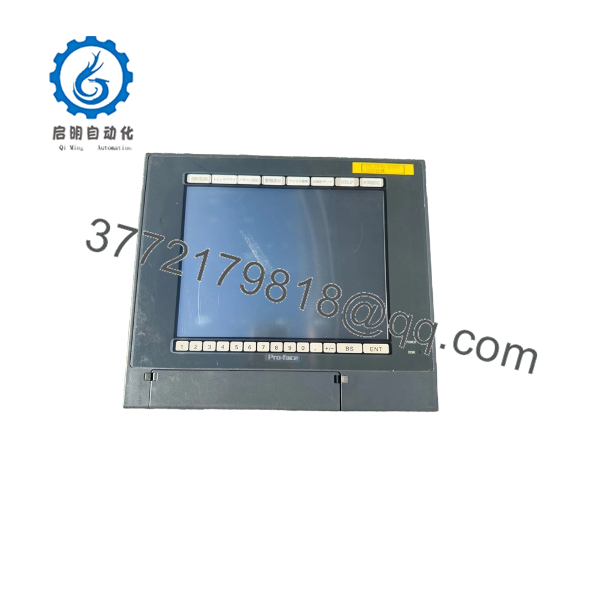
PL5910-T11
Installation & Configuration Guide
Stage 1: Pre-Installation Preparation — 5–10 Minutes
⚠️ Safety First: The PL5910-T11 operates from AC100V. Disconnect the power supply before opening the enclosure, removing boards, or disconnecting interface connectors. Pro-face specifically warns that internal components can carry hazardous voltages.
Tools Required
- ESD wrist strap
- Phillips screwdriver
- Multimeter
- Wire/cable labels
- Smartphone or camera
- Appropriate panel mounting tools
Before Removal
- Notify operations and place the controlled equipment in a safe state.
- Disconnect the AC power supply.
- Verify the absence of hazardous voltage with an appropriate meter.
- Photograph the complete PL5910 installation.
- Record the exact model and hardware configuration.
- Photograph all expansion cards and cable connections.
- Record BIOS, HDD, memory, and operating-system details if accessible.
- Keep the original unit available until the replacement has passed commissioning.
Stage 2: Removing the Existing Unit — Approximately 10 Minutes
- Remove the enclosure access covers as required.
- Label every cable before disconnecting it.
- Disconnect serial, LAN, USB, keyboard, mouse, printer, RAS, and other interfaces.
- Remove any installed expansion cards according to the hardware manual.
- Release the panel mounting hardware.
- Carefully withdraw the PL unit from the panel.
- Inspect the panel opening and mounting area.
- Check the gasket and surrounding surface for damage or contamination.
⚠️ Do not pull on interface cables to remove them. Old connectors and cable assemblies can be brittle after years of service.
Stage 3: Installing the Replacement — Approximately 10 Minutes
- Verify the model before installation: -T11.
- If the purchasing record specifies 3382701-03, compare that number against the actual product label and documentation before energizing.
- Check the 10.4-inch display and touch surface for shipping damage.
- Confirm the panel opening and mounting hardware.
- Reinstall expansion cards in their original positions.
- Reconnect each cable according to the photographs and labels.
- Verify the AC input wiring.
- Confirm protective grounding.
- Check that no cable is trapped against the chassis or mounting hardware.
- Secure the unit evenly in the panel.
⚠️ Do not assume 3382701-03 is interchangeable solely because the number appears on a Pro-face unit. The available evidence associates that number with PL5911-T11 rather than -T11. Confirm the nameplate and complete model before applying power.
Stage 4: Power-On & Functional Testing — 5–15 Minutes
- Perform a final visual inspection.
- Verify protective grounding.
- Check the AC input voltage before energizing.
- Observe the boot sequence.
- Confirm that the TFT display initializes correctly.
- Test the touch panel across multiple screen locations.
- Confirm keyboard and mouse operation if used.
- Verify LAN communication.
- Test the required RS-232C interfaces.
- Confirm HDD/OS operation.
- Start the plant application.
- Verify PLC or host communication.
- Perform a controlled operator-interface test.
⚠️ Safety warning: Pro-face explicitly states that safety-related functions should not rely on touch-panel switches. Emergency-stop and other critical safety functions should use a separate safety/control system.
Replacement Check
- model verified
- 3382701-03 identification checked against physical label
- AC100V supply verified
- Ground connection verified
- Expansion cards installed correctly
- HDD/OS configuration verified
- Display operating normally
- Touch panel tested
- LAN communication verified
- Serial communication verified
- Application started
- PLC/host communication verified
Frequently Asked Questions (FAQ)
Q1. Isace still an active product?
No. Pro-face lists as discontinued on November 30, 2010, and its repair service ended March 31, 2017. It should be treated as a legacy industrial PC.
Q2. What power suoes require?
The is the AC100V version. Its specified voltage range is AC85 to 132V, with 50/60 Hz operation and power consumption of 150 VA or less. Do not confuse it with -T41-24V, which is the 24 VDC version.
Q3. What display resoluoes use?
It has a 10.4-inch TFT color LCD with 640 × 480 VGA resolution and 262,144 display colors. The touch interface uses an analog resistive film system with 1,024 × 1,024 resolution.
oes support expansion cards?
Yes. The PL5910T architecture provides three expansion positions, with PCI/ISA support in the first two positions and an additional ISA position. The actual usable configuration depends on the installed hardware and board dimensions.
Q5. What operating systems were supported?
Pro-face lists MS-DOS and Windows 2000 for the PL5910T platform. This is important when replacing a failed unit because the legacy application may depend on the original OS, HDD image, drivers, or ISA hardware.
Q6. Is 3382701-03 th as ?
This requires verification. Pro-face’s official product page iies as the PL-5910T 3-slot AC model, but the available Pro-face installation documentation does not identify 3382701-03 as its model number. An independent repair database specifically lists PL5911-T11 with 3382701-03, creating a potential part-number mismatch.
If your physical label says “3-03 ,” use the complete nameplate information, revision, and serial number when requesting a replacement. That is safer than ordering from the part number alone.
Q7. What is the modern replacement strategy?
Pro-face’s current product information provides replacement options based on the PS6000 Series, rather thaning as a direct modern equivalent. A migration should account for the legacy Windows environment, expansion cards, storage, communication interfaces, application software, and panel dimensions.



