
 WhatsApp: +86 16626708626
 Email:
  Phone: +86 16626708626
Description
Key Technical Specifications
| Parameter | Specification |
|---|---|
| Manufacturer | Pro-face |
| Series | PL6000 |
| Model | PL6921-T41 |
| Part Number | 2780054-03 |
| Product Type | Industrial Panel PC / HMI |
| Display Size | 15 inches |
| Display Type | TFT color LCD |
| Resolution | 1024 × 768 pixels |
| Touch Technology | Analog resistive |
| Aspect Ratio | 4:3 |
| Operator Interface | Touchscreen |
| Intended Environment | Industrial automation |
| Installation | Panel-mounted |
| Primary Function | Machine visualization and operator control |
The PL6921-T41 belongs to Pro-face’s PL6000 family of industrial panel PCs. The T41 configuration denotes the touchscreen-oriented version, while 2780054-03 should be retained as the procurement identifier for the specific unit.
Product Introduction
The Pro-face PL6921-T41 (2780054-03) is a 15-inch industrial operator interface from the PL6000 Series. Its 4:3 TFT display and resistive touchscreen are suited to applications where operators need direct access to machine status, process values, alarms, recipes, and control commands.
The PL6000 platform is more than a conventional standalone HMI display. It is designed as an industrial panel-computing platform, allowing the operator interface and computer functionality to be integrated into the control cabinet.
For a replacement installation, the important point is to distinguish the PL6921-T41 front-panel configuration from the complete PL6000 computer configuration. Processor, memory, storage, operating system, and installed application software can vary by configuration.
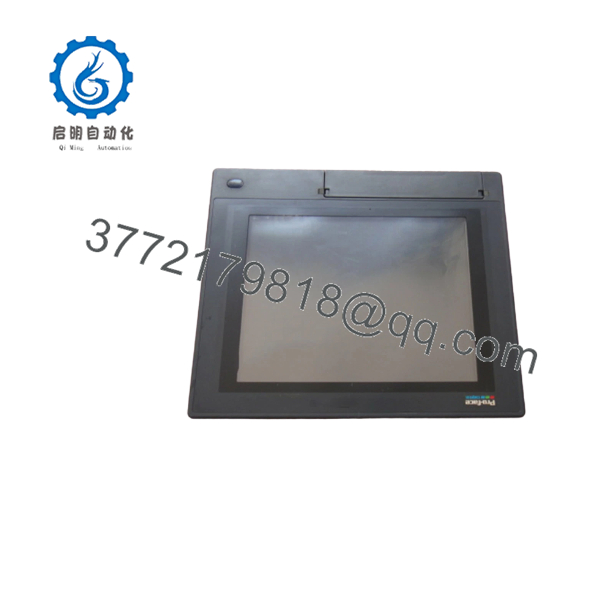
PL6921-T41
Installation & Configuration Guide
Stage 1: Pre-Installation Preparation — 5–10 Minutes
⚠️ Safety First: Shut down the controlled machine and isolate the panel PC from its power source before removing the unit. Follow the plant’s lockout/tagout procedure.
Before Removal
- Place the machine in a safe state.
- Disconnect power to the PL6921-T41.
- Verify that the unit is de-energized.
- Photograph the front and rear of the existing panel.
- Record the complete model and part number.
- Photograph all communication and power connections.
- Record the installed operating system and HMI application version if applicable.
- Back up the application before hardware replacement whenever possible.
Stage 2: Removing the Existing Unit
- Label all cables before disconnecting them.
- Disconnect Ethernet and serial communication cables.
- Disconnect USB and peripheral connections.
- Disconnect the power supply.
- Release the panel mounting hardware.
- Support the unit while removing the final fasteners.
- Carefully remove the panel PC.
- Inspect the panel opening, mounting surface, and gasket.
⚠️ Do not assume that another 15-inch Pro-face HMI has the same panel cutout. Screen size alone is not sufficient for mechanical compatibility.
Stage 3: Installing PL6921-T41
- Verify .
- Compare the replacement unit with the original before installation.
- Confirm the display and touchscreen are free of damage.
- Verify the panel cutout.
- Position the unit in the panel.
- Install and evenly tighten the mounting hardware.
- Reconnect power.
- Reconnect communication cables.
- Reconnect USB and peripheral devices as required.
- Verify that no cables are trapped or excessively stressed.
Stage 4: Power-On & Commissioning
- Check power wiring and polarity.
- Restore power.
- Confirm normal startup.
- Verify the display.
- Test touchscreen response across the active display area.
- Verify Ethernet/serial communication.
- Start the installed HMI application.
- Confirm PLC/controller data.
- Test alarms and status indications.
- Test representative operator commands.
- Verify the system under normal operating conditions.
Commissioning Checklist
- verified
- 2780054-03 verified
- Panel cutout verified
- Power verified
- Display tested
- Touchscreen tested
- Communication tested
- HMI application started
- PLC communication verified
- Alarm functions tested
- Operator commands tested
Frequently Asked Questions
Q1. What isace ?
The is a 15-inch touchscreen industrial panel computer/operator interface in the PL6000 Series.
Q2. What is part number 2780054-03?
2780054-03 is the part/registration identifier associated with the configuration. For purchasing a replacement, provide both identifiers rather than relying on the model alone.
Q3. What is the display resolution?
The uses a 1024 × 768-pixel 4:3 display.
Q4.the have a touchscreen?
Yes. The T41 configuration uses an analog resistive touchscreen, making it suitable for direct operator interaction in industrial environments.
Is a complete industrial PC?
The platform is an industrial panel-computing system rather than simply a passive HMI display. However, the exact CPU, memory, storage, and software configuration should be verified from the individual unit’s nameplate and system information.
Q6. What should I check before ordering 2780054-03?
Verify:
- Model:
- Part number: 2780054-03
- 15-inch display
- 1024 × 768 resolution
- Resistive touchscreen
- Physical panel cutout
- Power requirements
- CPU/RAM/storage configuration
- Operating system
- HMI application
- Communication interfaces
For a legacy replacement, request photographs of the front nameplate and rear label from the supplier. This is especially important because configurations can differ internally even when the front-panel dimensions appear similar.



