
 WhatsApp: +86 16626708626
 Email:
  Phone: +86 16626708626
Description
Key Technical Specifications
| Parameter | Value |
|---|---|
| Manufacturer | Pro-face |
| Series | PS4000 / PS4700 |
| Product Model | PS4700-V1-AZ-D-2G-XP-16CF-WGP |
| Pro-face Part Number | PFXPW170AD23300G00 |
| Product Type | Industrial Panel PC / HMI |
| Display Size | 15 inches |
| Display Format | 4:3 |
| Touch Technology | Analog resistive |
| CPU | Intel Atom Z510 |
| CPU Frequency | 1.1 GHz |
| RAM | 2 GB |
| Storage | 16 GB CompactFlash |
| Operating System | Windows XP |
| Power Supply | 24 VDC |
| HMI Runtime | WGP configuration |
| Ethernet | 1 port |
| Application | Industrial HMI / operator interface |
| Platform | PS4700 |
| Lifecycle | Legacy / discontinued platform |
The PS4700-V1-AZ-D-2G-XP-16CF configuration is documented in industry product listings as a 15-inch 4:3 industrial PC with an Intel Atom Z510 at 1.1 GHz, 2 GB RAM, 16 GB CF storage, Windows XP, one Ethernet port, and 24 VDC input.
A current market listing for the exact PFXPW170AD23300G00 identifies it as a Pro-face PS4700 touch-panel unit and lists a 17-inch display in its marketplace metadata. This conflicts with other PS4700 AZ configuration references that identify the standard PFXPW170 AZ configuration as 15 inches. For procurement, the physical nameplate and display size should therefore be verified rather than relying on the part number alone.
Product Introduction
The Pro-face PFXPW170AD23300G00 corresponds to the PS4700-V1-AZ-D-2G-XP-16CF-WGP, an older PS4000-series industrial panel PC designed for HMI and operator-interface applications. The configuration uses an Intel Atom Z510 processor, 2 GB RAM, 16 GB CompactFlash storage, Windows XP, and 24 VDC power.
This is a legacy computing platform. The Windows XP operating environment and CompactFlash storage are particularly important when replacing an installed unit because the application may depend on the original OS image, drivers, runtime software, and storage configuration. A replacement should be tested against the actual machine application before installation.
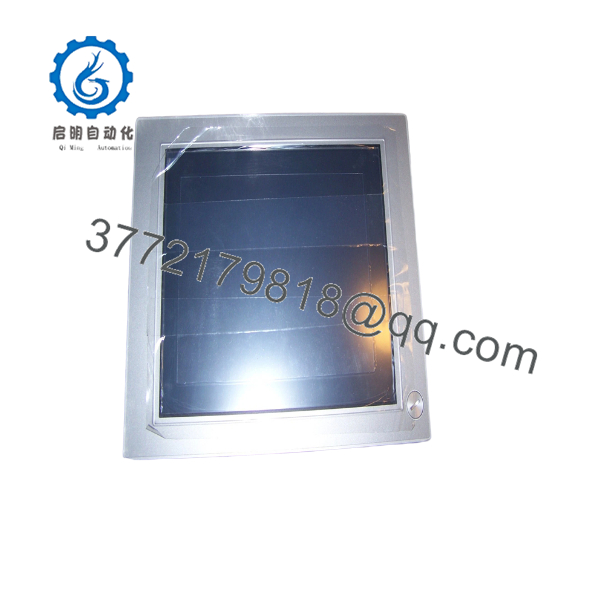
PS4700-V1-AZ-D-2G-XP-16CF-WGP
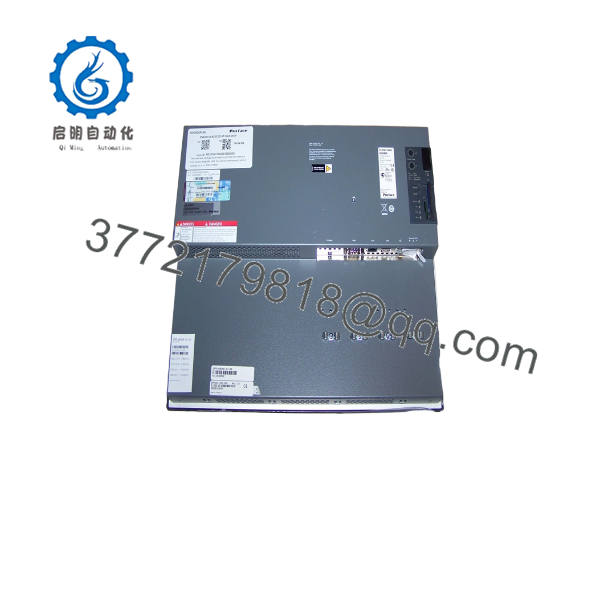
PS4700-V1-AZ-D-2G-XP-16CF-WGP
Installation & Configuration Guide
Stage 1: Pre-Installation Preparation — 10 Minutes
⚠️ Safety First: The uses 24 VDC input, but the industrial cabinet may contain hazardous AC and DC circuits. Follow the site’s lockout/tagout procedure and isolate the equipment before removing the panel PC.
Tools Required
- ESD wrist strap
- Phillips screwdriver
- Multimeter
- Cable labels
- Smartphone or camera
- Panel mounting tools
- Backup CompactFlash media if available
Before Removal
- Notify operations of the maintenance window.
- Place the controlled process in a safe state.
- Isolate the power supply.
- Verify the 24 VDC supply is de-energized.
- Photograph the front and rear of the existing unit.
- Record the complete model and part number.
- Photograph all Ethernet, serial, USB, and power connections.
- Record the Windows XP configuration and HMI runtime information.
- If possible, make a verified backup of the CompactFlash card or application image.
⚠️ Do not overwrite the original CompactFlash card during troubleshooting. For a legacy Windows XP HMI, the original CF image can be the most valuable recovery asset.
Stage 2: Removing the Existing — Approximately 10 Minutes
- Remove the required rear cabinet hardware.
- Label every cable before disconnecting it.
- Disconnect the Ethernet connection.
- Disconnect serial and peripheral interfaces.
- Disconnect the 24 VDC power connection.
- Release the panel mounting hardware.
- Support the while removing the final fasteners.
- Carefully withdraw the unit from the panel.
- Inspect the panel cutout and gasket.
- Check the old unit for identifying labels and configuration information.
⚠️ Keep the original intact until the replacement has successfully booted and communicated with the control system.
Stage 3: Installing PFXPW170AD23300G00 — Approximately 10 Minutes
- Verify the exact model: PFXPW170AD23300G00.
- Cross-check the system designation: PS4700-V1-AZ-D-2G-XP-16CF-WGP.
- Confirm the power requirement is 24 VDC.
- Compare the replacement display size and panel dimensions with the installed unit.
- Inspect the touchscreen and bezel for damage.
- Install the into the panel.
- Secure the mounting hardware evenly.
- Reconnect 24 VDC power with correct polarity.
- Reconnect Ethernet and serial interfaces.
- Verify all connectors are completely seated.
- Confirm that no cable is trapped behind the chassis.
⚠️ Verify the physical display size before installation. Current secondary-market records conflict on the exact screen size associated with PFXPW170AD23300G00, while the broader AZ-D-2G-XP-16CF configuration is documented as a 15-inch 4:3 .
Stage 4: Power-On & Commissioning — 10–20 Minutes
- Perform a final wiring inspection.
- Verify the 24 VDC supply voltage.
- Restore power.
- Observe the boot sequence.
- Confirm Windows XP starts correctly.
- Verify touchscreen response.
- Check Ethernet link status.
- Verify PLC or controller communication.
- Launch the HMI application.
- Test representative operator screens.
- Verify alarm and status functions.
- Test operator commands under controlled conditions.
- Confirm the application runs without CompactFlash or filesystem errors.
Replacement Check
- verified
- -V1-AZ-D-2G-XP-16CF-WGP verified
- 24 VDC input verified
- Display size physically confirmed
- Touchscreen tested
- CompactFlash verified
- Windows XP boot verified
- Ethernet communication verified
- Serial communication verified
- HMI runtime starts correctly
- PLC communication verified
- Operator controls tested
Frequently Asked Questions (FAQ)
Q1. What is Pro-face ?
is associated with the PS4700-V1-AZ-D-2G-XP-16CF-WGP industrial panel PC configuration. The platform uses an Intel Atom Z510 processor, 2 GB RAM, 16 GB CompactFlash storage, Windows XP, and 24 VDC power.
Q2. What processor does this use?
The configuration uses an Intel Atom Z510 at 1.1 GHz. The specific configuration includes 2 GB RAM.
Q3. Whrating system does -WGP use?
The suffix XP identifies the Windows XP configuration. The system stores the operating environment on a 16 GB CompactFlash card.
For an existing machine, this is not a minor detail. Application compatibility may depend on the exact Windows XP image, device drivers, HMI runtime, and CF-card contents.
Q4. What power supply does this require?
The configuration is specified for 24 VDC power.
Before installing a replacement, measure the cabinet supply rather than assuming the nominal 24 VDC rail is healthy. Check polarity and voltage under normal cabinet conditions.
Q5. How much memory and storage does it have?
This configuration uses 2 GB RAM and a 16 GB CompactFlash card.
Do not substitute a generic CF card without considering the original filesystem, boot configuration, application image, and industrial operating environment.
Q6. Is a current-generation Pro-face industrial PC?
No. It belongs to the older / PS4000 platform and uses Windows XP and CompactFlash storage. It should be treated as a legacy industrial computer when planning spare inventory and migration.
For a production-critical installation, keeping a tested spare can be practical, but the long-term strategy should include application migration and replacement of the Windows XP-dependent platform.
Q7. Is this a 15-inch or 17-inch Pro-face unit?
Verify the physical unit before ordering. This is one area where the available records are inconsistent. A current listing for the exact identifies the display as 17 inches, while another AZ configuration reference identifies the platform as a 15-inch 4:3 IPC.
For procurement, I would use the complete nameplate, front-panel dimensions, and rear model label as the final identification criteria.
Q8. What should I verify before purchasing a replacement?
For this particular part, verify more than the model number:
- CPU: Atom Z510, 1.1 GHz
- RAM: 2 GB
- Storage: 16 GB CompactFlash
- OS: Windows XP
- Power: 24 VDC
- Physical display size
- Touchscreen condition
- CF-card contents
- Ethernet/serial interfaces
- HMI runtime and application image
One current listing for the exact part describes the unit as new old stock/open box, while another listing describes a different configuration as used and tested. These conditions should not be treated as interchangeable when purchasing a production spare.



