
 WhatsApp: +86 16626708626
 Email:
  Phone: +86 16626708626
Description
3. Key Technical Specifications
| Parameter | Specification Value |
|---|---|
| Catalog Part Number | 4301-MBP-DFCM |
| Manufacturer | ProSoft Technology |
| Gateway Family | ProLinx 4000 Series |
| Port 1 Protocol | Modbus Plus (MBP) – Host/Node Communication |
| Port 2 Protocol | DF1 Master/Slave (DFCM) – RS-232/422/485 serial |
| Internal Data Buffer | 4000 16-bit register virtual database |
| Operating Power | 24 VDC nominal (18 to 36 VDC range, 300 mA max) |
| Configuration Software | ProSoft Configuration Builder (PCB) via RS-232 debug port |
| Mounting & Enclosure | Standard 35mm DIN-rail mount, IP20 rated enclosure |
| Operating Temperature | 0°C to +60°C (32°F to 140°F) |
4. Product Introduction & Supply Chain Strategy
The ProSoft 4301-MBP-DFCM is a standalone protocol conversion gateway engineered to bridge two major industrial automation ecosystems: Modicon Modbus Plus networks and Allen-Bradley DF1 serial links. Utilizing a internal 4000-word memory database, the gateway autonomously maps registers between Modbus Plus nodes (like Quantum or Compact PLCs) and DF1 serial devices (such as SLC 5/03, SLC 5/04, or MicroLogix PLCs) without requiring ladder logic modifications on either side.
This product is a Brand New Surplus unit. It is not used, not pulled from a decommissioned plant, and not refurbished. All serial ports, Modbus Plus transformer interfaces, and internal memory buses undergo full bench verification prior to shipment.
In legacy industrial manufacturing, replacing a cross-platform gateway during a hardware failure can require costly, high-risk controller reprograming. Sourcing verified New Surplus ProSoft 4301-MBP-DFCM modules allows maintenance teams to immediately replace failed network bridges, keeping cross-brand SCADA data flows active without engineering downtime.
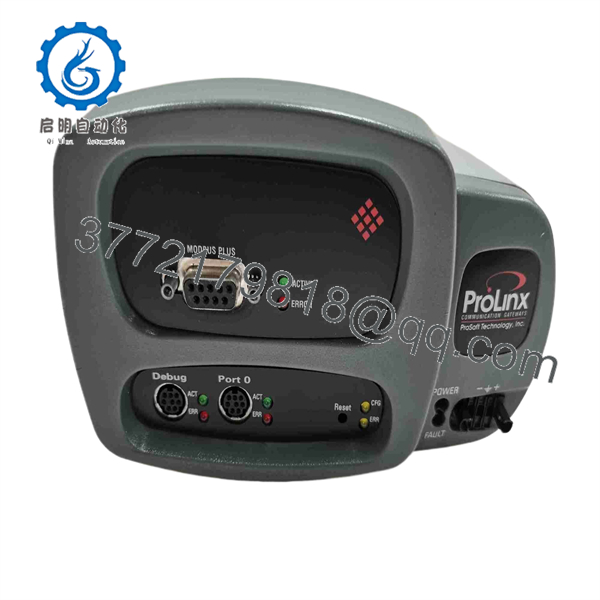
4301-MBP-DFCM
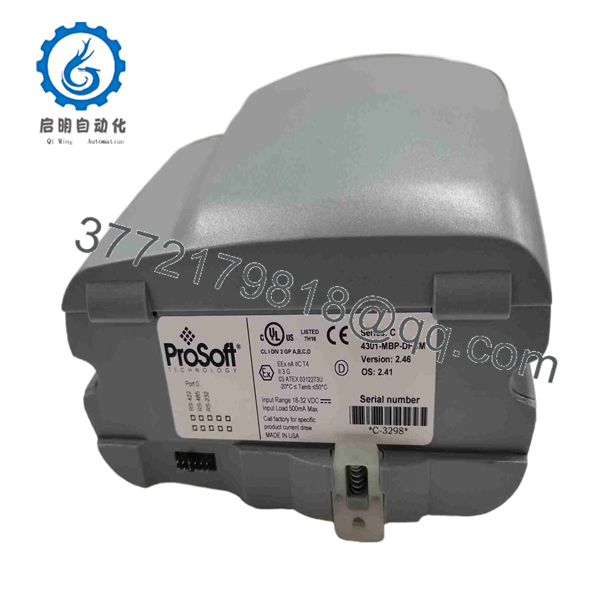
4301-MBP-DFCM
5. Installation & Configuration Guide
Electrical & Network Noise Hazard
Ensure 24V DC field power is disconnected before wiring serial communications or Modbus Plus cables. Connect the gateway ground terminal directly to a clean panel earth ground to prevent serial port transceiver damage from ground loops.
1
DIN-Rail Mounting & Power Wiring
Prerequisite
1.DIN-Rail Mounting & Power Wiring:Prerequisite.
Snap the 4301-MBP-DFCM onto a standard 35mm DIN rail inside the enclosure. Connect a clean 24 VDC power supply to the removable terminal block, ensuring proper ground bonding.
2
Modbus Plus & DF1 Cable Connections
Network Wiring
2.Modbus Plus & DF1 Cable Connections:Network Wiring.
Connect the Modbus Plus network drop cable to the DB9 port. Connect the Allen-Bradley serial interface cable (RS-232 null-modem or RS-485 pair) to the DF1 serial port.
3
ProSoft Configuration Builder Setup
Configuration
3.ProSoft Configuration Builder Setup:Configuration.
Connect a PC to the RJ45/DB9 Configuration Serial Port using a null-modem cable. Open ProSoft Configuration Builder (PCB), set the Modbus Plus Node Address, configure DF1 baud rate/parity, and define data map tables.
4
Firmware & Data Map Transfer
Download
4.Firmware & Data Map Transfer:Download.
Download the configuration file from PCB to the gateway. Cycle 24 VDC power on the 4301 module to store memory mappings into non-volatile EEPROM.
5
LED Diagnostic Check
Verification
5.LED Diagnostic Check:Verification.
Verify the PWR LED lights solid green. Confirm MBP ERR and DF1 ERR LEDs remain off, while TX/RX LEDs blink rapidly, indicating active data exchange between networks.
6. System Compatibility & Maintenance Notes
The ProSoft 4301-MBP-DFCM integrates legacy systems across vendor boundaries:
- PLC Compatibility: Bridges Modicon Quantum, Momentum, and 984 controllers with Allen-Bradley SLC 500, MicroLogix, PLC-5, and ControlLogix (via 1756-DH485/DF1 modules).
- Configuration Utility: Programmed via ProSoft Configuration Builder (PCB) utility software.
- Status Monitoring: Diagnostic LEDs provide immediate visual feedback for port errors, node collision, and power supply health.
7. Frequently Asked Questions (FAQ)
Q: Is this ProSoft 4301-MBP-DFCM module brand new or refurbished?
A: This product is a Brand New Surplus unit. It is not used, not pulled from a decommissioned plant, and not refurbished. All internal electronics undergo complete diagnostic testing.
Q: Does the 4301-MBP-DFCM require ladder logic changes in the connected PLCs?
A: No. The gateway operates autonomously by mapping registers in its internal database to both networks, eliminating the need to write complex messaging logic in the PLCs.
Q: What serial pinouts are supported on the DF1 port?
A: The DF1 port supports RS-232, RS-422, and RS-485 electrical standards, configurable via internal jumpers and software settings.
Q: What warranty applies to this New Surplus gateway?
A: We supply this module with a full 1-year functional replacement warranty from the date of shipment to ensure long-term network reliability.



