
 WhatsApp: +86 16626708626
 Email:
  Phone: +86 16626708626
Description
3. Key Technical Specifications
| Parameter | Specification / Value |
| Power Supply Requirements | 24 V DC nominal (10 to 30 V DC range) |
| Current Draw | 300 mA maximum at 24 V DC |
| Modbus Plus Port | 1x Modbus Plus host interface (RS-485 shielded twisted pair) |
| Serial Communication Ports | 4x configurable RJ45 ports (RS-232, RS-422, or RS-485) |
| Serial Protocols Supported | Modbus RTU Master/Slave, Modbus ASCII Master/Slave |
| Baud Rates | 110 bps to 115.2 kbps per serial port |
| Operating Temperature | 0°C to +60°C (32°F to 140°F) |
| Isolation Rating | 2500 V RMS optical isolation on serial communication ports |
| Mounting Configuration | Standard 35 mm DIN-rail mount |
| Configuration Interface | Serial RS-232 configuration port via ProSoft Configuration Builder |
4. Product Introduction & Supply Chain Strategy
This product is a Brand New Surplus unit. It is not used, not pulled from a decommissioned plant, and not refurbished. All modules undergo rigorous quality verification to ensure OEM-level reliability. The ProSoft 5302-MBP-MCM4 provides high-density serial connectivity by bridging a high-speed Modbus Plus network to four independent Modbus RTU or ASCII serial channels, allowing seamless integration between legacy Schneider Electric PLC infrastructure and standalone serial field devices.
Sourcing this unit as New Surplus is a critical supply-chain hedge against unplanned migration costs. Because Modbus Plus hardware is largely discontinued by OEMs, replacing a failed module normally forces an expensive controller upgrade. Refurbished units on the secondary market frequently suffer from thermal degradation of internal RS-485 transceivers and failing power supply circuits. Acquiring a verified New Surplus gateway provides 100% remaining useful service life, maintaining plant uptime without requiring immediate, high-CAPEX control system rewrites.
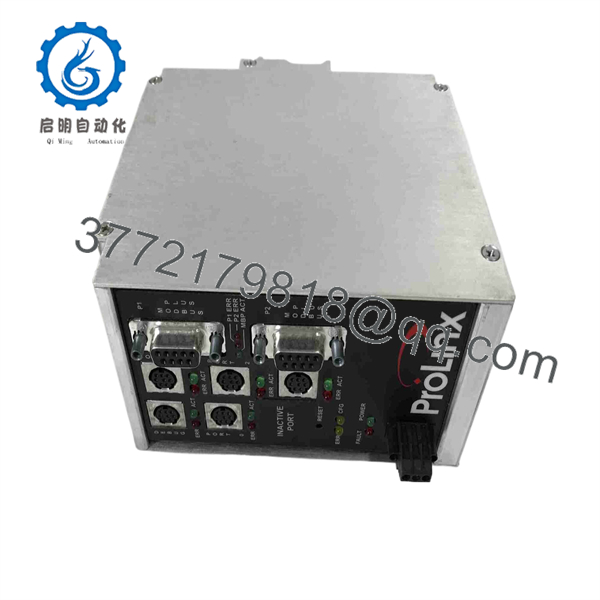
5302-MBP-MCM4
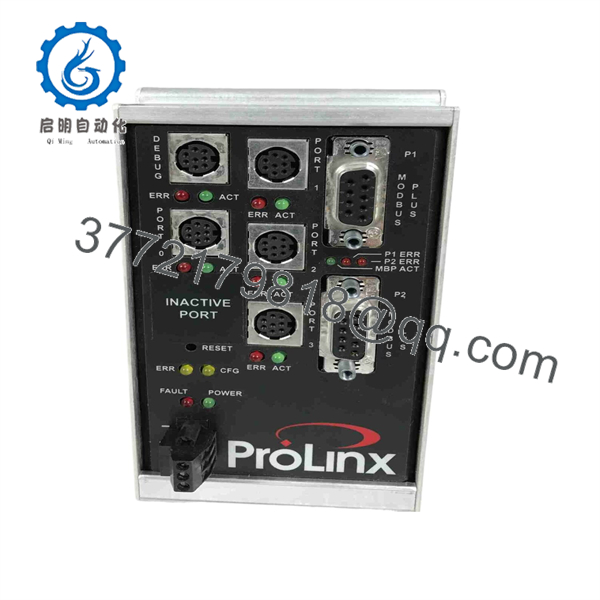
5302-MBP-MCM4
5. Installation & Configuration Guide
Stage 1: Pre-Installation (Prep & Safety)
- De-energize the enclosure and follow standard lock-out/tag-out (LOTO) isolation procedures.
- Put on a grounded ESD wrist strap before handling the replacement module.
- Record the Node Address set on the existing unit’s DIP switches and document port pinouts.
Stage 2: Removal
- Unplug the 24 V DC green power connector block.
- Label and disconnect the Modbus Plus cable and all four serial RJ45 cables.
- Use a flathead screwdriver to pull down the bottom DIN-rail latch and remove the module from the rail.
Stage 3: Installation (Clone & Seat)
- Set the Modbus Plus Node Address DIP switches on the new module to match the original unit.
- Clip the 5302-MBP-MCM4 onto the 35 mm DIN rail until the spring latch locks firmly into place.
- Reattach the Modbus Plus cable, serial RJ45 connectors, and power plug.
Stage 4: Power-On & Testing
- Apply 24 V DC power and confirm cabinet supply voltage measures between 21.6 V and 26.4 V DC.
- Verify the power LED is solid green and the Modbus Plus status LED cycles to a normal blinking pattern (indicating active token pass).
- Confirm serial TX/RX LEDs flash on active ports to verify bi-directional data flow.
6. Firmware/Software Versions & Upgrade Notes
- Recommended Firmware Version: V3.12 or higher for optimized database memory allocation across four active serial ports.
- Configuration Software: ProSoft Configuration Builder (PCB) V4.3.0 or higher.
- Compatibility Caveats: Firmware revisions prior to V2.05 do not support high-baud-rate Modbus ASCII modes on ports 3 and 4 simultaneously.
- Risk Warning: Do not interrupt power or serial communication during a firmware flash update. A aborted upload will corrupt the bootloader, requiring factory recovery.
7. Frequently Asked Questions (FAQ)
How can I verify this module is actually New Surplus and not refurbished?
Every unit is delivered in its original anti-static packaging with zero marks on the DIN-rail locking mechanism, pristine backplane terminals, and clean serial port pins. We enforce a strict zero-tolerance policy against refurbished or used equipment.
Why shouldn’t we buy a cheaper refurbished 5302-MBP-MCM4?
Refurbished modules are pulled from old plant tear-downs and often have thousands of hours of thermal aging. Internal optical isolators and RS-485 line drivers degrade over time, leading to intermittent signal loss that can shut down an entire production line. New Surplus guarantees full operational lifespan and zero prior runtime stress.
Do I need special software to configure the four serial ports?
Yes, you use ProSoft Configuration Builder (PCB), a free Windows-based utility provided by ProSoft Technology. It allows you to define slave addresses, baud rates, parity, and memory offset maps for all four ports via the configuration cable.
Is this unit hot-swappable in an active cabinet?
No. Removing or inserting the 24 V DC terminal block under electrical load can create arc transients that damage the internal communication transceivers. Always turn off power before swapping modules.
What is the warranty coverage on this New Surplus unit?
This module comes with a full 1-year replacement warranty. If any functional hardware defect occurs within 12 months under normal operating conditions, we supply an immediate replacement from stock.



