
 WhatsApp: +86 16626708626
 Email:
  Phone: +86 16626708626
Description
Key Technical Specifications
| Parameter | Value |
|---|---|
| Product model | ProSoft Technology 6105-WA-PDPS |
| Product role | Wireless PROFIBUS DP Slave |
| Product family | ProLinx 6000 Series |
| PROFIBUS protocol | PROFIBUS DP V0 Slave |
| PROFIBUS chipset | Siemens SPC3 |
| PROFIBUS baud rate | 9.6 kbit/s to 12 Mbit/s |
| PROFIBUS node address | 1 to 125, software configurable |
| PROFIBUS input data | Up to 244 bytes |
| PROFIBUS output data | Up to 244 bytes |
| Maximum mapped I/O | 400 bytes total |
| GSD file | PRLX05A5.GSD |
| DP functions | Freeze Mode, Sync Mode, Auto Baud |
| Wireless protocol | ProSoft Wireless Protocol (PWP) |
| Wireless standard | IEEE 802.11b DSSS |
| RF frequency | 2.4 GHz, 2,400 to 2,483.5 MHz |
| RF data rates | 1, 2, 5.5, or 11 Mbps |
| RF output power | 32 mW / 15 dBm |
| Wireless security | PWP plus 64-bit or 128-bit WEP encryption |
| Antenna connections | Two RP-SMA ports with automatic antenna diversity |
| Supply voltage | 24 VDC nominal; 18 to 36 VDC permitted |
| Maximum current draw | 500 mA at 24 VDC |
| Configuration port | Mini-DIN RS-232; no hardware handshaking |
| Application serial ports | Mini-DIN RS-232/422/485 |
| Serial-port isolation | 2,500 V opto-isolation |
| Power-supply isolation | 500 V |
| Operating temperature | −20 to +50 °C (−4 to +122 °F) |
| Storage temperature | −40 to +85 °C (−40 to +185 °F) |
| Relative humidity | 5% to 95%, non-condensing |
| Standard dimensions | 5.20 × 2.07 × 4.52 in. (132 × 52.5 × 114.8 mm) |
| Status indication | Power, module, application, serial, RF link, RF data, and error LEDs |
The 6105-WA-PDPS maps up to 244 bytes each of PROFIBUS input and output data into its internal database. It supports configurable byte swapping, communication-failure behavior, timeout multiplier settings, and diagnostic/status-data mapping. ProSoft identifies this model as a legacy ProLinx product, so verify actual stock, firmware, accessories, and regional radio compliance before committing it to a shutdown window.
Product Introduction
The ProSoft 6105-WA-PDPS is a ProLinx 6000 Series wireless PROFIBUS DP slave gateway. It connects a PROFIBUS DP master network to remote data over a 2.4 GHz ProSoft Wireless Protocol link, allowing PLCs, drives, remote I/O, and other DP systems to exchange mapped process data without a physical PROFIBUS cable run.
Buyers typically use the 6105-WA-PDPS with a matching 6104-WA-PDPM wireless PROFIBUS DP master. The slave supports PROFIBUS DP V0 at up to 12 Mbit/s, 244-byte input/output blocks, dual RP-SMA antennas, and 18 to 36 VDC power. It is a direct replacement only when the existing radio pair, GSD configuration, node addressing, and site wireless design match.
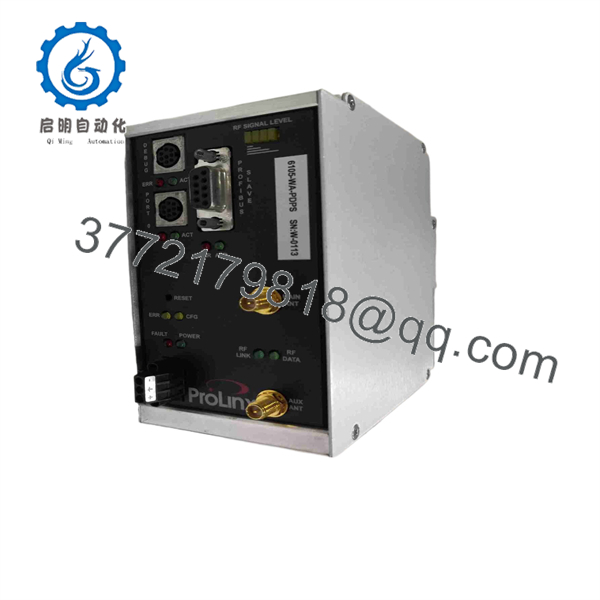
6105-WA-PDPS
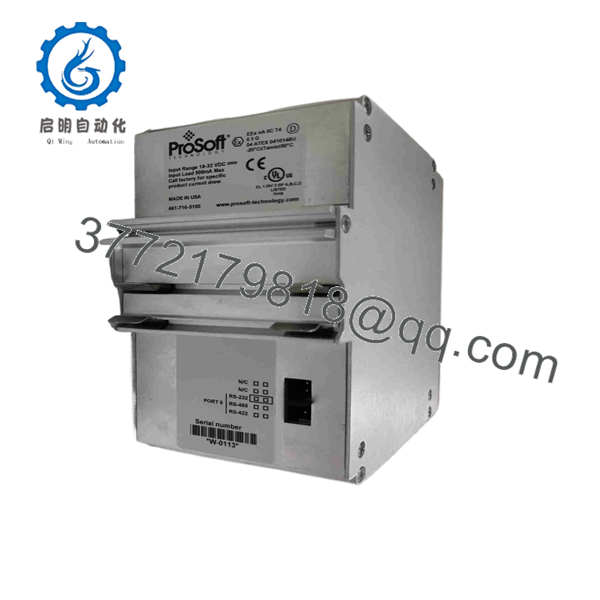
6105-WA-PDPS
Troubleshooting Quick Reference
| Symptom | Possible Cause | Relevance to this Part | Quick Check Method | Recommendation |
|---|---|---|---|---|
| No LEDs after applying power | Missing DC supply, blown fuse, reversed polarity, loose terminal wiring | ✅ High | Measure 18 to 36 VDC directly at the unit’s Positive and Negative power terminals using a calibrated meter. Confirm the supply can provide at least 500 mA per gateway. | Correct supply polarity and wiring first. Do not replace the gateway until the input voltage remains stable during startup. |
| Power LED is on but module status indicates fault | Corrupt configuration, failed boot, internal hardware fault | ✅ High | Connect through the Mini-DIN RS-232 configuration port and attempt to read the module with ProSoft Configuration Builder. Record LED states and capture the configuration utility error. | Reload a known-good configuration only after backing up the installed file. Replace the unit if it cannot boot or communicate locally with a verified cable and supply. |
| PROFIBUS master reports station unavailable | Incorrect station address, broken bus cable, missing termination, master configuration mismatch | ✅ High | Compare the configured slave address with the PLC or DP master hardware configuration. Check the PROFIBUS connector, shield, A/B conductors, and termination at both physical bus ends. | Do not condemn the 6105-WA-PDPS immediately. Addressing and termination faults cause this symptom far more often than gateway failure. |
| PROFIBUS diagnostics show parameterization or configuration fault | Incorrect GSD file, incorrect mapped I/O length, byte-order mismatch | ✅ High | Confirm that the master uses ProSoft GSD file PRLX05A5.GSD. Compare configured input/output length against the actual mapped database, within the 244-byte-per-direction and 400-byte-total limits. | Correct the master configuration, download it, then cycle power during an approved outage if the system design requires it. |
| RF Link LED remains off | Antenna not installed, antenna cable fault, wrong wireless channel, failed peer radio | ✅ High | Verify both RP-SMA antennas are installed and hand-tightened. Check that the paired 6104-WA-PDPM has matching wireless settings and an active RF link. | Inspect antennas, cable routing, line of sight, and radio settings before replacing either gateway. Never energize the transmitter repeatedly without proper antennas attached. |
| RF link is present but process data does not update | PWP mapping error, wrong multicast/group configuration, stale database mapping | ✅ High | Use ProSoft Configuration Builder to compare the active configuration file with the archived working file. Check mapped database register ranges and communication status counters. | Correct the mapping or PWP configuration. Swap hardware only after reproducing the issue with a known-good configuration. |
| Intermittent data loss or communication timeout | RF interference, antenna placement, excessive distance, enclosure shielding, poor grounding | ⚠️ Medium | Inspect RF status/error LEDs during the fault. Temporarily test with antennas closer together and away from VFDs, motors, large steel structures, and high-current conductors. | Treat this as a site RF problem first. Improve antenna placement and verify channel selection before ordering a replacement. |
| Serial activity is absent during setup | Wrong cable, incorrect PC COM-port settings, RS-232/422/485 wiring mismatch | ⚠️ Medium | Use the correct Mini-DIN-to-DB-9 configuration cable. Verify the PC serial-port settings and confirm whether the application port is configured for RS-232, RS-422, or RS-485. | Check the cable and interface standard before replacing the module. Do not wire from memory; confirm terminal assignments in the manual. |
| PLC loses multiple remote devices at once | Master-side failure, common power issue, PROFIBUS trunk fault, wireless master fault | ❌ Low | Check whether other DP nodes and the paired 6104-WA-PDPM remain online. Review the PLC diagnostic buffer and inspect the common 24 VDC supply. | Focus on the DP master, common supply, trunk wiring, or wireless peer before replacing this slave gateway. |
❗ Firmware and configuration warning: Document the existing 6105-WA-PDPS configuration before removal. A replacement unit may power up correctly but still fail to exchange data if its PROFIBUS address, I/O map, byte-swapping setting, PWP peer configuration, wireless channel, or communication-failure action differs from the installed unit.
❗ DIP switch and wiring warning: Take clear photos of every selector, terminal, antenna connection, and PROFIBUS connector before touching the old gateway. It sounds basic, but a missing terminator or an address mismatch can turn a quick swap into a two-day outage investigation.
Use an ESD wrist strap, isolate power before disconnecting the gateway, and retain the old configuration file. If the fault remains unclear, contact technical support with front-panel LED photos, the ProSoft Configuration Builder project file, master diagnostic logs, and the existing PROFIBUS network configuration.
Frequently Asked Questions (FAQ)
Q: What does the ProSoft 6105-WA-PDPS do?
A: The 6105-WA-PDPS acts as a wireless PROFIBUS DP slave. A PROFIBUS DP master sees it as a DP slave device, while the module exchanges its mapped internal database over the ProSoft Wireless Protocol link with a compatible wireless peer. In the normal architecture, the companion 6104-WA-PDPM operates as the wireless PROFIBUS DP master.
Q: Is the 6105-WA-PDPS a direct replacement for any PROFIBUS DP slave?
A: No. It is not a generic replacement for a drive, remote I/O head, valve island, or another vendor’s PROFIBUS DP slave. It replaces the same ProSoft 6105-WA-PDPS function in a ProLinx wireless gateway installation. Confirm the PROFIBUS station address, GSD file, I/O byte count, PWP configuration, antenna arrangement, and partner gateway model before ordering.
Q: Can I use the 6105-WA-PDPS without a 6104-WA-PDPM?
A: Usually, no. The 6105-WA-PDPS is the wireless PROFIBUS DP slave side of the system. The 6104-WA-PDPM provides the corresponding wireless PROFIBUS DP master function. Review the installed project file rather than relying solely on the label, because some sites use custom PWP data mapping between gateway pairs.
Q: Can I hot-swap a 6105-WA-PDPS?
A: Do not assume that you can. The module itself may not be installed in a conventional hot-swappable PLC rack, but removing it interrupts the PROFIBUS DP connection and the wireless data path. Kill power under an approved maintenance procedure, document the wiring and antenna connections, replace the module, then restore configuration before returning the process to service.
Q: Will I lose the configuration when I replace the gateway?
A: Yes, unless you have exported or recorded it. The replacement must receive the correct ProSoft Configuration Builder file and must match the original PROFIBUS address, I/O mapping, communication timeout behavior, wireless channel, encryption settings, and peer information. Back up the working configuration before pulling the existing unit. If the old module will not communicate, photograph labels and settings, then pull archived project files from the PLC or system documentation.
Q: What PROFIBUS data capacity does this model support?
A: The 6105-WA-PDPS supports up to 244 bytes of PROFIBUS input data and 244 bytes of output data, with a 400-byte total mapped limit. The master-side hardware configuration must use the correct GSD file, PRLX05A5.GSD, and must match the actual data size configured inside the ProLinx gateway. A byte-count mismatch commonly produces parameterization or configuration diagnostics.
Q: Is this model obsolete, and what does that mean for stock?
A: Yes. ProSoft lists the 6105-WA-PDPS in its legacy-product area, and the available technical documents date to the original ProLinx 6000 Series release period. That means factory availability may be limited or unavailable, while aftermarket inventory can vary by condition, firmware, included cables, and antenna accessories. Confirm actual inventory and lead time before scheduling downtime.
Q: Why can a New Surplus 6105-WA-PDPS cost less than factory inventory?
A: New Surplus normally means unused original equipment obtained from excess inventory, project cancellations, distributor liquidation, or decommissioned spare-parts stores. It may not carry the same channel status as current factory distribution. Ask for photos of the exact unit, label and serial information, packaging condition, included accessories, power-on verification, configuration-port communication test, PROFIBUS communication test, RF-link test, and written warranty terms before purchasing.



