WhatsApp: +86 16626708626
 Email:
 Phone: +86 16626708626
Description
Key Technical Specifications
| Parameter | Value |
| Backplane Current Load | 800 mA at 5 V DC; 3 mA at 24 V DC |
| Operating Temperature | 0 to 60°C (32 to 140°F) |
| Storage Temperature | -40 to 85°C (-40 to 185°F) |
| Relative Humidity | 5% to 95% non-condensing |
| Ethernet Port | 10/100 Mbps RJ45 connector, auto-crossover/auto-polarity |
| Application Port | Mini-USB Type B for configuration and diagnostics |
| Enclosure Type | Standard ControlLogix single-slot wide module |
| LED Indicators | Application Status, Backplane Transfer Status, Ethernet Link/Activity |
| Conformal Coating | Standard IPC-A-610 Class 2 protection against harsh industrial elements |
| Max Connections | Up to 30 simultaneous client/server connections |
Product Introduction & Supply Chain Strategy
The ProSoft Technology MVI56E-MNETCR is an advanced Modbus TCP communication module engineered for Rockwell Automation ControlLogix systems. It provides robust client and server connectivity over Ethernet networks, allowing the PLC to interface effortlessly with variable frequency drives, power monitors, and third-party SCADA software. Its integrated web server and data redirection features simplify diagnostics and network management across complex industrial architectures.
Procuring this module as genuine New Surplus ensures maximum system reliability and protects your plant against the high TCO associated with premature hardware failure. Refurbished Ethernet cards often harbor degraded RJ45 physical layers and worn-out flash memory, leading to intermittent packet drops and critical network timeouts. Maintaining a factory-fresh spare on your shelf guarantees rapid restoration during unexpected faults and removes operational vulnerabilities.
Installation & Configuration Guide
1.Pre-Installation (Prep & Safety):Tools needed: ESD wrist strap, Ethernet cable, screw driver.
Execute a lock-out/tag-out (LOTO) procedure on the ControlLogix chassis power supply. Wear a grounded ESD wrist strap before handling electronics. Save a backup of the current processor program and record the module’s IP address and network parameters.
Verification: Confirm chassis power LEDs are off and the backplane voltage reads 0 V DC.
2.Removal:Hardware extraction.
Disconnect the Ethernet patch cable and USB configuration cable from the front panel. Depress the top and bottom locking latches and carefully pull the MVI56E-MNETCR straight out of its chassis slot.
Verification: Visually inspect the chassis backplane pins to ensure no bending or debris accumulation.
3.Installation (Clone & Seat):Hardware mounting.
Align the new surplus module with the designated chassis slot guides. Firmly push the module straight back into the slot until the top and bottom tabs click securely into place. Reconnect the Ethernet cabling.
Verification: Check that the module is flush with adjacent cards and locking tabs are fully engaged.
4.Power-On & Testing:System startup.
Restore power to the ControlLogix chassis. Observe the LED diagnostic startup sequence to verify successful backplane enumeration and Ethernet link establishment. Ping the module’s IP address from your engineering workstation to confirm network accessibility.
Verification: Verify that the OK LED glows solid green and network traffic LEDs flash normally under active polling.
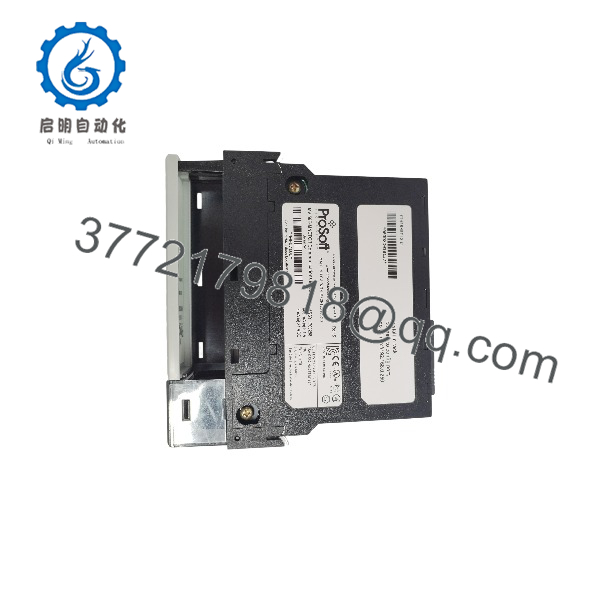
MVI56E-MNETCR
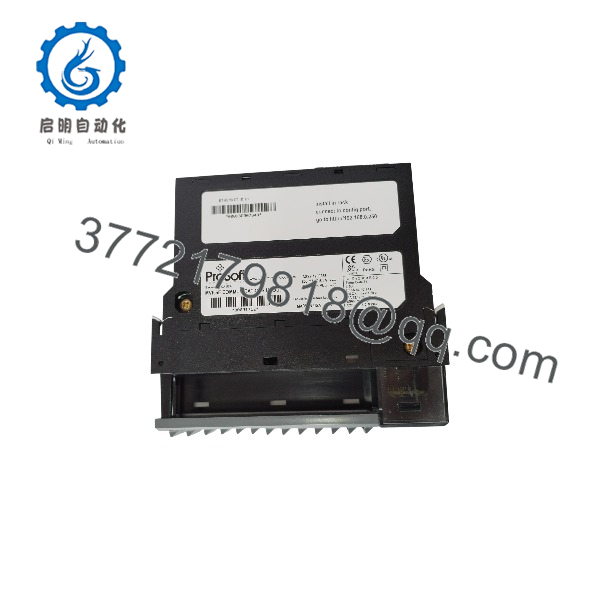
MVI56E-MNETCR
Firmware/Software Versions & Upgrade Notes
- Recommended Firmware: Version 2.04 or later is recommended to ensure robust Modbus TCP packet handling and enhanced security features.
- Compatibility Notes: Fully compatible with ControlLogix controllers running firmware version 16 through current revisions. Integrates directly via Add-On Profiles (AOP) in Studio 5000 Logix Designer.
- Upgrade Risk Warning: Always verify the IP address, subnet mask, and gateway settings after any firmware update or hardware swap to prevent network routing conflicts on the plant floor.
Frequently Asked Questions (FAQ)
Is this module genuinely new and unused?
This unit is a Brand New Surplus item. It has never been installed, powered on in a live environment, or refurbished. It is delivered in its original manufacturer packaging with pristine backplane pins.
Why choose New Surplus over cheaper refurbished alternatives?
While refurbished modules may offer short-term savings, they carry degraded electronic components that frequently trigger sudden network dropouts. Investing in New Surplus eliminates hidden downtime risks and delivers full OEM performance backed by a reliable warranty.
What warranty is included with this unit?
Every MVI56E-MNETCR module includes a comprehensive 1-year replacement warranty, safeguarding your spare parts investment.
Can I hot-swap the module without shutting down the rack?
Although ControlLogix backplanes support Removal and Insertion Under Power (RIUP), it is best practice to pause dependent communication tasks or power down the rack during installation to prevent transient Ethernet errors on active client connections.
How do I configure the IP address on a replacement unit?
You can configure the IP address using ProSoft Configuration Builder (PCB) via the front mini-USB port or through the Add-On Profile (AOP) parameters within your Studio 5000 project file upon initial download.