
 WhatsApp: +86 16626708626
 Email:
  Phone: +86 16626708626
Description
Key Technical Specifications
| Parameter | Value |
|---|---|
| Manufacturer | R. STAHL HMI Systems GmbH |
| Model | ET-436-A-FX-R2-SR-16GB-NOV |
| Product Type | Hazardous-area industrial Panel PC / HMI |
| Display Size | 15 in |
| Display Resolution | 1,024 × 768 pixels |
| Touch Technology | Resistive foil touchscreen |
| Processor | Intel Atom E3845, quad-core |
| System Memory | 16 GB |
| Function Keys | 8 |
| Mounting | Panel mounting |
| Cooling | Fanless architecture |
| Hazardous Area | Zones 1, 2, 21 and 22, configuration dependent |
| Ethernet | 10/100Base-TX reported |
| Power Supply | DC input; exact voltage should be verified against the nameplate |
| Enclosure | Industrial / hazardous-area construction |
| Status | Discontinued |
| Replacement Reported | ET-436-A-FX-730A100006R-000000000000 |
The 15-inch display, 1,024 × 768 resolution, Intel Atom E3845 processor, 16 GB configuration, resistive touchscreen, and eight function keys are documented by current product listings.
⚠️ Do not treat every ET-436 variant as electrically interchangeable. R. STAHL used configuration-specific suffixes for display, memory, communication, software, and hazardous-area characteristics.
Product Introduction
The R. STAHL ET-436-A-FX-R2-SR-16GB-NOV is a 15-inch hazardous-area Panel PC/HMI designed for operator visualization and control applications. The documented configuration uses an Intel Atom E3845 quad-core processor, 16 GB memory, a 1,024 × 768 resistive touchscreen, and eight function keys.
The model is now listed as discontinued in aftermarket R. STAHL product references. One current replacement reference identifies ET-436-A-FX-730A100006R-000000000000 as the successor. Verify the complete hazardous-area certification, mounting dimensions, software environment, and I/O configuration before accepting the newer unit as a direct replacement.
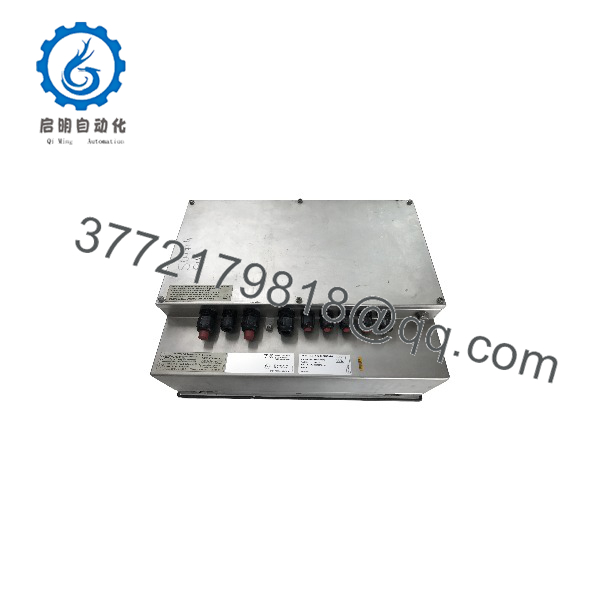
ET-436-A-FX-R2-SR-16GB-NOV
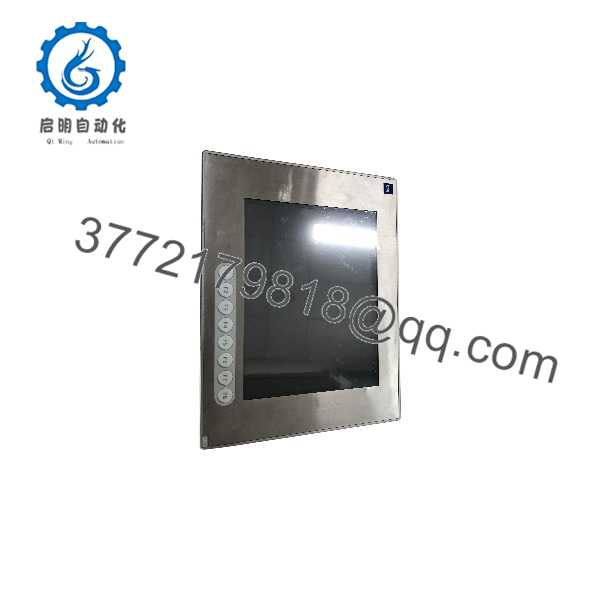
ET-436-A-FX-R2-SR-16GB-NOV
Installation & Configuration Guide
Stage 1: Pre-Installation Preparation — Approximately 15 Minutes
⚠️ Safety First: This is hazardous-area equipment. De-energize the installation according to the site’s hazardous-area work procedure and lockout/tagout requirements before removing the HMI.
Tools Required:
- ESD wrist strap
- Appropriate screwdrivers
- Digital multimeter
- Connector labels
- Smartphone/camera
- Existing R. STAHL system documentation
- Original HMI nameplate and certification information
Before removal:
- Record the complete model: ET-436-A-FX-R2-SR-16GB-NOV.
- Photograph the nameplate and all certification markings.
- Record the serial number and hardware revision.
- Photograph rear connectors and cable routing.
- Record Ethernet addresses and application configuration where applicable.
- Back up the HMI application/project before shutdown.
- Record the installed software/runtime version.
⚠️ For hazardous-area equipment, certification is part of the installation specification. Do not replace the HMI solely because the display size and connector arrangement appear identical.
Stage 2: Removing the Old HMI — Approximately 10 Minutes
- Shut down the HMI using the approved operating procedure.
- Isolate the associated power supply.
- Verify absence of hazardous energy according to site procedure.
- Disconnect Ethernet, serial, USB, power, and other installed connections as applicable.
- Label each connector before removal.
- Release the panel mounting hardware.
- Carefully remove the HMI from the panel.
- Inspect the panel cutout, gasket/sealing surfaces, connectors, and cable glands.
⚠️ Do not damage the sealing surface. The environmental and hazardous-area protection of the finished installation depends on the approved mounting arrangement.
Stage 3: Installing the Replacement — Approximately 15 Minutes
- Verify the complete replacement model and certification.
- Compare the panel cutout and mounting arrangement with the original.
- Inspect the replacement unit for shipping damage.
- Install the HMI using the specified mounting hardware.
- Maintain the required sealing arrangement.
- Reconnect Ethernet and other communication cables.
- Reconnect power according to the equipment documentation.
- Confirm cable glands and enclosure interfaces are correctly installed.
- Tighten mounting hardware according to the applicable R. STAHL installation documentation.
Self-Checklist:
- Model/configuration verified
- Hazardous-area certification verified
- Panel dimensions checked
- Gasket/sealing surfaces checked
- Power specification checked
- Ethernet/serial connections restored
- Application backup available
- Mounting hardware secured
Stage 4: Power-On & Commissioning — Approximately 15–30 Minutes
- Complete a final installation inspection.
- Restore power according to the approved procedure.
- Allow the Panel PC to complete its startup sequence.
- Verify touchscreen operation.
- Test all eight function keys where applicable.
- Verify Ethernet communication.
- Check communication with the PLC/DCS or connected automation system.
- Start the HMI runtime/application.
- Verify screen navigation and operator controls.
- Test representative read/write functions under controlled conditions.
- Confirm that no communication or application errors remain.
⚠️ Do not assume the replacement has the same operating-system image or HMI runtime configuration. Preserve the original application and configuration files before removing a working ET-436.
Frequently Asked Questions (FAQ)
Q: What is the ET-436-A-FX-R2-SR-16GB-NOV?
It is an R. STAHL industrial Panel PC/HMI intended for hazardous-area operator interface applications. The documented configuration has a 15-inch, 1,024 × 768 resistive touchscreen, Intel Atom E3845 quad-core processor, 16 GB memory, and eight function keys.
Q: Is the ET-436-A-FX-R2-SR-16GB-NOV discontinued?
Yes. Multiple current aftermarket references identify this exact configuration as discontinued. One supplier reference identifies ET-436-A-FX-730A100006R-000000000000 as its replacement.
Q: Is ET-436-A-FX-730A100006R-000000000000 a direct drop-in replacement?
It should not be assumed to be a direct drop-in replacement without checking the actual installation. The available references identify it as a successor, but you should verify panel dimensions, hazardous-area certification, power requirements, interfaces, software/runtime, and project compatibility before ordering.
Q: What display does this ET-436 configuration use?
The documented configuration uses a 15-inch display with 1,024 × 768 pixel resolution and resistive foil touch technology.
Q: How much memory does the unit have?
The specified configuration contains 16 GB of system memory.
Q: Can I use any ET-436 as a replacement?
No. The ET-436 family contains multiple configurations. The complete suffix should be matched because display, memory, communication, software, and hazardous-area configurations can differ.
Q: Is this HMI suitable for hazardous areas?
The available documentation describes this configuration for hazardous-area applications, including Zones 1, 2, 21 and 22, depending on the specific certification/configuration. Before installation, verify the actual certification marking on the unit and confirm that it matches the site’s hazardous-area classification.
Q: Is the unit factory new?
Condition depends on the supplier. One current listing describes a used unit, while another marketplace record shows a new listing that is no longer available. Do not equate the model number with condition; confirm whether the offered unit is factory sealed, new surplus, used, or refurbished.



