
 WhatsApp: +86 16626708626
 Email:
  Phone: +86 16626708626
Description
Key Technical Specifications
| Parameter | Value |
|---|---|
| Manufacturer | Reliance Electric |
| Model | 61C22B |
| Alternate Part Number | 61C-22B |
| Product Family | AutoMate |
| Product Type | Local I/O Head |
| Supply Voltage | 120 VAC |
| I/O Architecture | AutoMate local I/O |
| Installation | AutoMate I/O system |
| Approx. Dimensions | 5.5 × 3.5 × 6.8 in |
| Approx. Weight | 2 lb 8.3 oz / 1.1 kg |
| Lifecycle | Legacy / discontinued |
| Related Revision | 61C22A |
| Typical Application | Reliance Electric AutoMate control systems |
Santa Clara Systems identifies the unit as “Local I/O Head | Automate 61C-22B 120VAC.” Classic Automation likewise identifies 61C22B as a Reliance Electric AutoMate Local I/O Head and lists 61C-22B as an alternate part number.
Technical caution: I found conflicting secondary-market specifications for this part. One reseller incorrectly or incompletely describes it as a generic I/O module and publishes figures such as RS-485/DeviceNet and 16 channels that are not corroborated by the more specific Local I/O Head records. I would not use those figures for engineering substitution without an OEM manual or the actual module nameplate.
Product Introduction
The Reliance Electric 61C22B is an AutoMate Local I/O Head designed to interface the AutoMate control system with its local I/O architecture. The documented identification is 61C-22B, 120 VAC, making the exact supply designation important when replacing an installed unit.
This is a legacy control-system component rather than a generic PLC I/O module. The 61C22B and 61C22A are separate revisions, so replacement should be based on the complete part number and system configuration rather than simply matching the 61C22 family prefix.
Installation & Configuration Guide
Stage 1: Pre-Installation Preparation
Estimated time: 15–25 minutes
⚠️ Safety First: The 61C22B is identified as a 120 VAC Local I/O Head. De-energize the AutoMate system according to the site’s LOTO procedure before removing the module.
Tools Required:
- ESD wrist strap
- CAT-rated multimeter
- Appropriate screwdriver
- Wire labels
- Smartphone/camera
- AutoMate system documentation
Data Backup:
- Record the complete 61C22B / 61C-22B marking.
- Photograph the installed unit.
- Record the rack and I/O-head location.
- Photograph all terminal and cable connections.
- Record the associated I/O modules.
- Document the 120 VAC supply wiring.
- Photograph any address/configuration switches if fitted.
⚠️ Do not assume 61C22A and 61C22B are interchangeable. Treat the revision suffix as part of the required part number.
Stage 2: Removing the Old Module
Estimated time: 10–15 minutes
- Put the AutoMate-controlled equipment into a safe state.
- Apply LOTO to the applicable power source.
- Verify the 120 VAC supply is absent with a meter.
- Photograph the wiring before disconnecting it.
- Label each field or I/O connection.
- Disconnect the cables carefully.
- Release the mounting hardware.
- Remove the 61C22B from the rack or mounting assembly.
- Inspect the mating connector for bent contacts or contamination.
- Retain the original module until commissioning is complete.
Stage 3: Installing the Replacement
Estimated time: 15–20 minutes
- Verify the replacement marking is 61C22B.
- Confirm the nameplate indicates the appropriate 120 VAC configuration.
- Compare connector positions with the removed unit.
- Inspect the connector and mounting hardware.
- Install the Local I/O Head into the correct position.
- Secure the mounting hardware.
- Reconnect wiring according to the photographs and wiring documentation.
- Verify the supply and I/O conductors are not reversed.
- Check that all connectors are fully seated.
Self-Checklist:
- 61C22B verified
- 61C-22B designation checked
- 120 VAC supply confirmed
- Correct rack/location confirmed
- Wiring photographed before removal
- Connectors fully seated
- Mounting hardware secured
Stage 4: Power-On & Testing
Estimated time: 20–45 minutes
- Perform a final wiring inspection.
- Verify there is no short circuit on the supply.
- Restore control power.
- Observe the Local I/O Head and controller status.
- Verify the controller recognizes the local I/O system.
- Check for I/O communication or configuration faults.
- Test representative digital inputs.
- Test representative digital outputs.
- Confirm the controller sees the expected I/O states.
- Run the machine through a controlled operational test.
⚠️ Do not test outputs by forcing them into an energized machine without first confirming what the output controls. A correct electrical replacement can still create an unsafe machine state if the output test is performed incorrectly.
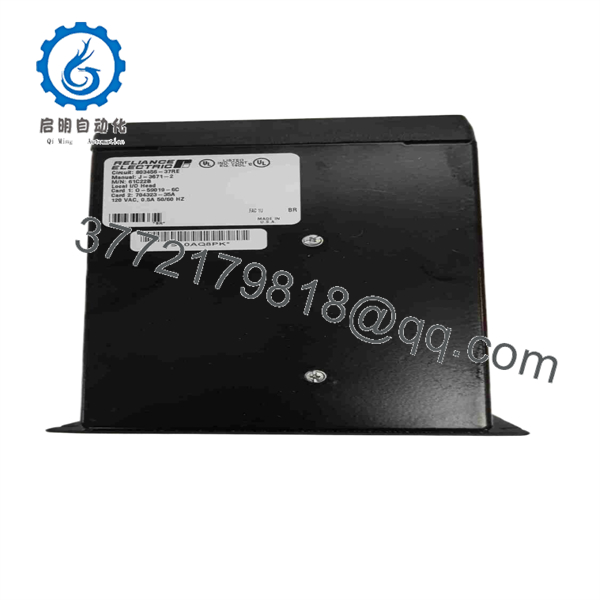
61C22B
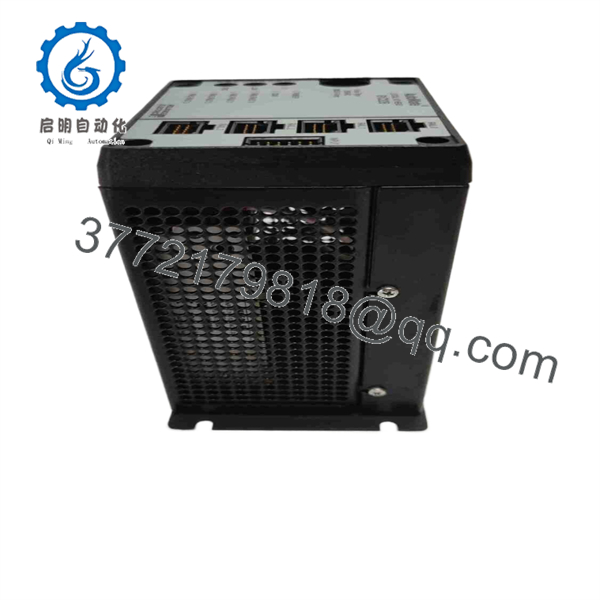
61C22B
Frequently Asked Questions (FAQ)
What is Reliance 61C22B?
The 61C22B is a Reliance Electric AutoMate Local I/O Head. Industrial automation suppliers consistently identify it as a Local I/O Head, with 61C-22B as an alternate designation.
What voltage does the 61C22B use?
The documented product description identifies the 61C22B / 61C-22B as a 120 VAC Local I/O Head.
Is 61C22B the same as 61C22A?
They are different revisions within the 61C22 family. Automation inventory catalogs separately identify 61C22, 61C22A, and 61C22B. Do not substitute one for another solely because the basic model number is similar.
Is 61C22B a PLC CPU?
No. The more specific equipment records identify it as a Local I/O Head, not an AutoMate processor. A CPU/processor replacement should be sourced by its own exact Reliance part number.
Is the 61C22B obsolete?
It is a legacy Reliance Electric AutoMate component. Current industrial suppliers primarily handle it as a surplus, used, refurbished, repair, or replacement item. Santa Clara Systems currently lists it as out of stock, while other suppliers list used/refurbished inventory.
Can I use a generic 120 VAC I/O module instead?
No—not as a direct replacement. The 61C22B is an AutoMate-specific Local I/O Head, so electrical supply voltage alone does not establish compatibility. The AutoMate I/O architecture, rack interface, communications, and associated I/O hardware must all match.
What condition should I specify when purchasing?
Specify the exact condition rather than accepting “tested” without details:
- New Original / New Surplus — unused legacy inventory
- Refurbished / Tested — previously used and function-tested
- Used — prior operational history, with testing level stated
- As-Is — no functional guarantee
For example, Classic Automation currently lists a used/refurbished 61C22B and identifies it as a Local I/O Head, while its inventory page specifies the 61C-22B alternate designation.
What should procurement verify before ordering?
Request a photograph of the actual unit showing:
- 61C22B part number
- 61C-22B designation if present
- 120 VAC rating
- Revision/serial information
- Connector arrangement
- Physical mounting configuration
- Actual condition
- Functional test report
For a legacy AutoMate installation, the nameplate and connector configuration should take precedence over generic online descriptions, particularly because several secondary-market listings publish inconsistent technical specifications for this part.



